
Authenticated Session Recording


Most of a web application only exists after login. RedAmon can give every recon tool and the AI agent a single authenticated identity for a project, so the post-login surface is crawled, fuzzed, probed and attacked instead of missed. You set that identity in one of two ways:
- Record it: drive your own browser through the capture proxy, log in once, and RedAmon extracts the session for you.
- Enter it by hand: paste a cookie, a bearer token, or custom headers.
The stored value is write-only: RedAmon hands it to the scanners and the agent but never shows it back in the UI, and it is attached only to in-scope hosts, never leaked cross-origin.
What it buys you
A crawl of a typical app, same target, same settings, with and without a session:
| Anonymous | Authenticated | |
|---|---|---|
| URLs found by the crawler | the marketing pages and /login | every page behind the login |
| Forms discovered | whatever the login page has | the real ones, on the real screens |
| Fuzzer targets | the public root | one per authenticated path |
Everything downstream inherits it. Endpoints found only while logged in are the ones worth attacking, and they are the ones an anonymous scan silently never sees.
The one idea to hold on to
There is exactly one AuthProfile per project. Every tool reads it, so you configure auth once, not per tool. It lives in its own database row (never on the project record), which is what keeps the secret off browser responses by default.
%%{init: {'theme':'base','themeVariables':{'primaryColor':'#64748b','primaryTextColor':'#ffffff','primaryBorderColor':'#475569','lineColor':'#8b949e','textColor':'#737b85','edgeLabelBackground':'#475569','clusterBkg':'transparent','clusterBorder':'#8b949e','titleColor':'#737b85'},'flowchart':{'padding':14,'nodeSpacing':36,'rankSpacing':58}}}%%
flowchart LR
subgraph Browser["Operator browser (dedicated profile)"]
B["Log in to the target"]
end
subgraph Proxy["Capture proxy (holds no key)"]
P["Stamps the pre-signed<br/>operator tag on<br/>in-scope requests"]
end
subgraph Ingest["Ingest worker"]
E["Extract session<br/>(before redaction)"]
end
subgraph Web["Webapp"]
S["RecordingSession<br/>(pending material)"]
AP["ProjectAuthProfile<br/>(write-only secret)"]
end
subgraph Consumers["Consumers"]
R["Recon tools (-H)"]
A["Agent replay"]
end
B -->|" proxied "| P --> E -->|" observe "| S
S -->|" operator confirms "| AP
AP -->|" in-scope only "| R
AP -->|" in-scope only "| A
classDef actor fill:#1d4ed8,stroke:#1e3a8a,color:#ffffff
classDef step fill:#64748b,stroke:#475569,color:#ffffff
classDef secret fill:#b45309,stroke:#78350f,color:#ffffff
classDef ai fill:#6d28d9,stroke:#4c1d95,color:#ffffff
class B actor
class P,E,S,R step
class AP secret
class A ai
style Browser fill:transparent,stroke:#8b949e,stroke-dasharray:6 4,color:#737b85
style Proxy fill:transparent,stroke:#8b949e,stroke-dasharray:6 4,color:#737b85
style Ingest fill:transparent,stroke:#8b949e,stroke-dasharray:6 4,color:#737b85
style Web fill:transparent,stroke:#8b949e,stroke-dasharray:6 4,color:#737b85
style Consumers fill:transparent,stroke:#8b949e,stroke-dasharray:6 4,color:#737b85
Components
- AuthProfile: the per-project identity. Its type (
cookie,bearer,header,basic,apikey), value, extra headers, and the scope hosts it may attach to. Stored plaintext (same trust level as the LLM provider keys) and never returned to a browser. - Capture proxy: the existing mitmproxy addon. During a recording it stamps a short-lived, pre-signed operator tag onto in-scope requests. It mints no keys.
- Ingest worker: extracts the session (cookie / bearer / CSRF) from operator traffic before redaction and hands it to the webapp. The stored traffic row stays redacted; the raw secret never persists in the traffic corpus.
- RecordingSession: tracks a live recording, counts what was captured, and holds the pending material until you confirm it.
Where it lives
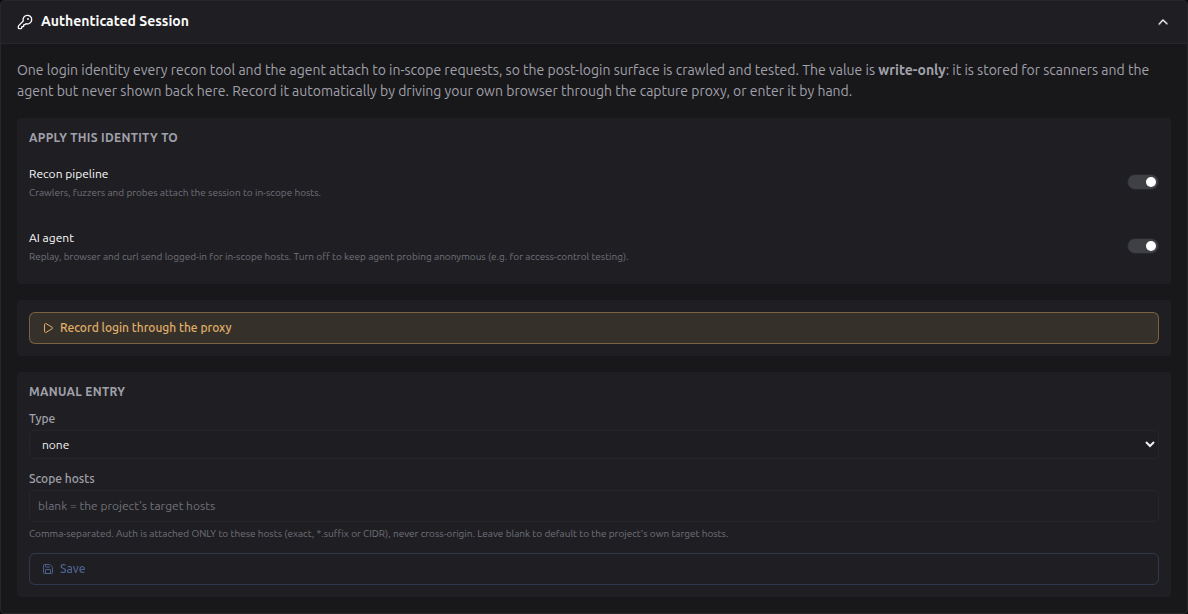
On the project form, under Target & Modules, in the Authenticated Session section. It is in the same place in both project-form views: the tabbed view and the workflow/diagram view (open the Target Input node).
Choosing who uses it
Apply this identity to carries two independent switches, both on by default:
- Recon pipeline: crawlers, fuzzers and probes attach the session to in-scope hosts.
- AI agent: replay, browser and curl send logged-in for in-scope hosts.
Turning one off does not delete the profile, it just stops that consumer using it. The usual reason to switch the agent off is access-control testing: you want the agent probing anonymously to see what an unauthenticated user can reach, while recon still maps the authenticated surface. The switches save immediately, with no project save needed.
Scope hosts
Leave Scope hosts blank and the profile defaults to the project's own target
hosts, the apex and its subdomains (example.test plus *.example.test).
That default matters: operators log in at app. or portal. far more often than
at the apex, and an apex-only scope would leave those crawls quietly logged out.
Set it explicitly to narrow things. Entries may be an exact host, a *.suffix
wildcard, or a CIDR.
Where the session is actually used
One profile, many consumers. Nothing here is configured per tool: each consumer asks the shared builder for the profile's header lines and gets either the headers or nothing.
In the full recon pipeline
| Module | Tools it authenticates | How the headers arrive |
|---|---|---|
http_probe | httpx | one -H set for the probe |
resource_enum | katana, hakrawler, ffuf, ZAP Ajax Spider, arjun, kiterunner, OpenAPI | prepended to each tool's own custom-header list; OpenAPI sends them on its own client to the exact document origin only |
vuln_scan | nuclei | -H per header line |
ai_surface_recon | its own HTTP client | set on the session, per base URL |
graphql_scan | the GraphQL probes | built from the same profile |
The crawlers are where it pays off most. Katana and hakrawler discover URLs by
following links in responses; logged out they see the login page and stop, so
every downstream stage inherits an empty map. ffuf and kiterunner brute-force
paths, and a logged-out run scores nearly everything as a redirect to /login,
which auto-calibration then discards as one uniform response. arjun and the ZAP
Ajax Spider need a real rendered page to find parameters and events at all.
ai_surface_recon is called out separately because AI endpoints very often sit
behind login: without a session they answer 401 and the scan concludes they are
simply absent.
In partial recon
The same profile, through the same builder, so a partial re-run authenticates exactly like the full pipeline:
| Module | Tools |
|---|---|
web_crawling | katana, hakrawler, ZAP Ajax Spider, ffuf |
parameter_discovery | kiterunner, arjun |
openapi_recon | OpenAPI document fetches |
In the agent
| Path | What it is | How the session attaches |
|---|---|---|
/traffic/replay | proxy_brain replay and fuzz | scope-checked against the origin transaction's host |
/traffic/browser | the agent's chromium context | returned as auth_headers; the session rides every request the page makes |
execute_curl | the agent's curl tool | opt-in: only when the model sets use_session=true |
execute_curl is opt-in for a reason. Replay and the browser are always aimed at
a host RedAmon already knows, while curl args are free-form, so the agent has to
ask for the identity explicitly. Even then it never handles the secret: the value
is resolved server-side at a single chokepoint and appended as -H, so the raw
session never enters the model's context.
What deliberately never gets it
- GAU and ParamSpider query third-party archives rather than your target. Attaching a session would send it to the archive provider.
- naabu, masscan, nmap, tlsx and DNS work below HTTP.
- jsluice reads JavaScript files rather than authenticated pages.
How scope is enforced
Two different checks, because the tools behave differently.
All-or-nothing (fail closed). Most recon tools take one -H set and apply it
to an entire targets file. There is no way to say "this header only for that
host", so the check is made across every host in the run: if a single one is out
of scope, the session is attached to none of them. A scan that quietly ran
half-authenticated, leaking the identity to the one host that should not have had
it, is a worse outcome than a scan you can see was anonymous. Every refusal is
printed and names the host.
Per-host. ai_surface_recon and all three agent paths send one request to one
known host at a time, so they can be evaluated individually: in-scope hosts get
the session, out-of-scope ones are simply left anonymous, with no effect on the
rest of the run.
Two more rules hold everywhere:
- The consumer gate is checked at the source. Switching Recon pipeline off makes the profile resolve to nothing for every recon module at once, rather than each tool remembering to check a flag.
- Auth headers are ordered first. Some tools pack headers into one delimited
argument (hakrawler joins on
;;, arjun on newlines). Leading keeps them ahead of, and separate from, the internalX-Redamon-Ctxcapture tag appended last.
Recording a login, step by step
- Enable the capture proxy globally (Global Settings → TrafficMind, admin only) and turn on HTTP capture for the project.
- Open the Authenticated Session section and click Record login through the proxy. The modal opens in place.
- Press Start recording.
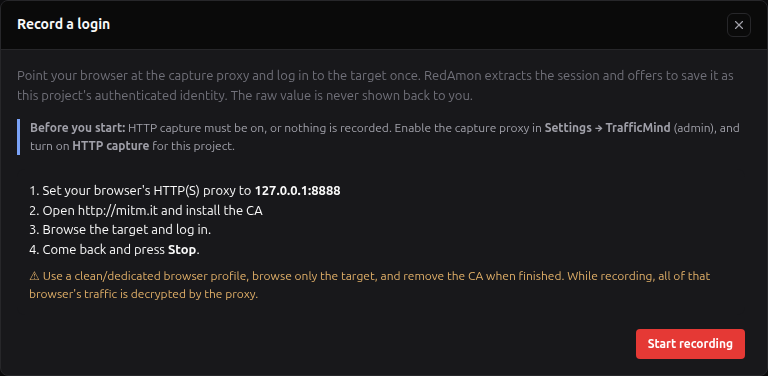
- Point a dedicated, clean browser profile at the proxy
127.0.0.1:8888and install its certificate (see below). This is a proxy setting, not a URL. Do not browse to127.0.0.1:8888. - Browse the target and log in once. The modal shows a live count of captured requests.
- Press Stop. RedAmon shows a masked summary of what it captured (which auth type, which hosts), never the raw value.
- Press Save session to store it as the project's AuthProfile, or Discard. An empty capture never overwrites an existing profile.
A clean way to get step 4 right on Linux without touching your everyday browser, which keeps the proxy and the CA in a throwaway profile you can simply delete:
google-chrome --proxy-server=http://127.0.0.1:8888 \
  --user-data-dir=/tmp/redamon-rec https://target.example.com
Trusting the certificate
The capture proxy uses its own MITM certificate authority. Point the browser's
HTTP(S) proxy at 127.0.0.1:8888, open http://mitm.it, and install the CA for
your browser. Use a dedicated/clean browser profile, browse only the target, and
remove the CA when you are done. While recording, all of that browser's traffic
is decrypted by the proxy.
Chrome / Edge
- Set the system/proxy to
127.0.0.1:8888. - Open
http://mitm.it, download the CA (PEM/CRT). - Settings → Privacy and security → Security → Manage certificates → Authorities → Import, trust it for identifying websites.
- When finished, remove it from the same screen.
Firefox
- Set Firefox's network proxy to
127.0.0.1:8888(Firefox has its own proxy and its own certificate store). - Open
http://mitm.it, download the CA. - Settings → Privacy & Security → Certificates → View Certificates → Authorities → Import, trust it for websites.
- Remove it there when finished.
Safari / macOS
- Set the system proxy (Network → Proxies) to
127.0.0.1:8888. - Open
http://mitm.it, download the CA, and add it to Keychain Access. - In Keychain Access, set the certificate to Always Trust.
- Delete it from Keychain when finished.
Security model
- The value is never returned to a browser. It is served only to the scanners and the agent, which fetch project settings with an internal key. The UI is write-only.
- Auth attaches only to in-scope hosts (exact host,
*.suffix, or CIDR), minus any Rules-of-Engagement exclusions. Most tools send one header set for a whole target file, so if any host in that file is out of scope the session is not attached at all: fail closed, never a cross-origin leak. - What "in scope" means. With no scope hosts on the profile, the session goes
where the project's scope groups point: for an enumerated group (a wildcard, or
a single domain with no subdomain prefixes) every subdomain of its scan root
(
*.example.com); for a listed group exactly the listed hosts, never the rest of the domain; and the scan root itself only when it is a target (Include Root Domain, or Root on a batch row). Recon, the agent's replay and curl, and a recording's default scope all apply this one rule, a Domain batch included. - Scope hosts on the profile only narrow it. They are intersected with the
project's scope, never used in its place:
*.example.comon a project listing onlywww.example.comsends the session towww.example.com, and a host the project does not cover gets nothing. A suffix wildcard (*.co.uk) or a guardrail-blocked name is refused when the profile is saved. - Agent curl attaches the session only to a command with exactly one URL and
none of the flags that move a request elsewhere (
--resolve,--connect-to, a proxy, a config file,-Land the like). Otherwise the command runs without the session, and the tool output says so. - Recorded values are sanitized: a target-controlled cookie carrying line breaks or delimiter characters is rejected, so it cannot inject headers or spoof the proxy's internal tag.
- The recording window is time-boxed (max 30 minutes) and single-active across all projects. Stopping, expiry, or turning capture off drops the injected tag within a few seconds. The proxy holds no signing key.
- While recording, all of the proxied browser's TLS is decryptable, hence the dedicated-profile guidance above.
What changes in a scan once a session is attached
A tool applies its header set to every request it makes, including ones aimed at hosts that were never scope-checked. Two of those are tightened automatically:
- Redirects are confined to the same host. A cross-host
Location(an SSO hop, or one the target controls) would otherwise re-send the session to whatever host it names. - Out-of-band (OAST) testing is switched off for nuclei. Interactsh callbacks go to a public third-party collector that can never be in your scope, and the session would ride along on them. Blind-OOB coverage is the price; disclosing the client's session is not an acceptable alternative. Turn the Recon pipeline switch off if you need a full OAST pass, and run it as a separate anonymous scan.
Troubleshooting
The scan came back logged out. Check the recon log. Every attach and every refusal is printed:
[*][Auth] Session attached (cookie) to 2 in-scope host(s).
[!][Auth] Session NOT attached: host 'x.example.test' is outside the auth scope [...]
A refusal names the offending host. Add it to Scope hosts, or narrow the scan. No line at all means the profile is unset or the Recon pipeline switch is off.
The recording captured nothing. The proxy only tags in-scope requests, so a login at a host outside the recording scope is invisible to it. Confirm the browser is really proxied (the target should appear in TrafficMind while you browse), and that you logged in at a host covered by the project's targets.
The durability caveat
A statically recorded cookie or JWT is short-lived; SPA/token sessions rotate in minutes. Re-record when a scan starts seeing logged-out responses.
Related pages
- TrafficMind: the capture proxy this feature records through
- proxy_brain: the agent's traffic tool that uses the profile on replay
- Running Reconnaissance: the recon runs the profile authenticates
- Rules of Engagement (RoE): scope enforcement that also bounds where auth attaches
- Project Settings Reference: where the Authenticated Session section lives