
Secret Multiscanner
The Secret Multiscanner is RedAmon's deep secret-scanning engine. It searches 14 different kinds of target for exposed credentials using 1060 detectors, and it can go one step further than any regex scanner: it calls the owning service's API with the credential it found and tells you whether it is actually live.
It runs outside the recon pipeline. You configure it once per project, in project settings > Other Scans > Secret Multiscanner, and you start it per source from the Other Scans modal in the Red Zone.
Table of contents
- How it works
- Verification: the switch that matters
- Step 1: set the keys
- Step 2: the settings page, control by control
- The 14 sources, field by field
- Advanced shared options
- Step 3: run the scans
- Understanding results
- Security model
- Troubleshooting
- Next steps
How it works
Three ideas explain the whole feature.
One source, one scan. A source is a place secrets can hide: a Git repository, a GitHub org, a Docker registry namespace, an S3 bucket, a Jenkins instance. You add each source you care about as its own card in project settings, and each card becomes its own startable scan in the Other Scans modal. Adding "GitHub" and "Docker registry" gives you two independent scans with their own Start, Stop, Logs and status.
Sources run in parallel. A Docker Hub scan and a Hugging Face scan can be in flight at the same time. The only thing refused is a second run of the same source while the first is still running. There is no scanner-specific parallelism cap: admission goes through the same memory governor as every other scan, with a per-source memory envelope (768 MB by default, 1.5 GB for Docker and Hugging Face, 1.125 GB for S3 and GCS).
Shared options apply to all sources. Verification, result types, concurrency and the detector lists live on the project, not on the card. Change them once and every source uses the new value, including sources that are already queued.
Each source has:
| Source | What it scans | Asset type produced |
|---|---|---|
| Git repository | Any Git host over https://, ssh://, git:// or file://, plus local mirror clones | Repository |
| GitHub | Repositories, organizations, wikis, gists, issue / PR / gist comments | Repository |
| GitHub deleted commits | Force-pushed and deleted commits in one repository | Repository |
| GitLab | GitLab.com or a self-hosted instance, by repo or by group | Repository |
| Docker registry | Image layers and the build history baked into RUN / ENV directives | Image |
| Hugging Face | Models, spaces, datasets and their buckets, or a whole org / user sweep | Model |
| AWS S3 | Buckets, optionally across assumed roles | Bucket |
| Google Cloud Storage | Buckets, authenticated or public-only | Bucket |
| Filesystem | A RedAmon-owned folder on the host, mounted read-only | Endpoint |
| Jenkins | A Jenkins instance's jobs and builds | Endpoint |
| Elasticsearch | A cluster's indices and documents | Endpoint |
| Postman | Workspaces, collections and environments | Endpoint |
| CircleCI | Whatever the token can reach | Endpoint |
| Travis CI | Whatever the token can reach | Endpoint |
An exposed, unauthenticated Jenkins or Elasticsearch scans without any credential, and is itself a finding worth reporting.
Verification: the switch that matters
Unlike a regex-only scanner, the Secret Multiscanner can verify a finding by calling the owning service's API with the credential it just found: AWS keys go to STS GetCallerIdentity, GitHub tokens to GET /user, Slack tokens to auth.test. A verified finding is a confirmed live credential, which is the highest-value result in an authorised engagement.
This is an ACTIVE behaviour. RedAmon transmits found credentials to third-party services to test them. The scanner's badge reflects that in real time: it reads ACTIVE when verification is on and PASSIVE when it is off. The blast-radius control is the Exclude detectors list: an excluded detector is never contacted at all.
Every finding carries a validation_status, and the four values mean genuinely different things:
| Status | Shown as | Meaning |
|---|---|---|
validated | LIVE (critical) | The owning API confirmed the credential works. Act on this. |
unvalidated | not live | Verification ran and the API rejected the credential. |
verify_error | verify error | The verify call itself failed. This is not proof the credential is dead. |
unverified | not checked | Verification was switched off for the run. Nobody looked, which is not the same as safe. |
A footgun that no longer exists. The old UI had two independent toggles, "Only Verified" and "Skip Verification". Enabling both asked the engine to report only verified results while forbidding it to verify anything: zero findings, no error. There is now one always-visible switch plus a separate result-type filter that greys out when verification is off.
Step 1: set the keys
The Secret Multiscanner has its own keys, grouped under Global Settings > API Keys > Secret Multiscanner. They are deliberately separate from the GitHub Secret Hunt Token and the Supply Chain GitHub Token, which belong to GitHub Secret Hunting and Supply Chain Scanning and are themselves two different keys. Keys are stored per user, shared across all of that user's projects, and are never included in a project export.
There is one key per source, or several where the service allows several auth styles.
| Key | Source | Mandatory? | Notes |
|---|---|---|---|
| Secret Multiscanner GitHub Token | github, github deleted commits | Yes, always | Mandatory even for public repos: unauthenticated GitHub allows only 60 requests/hour, which this scan exhausts immediately. Use repo scope for private repositories, or a fine-grained token scoped to specific repos. |
| Secret Multiscanner GitLab Token | gitlab | Yes | With no repository or group set, it scans every project the token can reach. |
| Secret Multiscanner Postman Token | postman | Yes | |
| Secret Multiscanner CircleCI Token | circleci | Yes | The token defines the scan scope. |
| Secret Multiscanner Travis CI Token | travisci | Yes | The token defines the scan scope. |
| Secret Multiscanner Docker Token | docker | Conditional | Optional for a single public image. Mandatory for a namespace scan and for "Include private images": Docker Hub allows only 10 anonymous pulls/hour per IP. Used as both bearer and registry token. |
| Secret Multiscanner AWS Access Key ID | s3 | Conditional | Mandatory unless "Use cloud environment IAM" is on. |
| Secret Multiscanner AWS Secret Key | s3 | Conditional | Same condition as the access key ID. |
| Secret Multiscanner AWS Session Token | s3 | Optional | Only for temporary (STS) credentials. |
| Secret Multiscanner GCP Service Account (JSON) | gcs | Conditional | Mandatory unless "Without auth" or "Use cloud environment ADC" is on. Paste the whole service-account JSON blob. |
| Secret Multiscanner Hugging Face Token | huggingface | Optional | Public assets scan without it. Set it for private or gated assets, or for higher rate limits. |
| Secret Multiscanner Jenkins Username | jenkins | Optional | An exposed instance scans without it. Set username and password for an instance behind a login. |
| Secret Multiscanner Jenkins Password | jenkins | Optional | Pairs with the username. |
| Secret Multiscanner Elasticsearch Username | elasticsearch | Optional | If the cluster is secured, provide exactly one of: username+password, API key, or service token. |
| Secret Multiscanner Elasticsearch Password | elasticsearch | Optional | Pairs with the username. |
| Secret Multiscanner Elasticsearch API Key | elasticsearch | Optional | Use instead of username+password or a service token. |
| Secret Multiscanner Elasticsearch Service Token | elasticsearch | Optional | Use instead of username+password or an API key. |
| Secret Multiscanner Git Username | git | Optional | Public Git URLs clone anonymously. Set username and token only to reach a private repository over HTTPS. |
| Secret Multiscanner Git Token | git | Optional | Pairs with the Git username. Also used to authenticate ssh:// targets, which is the one case where the git source requires a credential. |
If a source's key is mandatory and empty, its card shows missing <key name> in red, its Start button is disabled, and the card links straight to the field. The server re-checks at start time, so a queued scan whose key was cleared in the meantime also fails closed.
Setting a key without leaving the form. Every source card, and every blocked row in the Other Scans modal, carries an inline editor for the keys that source declares:
| Element | Behaviour |
|---|---|
| Global setting badge | Reminds you the key is per user and shared by all your projects, not per project |
| Set / Required / Optional badge | Whether the key is stored, and whether its absence blocks the scan |
| Input | Starts empty even when a key is stored: the API masks secrets on read, so the stored value is shown only as a placeholder and a save replaces rather than edits |
| Eye icon | Reveals what you are currently typing, which is what it is for: checking a pasted token |
| Save / Replace | The button reads Save when nothing is stored and Replace when something is. Enter also commits |
| Links | "All keys in Global Settings", plus a "Get a token" link to the provider's console where one exists |
Bulk entry. Global Settings > API Keys has a downloadable JSON template and an import button, and all 19 of these keys are in it, so an air-gapped operator can fill them in offline and import them in one go.
Step 2: the settings page, control by control
Open project settings, go to the Other Scans tab, and find the Secret Multiscanner section.
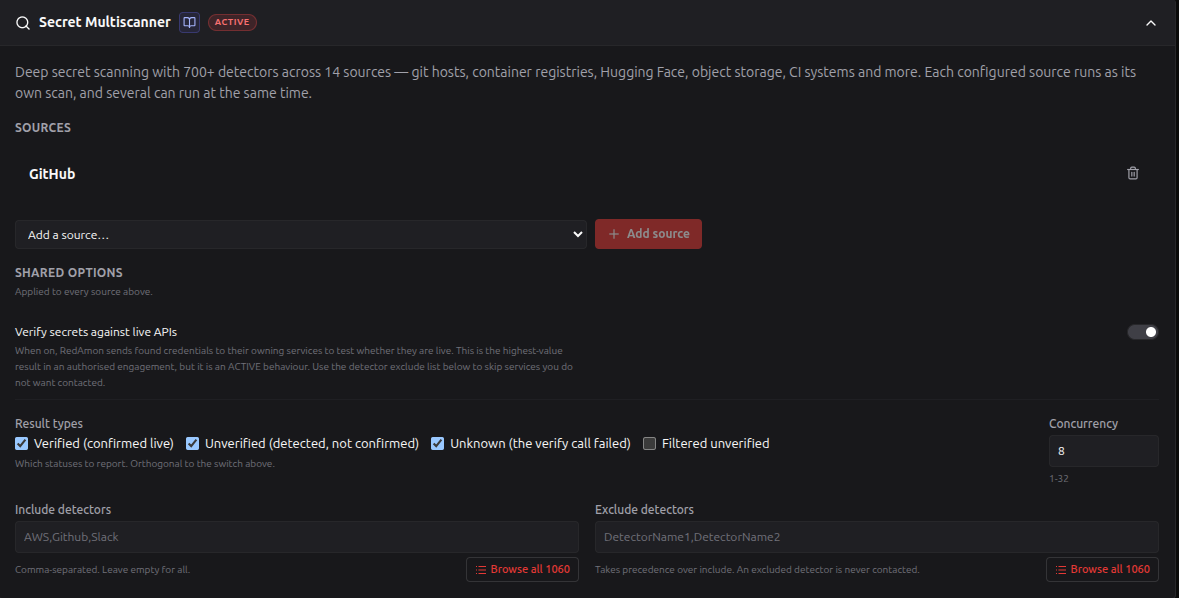
Sources can only be managed on a saved project. In create mode the section shows the shared options only and says "Save the project first, then add the sources to scan here."
Section header
| Element | Behaviour |
|---|---|
| Secret Multiscanner title | Click anywhere on the header row to collapse or expand the whole section. |
| Wiki button (book icon) | Opens this page. |
| ACTIVE / PASSIVE badge | Not a fixed label. It reads ACTIVE (red) while "Verify secrets against live APIs" is on, because the scanner then authenticates to third-party services with credentials it found, and PASSIVE (teal) when verification is off. |
| Chevron | Same collapse toggle as the title. |
| Description line | "Deep secret scanning with 700+ detectors across 14 sources: git hosts, container registries, Hugging Face, object storage, CI systems and more. Each configured source runs as its own scan, and several can run at the same time." |
Sources block
This is the top block, because the sources are the scan. Everything below only modulates them.
| Control | Behaviour |
|---|---|
| Add a source… dropdown | Lists only the sources you have not configured yet. One profile per source per project, so a source disappears from the list once added, and the whole dropdown row disappears when all 14 are configured. |
| + Add source button | Creates the profile with an empty config and expands its card immediately. Disabled until a source is picked. |
| Source card (collapsed) | Shows the source label, plus two possible warnings: needs configuration (amber) when the config fails validation, and missing <key> (red) when a mandatory credential is unset. The red warning updates live as soon as you set the key from the card. |
| Trash icon | Deletes that source profile. It does not touch findings already in the graph. |
| Clicking the card | Expands or collapses it. Only one card is expanded at a time. |
Inside an expanded source card:
| Element | Behaviour |
|---|---|
| Description | One line describing what the source scans. |
| Local target note | Shown only for the three sources that can read from disk (git, docker, filesystem). It names the exact host folder to drop files into, and warns that a name containing a slash or .. is refused. |
| Missing-credential note | Names the missing key and links to Global Settings > API Keys > Secret Multiscanner. States plainly that the source cannot start until it is set. |
| Credential shortcuts | Every credential the source declares, mandatory and optional alike, each with a set/unset badge and an inline input so you can set or replace a key without leaving the form. These are user settings shared by all your projects, which each badge says. |
| Field grid | The source's own fields (documented per source below). |
| Validation errors | Amber lines under the grid, live as you type. The same rules are re-run server-side at start, so this is fast feedback and never the only gate. |
Source cards save immediately. Every change inside a source card is written to the server as you make it. The shared options below are part of the project form and are saved with the form's Save button.
Rules the sources block enforces:
- One profile per source per project. This is a database constraint, not a convention, and it is the same rule that makes "one run per source" true at scan time. A double-submitted add is answered with "A
<source>profile already exists for this project" rather than a second card. - Cards are listed in the order they were added, and that is the order the Other Scans rows appear in.
- No credential may live in a source config. A write containing a field named like a token, password, secret or API key is refused, with a message pointing at the key group instead. So is a field the source does not declare. The refusal is deliberate rather than a silent strip, because a project export copies a profile's config verbatim.
- Deleting a source removes the card and its scan row. Findings already written to the graph stay until that source is re-run or the graph data is cleared.
- With no sources yet, the block reads "No sources configured yet. Add one below to make it startable from Other Scans."
- A failed add or save shows a red banner above the cards with the server's reason.
Shared options block
Header: SHARED OPTIONS, with the hint "Applied to every source above."
Verify secrets against live APIs
| Control | Toggle switch |
| Default | On (verification enabled) |
| Effect | On: the engine calls each owning service to test whether the credential is live, and findings get validated / unvalidated / verify_error. Off: --no-verification is passed, nothing is contacted, and every finding is unverified. |
| On the page | The description sits below the switch: "When on, RedAmon sends found credentials to their owning services to test whether they are live. This is the highest-value result in an authorised engagement, but it is an ACTIVE behaviour. Use the detector exclude list below to skip services you do not want contacted." |
Result types
| Control | Four checkboxes: Verified (confirmed live), Unverified (detected, not confirmed), Unknown (the verify call failed), Filtered unverified |
| Default | Verified, Unverified, Unknown checked. Filtered unverified unchecked. |
| Effect | Which statuses the engine reports. Orthogonal to the switch above. When the selection differs from the default set, it becomes --results=<list>; when it equals the default set, no flag is emitted. |
| Greying | The whole group is disabled and dimmed while verification is off, with the hint "Disabled while verification is off: nothing is checked, so every finding is unverified." |
| Note | filtered_unverified exists in the pinned binary but is not part of the upstream default set, which is why it is off by default. |
Concurrency
| Control | Number input, 110px wide, to the right of the result types |
| Default | 8 |
| Range | 1 to 32. The bound is enforced on typed digits too, not only on the steppers. |
| Effect | Concurrent scanning workers inside one scan (--concurrency). Raising it speeds up large repositories and deep image layers at the cost of CPU and memory inside the container's envelope. |
| Detail | While you are editing, the box holds raw text so you can clear it and retype. Only a valid number is stored, so leaving the form mid-edit can never save an empty or invalid value. |
Include detectors
| Control | Text input, placeholder AWS,Github,Slack, with a Browse all 1060 button |
| Default | Empty, which means all detectors |
| Effect | Restricts the scan to these detectors (--include-detectors). |
| Warning | A name the engine does not know is not ignored: the engine refuses to initialise and the scan dies at once. The field therefore validates live and shows, in amber, "Secret Multiscanner does not know <name> and refuses to start. Check the spelling in the list; names are case-sensitive." |
Exclude detectors
| Control | Text input, placeholder DetectorName1,DetectorName2, with a Browse all 1060 button |
| Default | Empty |
| Effect | Removes these detectors (--exclude-detectors). Takes precedence over include. An excluded detector is never contacted, which makes this the blast-radius control for verification. |
| Warning | Same unknown-name validation as the include field. |
The detector picker
Both detector fields have a Browse all 1060 button that opens the full catalogue inline. It exists because the fields are free text whose only valid values are 1060 exact, case-sensitive names that appear nowhere else in the UI.
| Control | Behaviour |
|---|---|
| Title | "Detectors to include" or "Detectors to exclude", depending on which button opened it. |
| Filter box | Case-insensitive substring match, e.g. typing aws narrows to every AWS-related detector. |
n of 1060 counter | How many names the current filter shows. |
| Copy shown | Copies the currently filtered names as one comma-separated string. Silently does nothing where the clipboard is unavailable (it is permission-gated and absent over plain HTTP); the names are selectable text either way. |
| X | Closes the picker. |
| Name chips | Click to add or remove a name from the target field. Selected names are highlighted. Names are written exactly as shown, so they never have to be typed. |
The detector list is regenerated whenever the pinned scan engine is upgraded, because a new version adds detectors and a name copied from a stale list produces a scan that refuses to start.
Field types used by the source cards
Every source field below is rendered from its declared type. The same type also decides how the value is turned into a command line, so what you type and what the engine receives cannot drift apart.
| Type | Control on the page | Stored as | Becomes |
|---|---|---|---|
text | Single-line input | string | --flag=value |
multi | Single-line input, you type comma-separated | list of strings | one repeated --flag=item per item |
csv | Single-line input, comma-separated | string | one --flag=a,b,c |
number | Number input | number | --flag=n (omitted when empty or 0) |
toggle | Switch | boolean | the bare flag when on, nothing when off |
select | Dropdown with an empty "Select…" option | string | consumed by RedAmon, not passed through |
bytes | Single-line input, a size with its unit, e.g. 250MB | string | --flag=250MB |
pathfile | 3-row textarea, one regex per line | string | written to a file in the run directory, whose path is passed as --flag=<path> |
textarea | 3-row textarea | string | --flag=value |
Two more rules apply everywhere:
- A field marked with
*is required. Cross-field rules ("one of A or B") appear as validation errors instead. - A field with a dependency renders at 50% opacity and is disabled until the field it depends on has a value. GitHub's org-only options depend on Organizations; Hugging Face's sweep options depend on Mode being "Organization / user sweep".
The 14 sources, field by field
The last column is the scan-engine flag the field becomes, included so a run can be traced back to exactly what was executed. positional means the value is passed as the scan target itself rather than behind a flag.
1. Git repository
Any Git host over https://, ssh://, git:// or file://. Also scans a local mirror clone with no network at all.
Asset produced: MultiscannerRepository. Credentials: Git Username (optional), Git Token (optional). A credential is only required when the URI starts with ssh://.
| Field | Type | What it does | Flag |
|---|---|---|---|
| Repository URI | text | The repository to scan. Hint: "https:// or ssh://. Leave empty when using a local repository below". Only https, http, ssh, git and file schemes are accepted, and the value may not contain a semicolon, a pipe, an ampersand, a backtick or a newline. When a Git username and token are set and the URI is http(s), they are spliced into the URI for the duration of one command and never written back. | positional |
| Local repository | text | A folder name inside scanners/scan_targets/git/ on the RedAmon host. Hint: clone with git clone --mirror <url> myrepo.git, then type myrepo.git. Needs no network. The folder is mounted read-only into the scan; the path is composed server-side, never typed. | positional (file://) |
| Branch | text | Restrict to one branch. Default: all branches. | --branch |
| Since commit | text | Scan forward from this SHA. | --since-commit |
| Max commit depth | number | Stop after this many commits. | --max-depth |
| Bare repository | toggle | Required for a --mirror / --bare clone. Without it the scan fails with "failed to stat .git". | --bare |
| Include paths | pathfile | One regex per line. Only matching paths are scanned. | --include-paths |
| Exclude paths | pathfile | One regex per line. | --exclude-paths |
| Exclude globs | csv | Filters at git-log level, so it is faster than exclude paths. | --exclude-globs |
Validation rules
- Set a Repository URI or a Local repository. Neither is an error.
- The two are mutually exclusive: one run scans one repository.
- A local repository name must be a single path segment matching
[A-Za-z0-9][A-Za-z0-9._-]*. No slashes, no...
Scan descriptor: local:<name>, or the URI with any embedded credentials stripped.
2. GitHub
Repositories, organizations, wikis, gists and issue / PR / gist comments.
Asset produced: MultiscannerRepository. Credential: Secret Multiscanner GitHub Token, always mandatory.
| Field | Type | What it does | Flag |
|---|---|---|---|
| Endpoint | text | Default https://api.github.com. Set it for GitHub Enterprise. | --endpoint |
| Repositories | multi | Full URL or org/repo, comma-separated. | --repo |
| Organizations | multi | Scan every repository in these orgs. | --org |
| Include repos | multi | Glob filter, org scans only. Disabled until Organizations has a value. | --include-repos |
| Exclude repos | multi | Glob filter, org scans only. Disabled until Organizations has a value. | --exclude-repos |
| Include forks | toggle | Also scan forks. | --include-forks |
| Include member repos | toggle | Also scan org members' personal repos. Org scans only, disabled until Organizations has a value. | --include-members |
| Include wikis | toggle | Also scan repository wikis. | --include-wikis |
| Exclude archived | toggle | Skip archived repositories. | --exclude-archived |
| Ignore gists | toggle | Skip gists. | --ignore-gists |
| Scan issue comments | toggle | Search issue comment bodies. | --issue-comments |
| Scan PR comments | toggle | Search pull-request comment bodies. | --pr-comments |
| Scan gist comments | toggle | Search gist comment bodies. | --gist-comments |
| Comments timeframe (days) | number | How far back to read comments. Only meaningful with one of the comment toggles on. | --comments-timeframe |
| Include paths | pathfile | One regex per line. | --include-paths |
| Exclude paths | pathfile | One regex per line. | --exclude-paths |
Validation rules
- Set at least one repository or organization.
- Include repos, Exclude repos and Include member repos apply only to organization scans. Setting one without an org is refused.
Scan descriptor: the orgs followed by the repos.
Why GitHub findings do not split into duplicate nodes. GitHub reports a repository in two shapes: a clone URL for a finding in a file, and a bare
owner/repofor one in an issue or PR comment. RedAmon canonicalises both to the clone-URL form, using the host from the finding's own link so a GitHub Enterprise repository is never renamed to a github.com one.
3. GitHub deleted commits
Finds secrets in force-pushed and deleted commits, which are the canonical leak pattern: commit a key, notice, revert, force-push. The tip looks clean but the original blob is still in the object database.
Asset produced: MultiscannerRepository. Credential: Secret Multiscanner GitHub Token, always mandatory. The engine's object-discovery submodule is always enabled, because the command errors out without it.
| Field | Type | What it does | Flag |
|---|---|---|---|
| **Repository *** | text | Required. A single repo, not an org. | --repo |
| Collision threshold | number | Default 1. Raise it to widen the short-SHA search. | --collision-threshold |
| Delete cached data | toggle | Recommended: the scan caches repository objects to disk. | --delete-cached-data |
This source is far slower than a normal GitHub scan, and its findings have no live file path: the blob no longer exists on any branch.
4. GitLab
GitLab.com or a self-hosted instance.
Asset produced: MultiscannerRepository. Credential: Secret Multiscanner GitLab Token, always mandatory.
| Field | Type | What it does | Flag |
|---|---|---|---|
| Endpoint | text | Default https://gitlab.com. Set it for a self-hosted instance. | --endpoint |
| Repositories | multi | Leave empty to scan every project the token can reach. | --repo |
| Group IDs | multi | Scans the group, including subgroups. | --group-id |
| Include repos | multi | Glob filter. | --include-repos |
| Exclude repos | multi | Glob filter. | --exclude-repos |
| Include paths | pathfile | One regex per line. | --include-paths |
| Exclude paths | pathfile | One regex per line. | --exclude-paths |
Validation rules
- A repository, if given, must be a full http(s) URL.
org/repois refused with a suggested rewrite, because the engine answers the shorthand with an INFO-level notice and then scans nothing for it: a silent miss rather than a failure. GitHub accepts the shorthand, which is exactly why this trap is worth guarding. - Empty repos plus empty groups is legal and means "everything the token can see".
Scan descriptor: the repos and group:<id> entries, or the endpoint, or gitlab.com (all visible).
5. Docker registry
Docker Hub or any OCI registry. Scans image layers and the build history baked into RUN / ENV directives.
Asset produced: MultiscannerImage. Credential: Secret Multiscanner Docker Token, mandatory when a namespace is set or "Include private images" is on.
| Field | Type | What it does | Flag |
|---|---|---|---|
| Images | multi | nginx:1.25, ghcr.io/org/app@sha256:.... Bare references only. | --image |
| Local image tarballs | multi | File names inside scanners/scan_targets/docker/ on the host. Create one with docker save myimage:latest -o myimage.tar. Needs no network; the folder is mounted read-only and the path is composed server-side. | --image=file://… |
| Namespace | text | e.g. acme. Include the host for other registries, e.g. ghcr.io/acme. Scans every image in the namespace. | --namespace |
| Exclude paths | csv | Comma-separated inline list, e.g. /usr/share,/var/lib/apt. Note this is the one source where exclude paths is a list and not a file of regexes. | --exclude-paths |
| Max images | number | Ceiling when expanding a namespace or tag list. Default 25. Handled by RedAmon, not passed to the engine. | RedAmon-side |
| Scan all tags | toggle | Expands each reference to every published tag. Multiplies the pull count directly; Docker Hub allows 10 anonymous pulls/hour per IP. Handled by RedAmon. | RedAmon-side |
| Scan all architectures | toggle | Each architecture can hold different secrets. Multiplies the pull count again. Handled by RedAmon. | RedAmon-side |
| Include private images | toggle | Sends the registry token. Needs a Docker token. | --registry-token |
Validation rules
- Set at least one image or a namespace.
- An image containing
://is refused:docker://needs the Docker socket, which a scan container never gets, andfile://would read the container's own filesystem. - An image must match a bare-reference shape: name, optional
:tag, optional@sha256:<64 hex>. - A namespace containing shell metacharacters or a leading dash is refused.
- A local image tarball name must be a single path segment with no slashes.
Expansion behaviour: with "Scan all tags" or "Scan all architectures" on, RedAmon lists the tags from Docker Hub and expands each reference into per-tag or per-architecture digests, stopping at Max images. A listing error is fail-soft: the original reference is scanned as-is rather than aborting the run.
Scan descriptor: the image list plus local:<name> entries, or the namespace.
A secret found in an image's build history has a synthetic path that exists in no filesystem. RedAmon marks these
finding_kind: image_historyand renders the location as "Dockerfile (build history)" so nobody goes looking for a file that is not there.
6. Hugging Face
Models, spaces and datasets, either as named assets or as a whole organization / user sweep.
Asset produced: MultiscannerModel. Credential: Secret Multiscanner Hugging Face Token, optional.
| Field | Type | What it does | Flag |
|---|---|---|---|
| Mode | select | Specific assets (default) or Organization / user sweep. Decides which fields below are active. Handled by RedAmon. | RedAmon-side |
| Endpoint | text | Default https://huggingface.co. | --endpoint |
| Models | multi | Named models. | --model |
| Spaces | multi | Named spaces. | --space |
| Datasets | multi | Named datasets. | --dataset |
| Buckets | multi | Named buckets. | --bucket |
| Organizations | multi | Sweep every asset of these orgs. | --org |
| Users | multi | Sweep every asset of these users. | --user |
| Skip all models | toggle | Sweep only. | --skip-all-models |
| Skip all spaces | toggle | Sweep only. | --skip-all-spaces |
| Skip all datasets | toggle | Sweep only. | --skip-all-datasets |
| Skip all buckets | toggle | Sweep only. | --skip-all-buckets |
| Include models | multi | Sweep only. Allowlist within the sweep. | --include-models |
| Include spaces | multi | Sweep only. | --include-spaces |
| Include datasets | multi | Sweep only. | --include-datasets |
| Include buckets | multi | Sweep only. | --include-buckets |
| Ignore models | multi | Sweep only. Denylist within the sweep. | --ignore-models |
| Ignore spaces | multi | Sweep only. | --ignore-spaces |
| Ignore datasets | multi | Sweep only. | --ignore-datasets |
| Ignore buckets | multi | Sweep only. | --ignore-buckets |
| Include discussions | toggle | Also scan discussion threads. Active in both modes. | --include-discussions |
| Include PRs | toggle | Also scan pull requests. Active in both modes. | --include-prs |
Every field marked Sweep only is greyed out and disabled while Mode is "Specific assets".
Validation rules
- Specific assets mode: set at least one model, space, dataset or bucket.
- Sweep mode: set at least one organization or user.
Scan descriptor: orgs, users, models, spaces, datasets and buckets, joined.
7. AWS S3
S3 buckets, optionally across assumed roles.
Asset produced: MultiscannerBucket. Credentials: AWS Access Key ID and AWS Secret Key (mandatory unless cloud environment IAM is on), AWS Session Token (optional, STS only).
| Field | Type | What it does | Flag |
|---|---|---|---|
| Buckets | multi | Scan exactly these buckets. Cannot be combined with Ignore buckets. | --bucket |
| Ignore buckets | multi | Scan everything reachable except these. Cannot be combined with Buckets. | --ignore-bucket |
| Role ARNs | multi | Assume each role in turn and scan what it can reach. | --role-arn |
| Use cloud environment IAM | toggle | Use instance-profile credentials. No key needed when this is on. | --cloud-environment |
| Max object size | bytes | Skip objects larger than this. Default 250MB. | --max-object-size |
Validation rules
- Buckets and Ignore buckets are mutually exclusive.
Scan descriptor: the bucket list, or all reachable buckets.
8. Google Cloud Storage
GCS buckets, authenticated or public-only.
Asset produced: MultiscannerBucket. Credential: GCP Service Account JSON, mandatory unless "Without auth" or "Use cloud environment ADC" is on. The JSON blob is written to the run directory and passed as a file path, because the flag takes a path and not the key itself.
| Field | Type | What it does | Flag |
|---|---|---|---|
| Project ID | text | The GCP project whose buckets to scan. Cannot be combined with Without auth. | --project-id |
| Without auth | toggle | Public buckets only. | --without-auth |
| Use cloud environment ADC | toggle | Application Default Credentials from the environment. | --cloud-environment |
| Include buckets | multi | Globs supported. | --include-buckets |
| Exclude buckets | multi | Globs supported. | --exclude-buckets |
| Include objects | multi | Globs supported. | --include-objects |
| Exclude objects | multi | Globs supported. | --exclude-objects |
| Max object size | bytes | Default 10MB. | --max-object-size |
Validation rules
- Project ID cannot be combined with Without auth.
- Set a Project ID or enable Without auth. Neither is an error.
Scan descriptor: the project ID, or public buckets.
9. Filesystem
Scans a RedAmon-owned folder on the host: scanners/scan_targets/filesystem/. Put the files to scan in that folder. There is no target to type and no credential.
Asset produced: MultiscannerEndpoint. Credentials: none.
| Field | Type | What it does | Flag |
|---|---|---|---|
| Include paths | pathfile | One regex per line. | --include-paths |
| Exclude paths | pathfile | One regex per line. | --exclude-paths |
| Max symlink depth | number | How far to follow symlinks. | --max-symlink-depth |
Why there is no path field. The scan container carries a source credential in its job file. A free-text
file://target would let a scan read that token and report it back as a finding, which defeats the point of giving the container exactly one secret. The folder is fixed, mounted read-only, and composed server-side.
Scan descriptor: scan_targets/filesystem.
10. Jenkins
A Jenkins instance's jobs and builds.
Asset produced: MultiscannerEndpoint. Credentials: Jenkins Username and Password, both optional. An exposed unauthenticated instance scans without a credential, and is itself a finding.
| Field | Type | What it does | Flag |
|---|---|---|---|
| **Jenkins URL *** | text | Required. Must be http:// or https://. | --url |
| Skip TLS verification | toggle | For self-signed internal instances. | --insecure-skip-verify-tls |
Scan descriptor: the URL.
11. Elasticsearch
An Elasticsearch cluster's indices and documents.
Asset produced: MultiscannerEndpoint. Credentials: Username, Password, API Key, Service Token, all optional. If the cluster is secured, set exactly one of: username+password, API key, or service token.
| Field | Type | What it does | Flag |
|---|---|---|---|
| Nodes | multi | e.g. 192.168.14.3:9200. | --nodes |
| Cloud ID | text | Elastic Cloud identifier. | --cloud-id |
| Index pattern | text | Default *. | --index-pattern |
| Query JSON | textarea | Document filter. | --query-json |
| Since timestamp | text | Overrides any timestamp inside Query JSON. | --since-timestamp |
Validation rules
- Set at least one node or a Cloud ID.
- A Cloud ID must be in the
<name>:<base64>form. RedAmon decodes it to recover the hidden host, because a Cloud ID that cannot be decoded presents no host for the egress guard to check while still reaching whatever it resolves to. An undecodable value is refused.
Scan descriptor: the node list, or the Cloud ID.
The engine's continuous "best effort scan" mode is deliberately not offered: it never finishes, so the run would never reach a terminal state and would hold its memory reservation forever.
12. Postman
Postman workspaces, collections and environments.
Asset produced: MultiscannerEndpoint. Credential: Secret Multiscanner Postman Token, mandatory.
| Field | Type | What it does | Flag |
|---|---|---|---|
| Workspace IDs | multi | Scan these workspaces. | --workspace-id |
| Collection IDs | multi | Scan these collections. | --collection-id |
| Environments | multi | Scan these environments. | --environment |
| Include collection IDs | multi | Allowlist within a workspace scan. | --include-collection-id |
| Exclude collection IDs | multi | Denylist within a workspace scan. | --exclude-collection-id |
| Include environments | multi | Allowlist. | --include-environments |
| Exclude environments | multi | Denylist. | --exclude-environments |
Validation rules
- Set at least one workspace, collection or environment.
Scan descriptor: the workspaces, collections and environments, joined.
13. CircleCI
Asset produced: MultiscannerEndpoint. Credential: Secret Multiscanner CircleCI Token, mandatory.
No fields. The token defines the scan scope, so there is nothing else to configure. Add the source, set the key, start it.
14. Travis CI
Asset produced: MultiscannerEndpoint. Credential: Secret Multiscanner Travis CI Token, mandatory.
No fields. The token defines the scan scope.
Advanced shared options
These options exist on the project and are sent with every scan, but they have no control on the settings page: they ship with sensible defaults and are meant for tuning through the API or a preset rather than by hand. They are listed here so nothing about a run is invisible.
| Option | Default | Effect | Flag |
|---|---|---|---|
| Filter entropy | empty | Minimum Shannon entropy for a candidate match. Raising it cuts noise and can cut real findings. | --filter-entropy |
| Detector timeout | empty | Per-detector time limit, e.g. 10s. | --detector-timeout |
| Max decode depth | 5 | How many nested encodings (base64 inside base64, and so on) to unwrap. | --max-decode-depth |
| Force skip binaries | off | Never scan binary files. | --force-skip-binaries |
| Force skip archives | off | Never unpack archives. | --force-skip-archives |
| Archive max size | empty | Skip archives larger than this. | --archive-max-size |
| Archive max depth | 0 (unlimited) | How deep to unpack nested archives. | --archive-max-depth |
| Archive timeout | empty | Time limit per archive. | --archive-timeout |
| Allow verification overlap | off | Let several detectors verify the same candidate. | --allow-verification-overlap |
| Drop unverified JWT results | off | Discard JWTs that could not be verified. Useful against JWT noise. | --drop-unverified-jwt-results |
Two flags are always on and cannot be turned off:
- No self-update. The engine self-updates on startup, which fails outright on the container's read-only root filesystem and would silently replace the pinned, checksum-verified version.
- Fail on scan errors. The engine exits 0 even when a scan wholly failed: a nonexistent path, an unreachable host or a rejected token all still exit 0. Without this flag, a run that never reached its target would be reported as a clean result, and "0 findings" would read as "no secrets here".
Step 3: run the scans
Open the Red Zone and click Other Scans in the toolbar. The Secret Multiscanner card lists one row per configured source, in the order the sources were added.
Unlike GitHub Secret Hunt, this scanner does not require a recon run first. A source can be started on a brand-new project.
Each source row carries:
| Element | Behaviour |
|---|---|
| Source name | The source's label, with the current target beside it (the org list, image list, bucket, URL, and so on) |
| Status badge | idle, starting, running, stopping, completed or error, per source |
| Start | Disabled while that source is active, while a mandatory key is missing ("Set <key> in Global Settings > API Keys"), while the config is incomplete ("This source is not fully configured"), and while you are viewing a saved graph version. Reads "Running…" with a spinner while live |
| Stop | Appears only while the source is active. Stops that source only; the others keep going |
| Logs | Enabled only while the source is active. Opens a logs drawer titled with the source name |
| Missing-key note | An amber line naming the blocking key, linking to the key group, plus an inline editor to set it right there |
Card-level controls:
| Element | Behaviour |
|---|---|
| Card status badge | Reflects the busiest source: running or starting wins, then error, then completed, then idle |
| Download | Saves every source's findings as one JSON file. Disabled while any source is active, when there is no data, and while viewing a saved graph version |
| Gear icon | Jumps to the settings section for this scanner |
| Empty state | With no source configured, the card shows "No sources configured. Add one in project settings to make it startable here." |
Logs. Each source streams its own container output live, with three phases: Preparing, Scanning, Complete. Credentials are redacted before the logs leave the orchestrator, by value rather than by flag name, so a token spliced into a clone URL is caught too.
Parallelism. Start one source, then another; they run at the same time. Starting the same source twice is refused while the first run is live, and the one-profile-per-source rule is a database constraint rather than a convention.
PAUSE ALL. The Red Zone's emergency button has no pause for this scanner: it stops every live source instead. There is no pause or resume for multiscanner runs.
Queue and history. Runs appear in the Scan Timeline's Scan queue and Run history. A queued job's fingerprint covers the shared options and the source profile's own config, so re-pointing a queued Docker scan at a different namespace invalidates the job and it has to be re-confirmed before it dispatches. Scheduling covers the full recon pipeline only: multiscanner sources are started by hand or enqueued.
Understanding results
Graph model
Findings land in the Neo4j graph as one scan node per project and source:
Domain ──HAS_MULTISCANNER_SCAN──> MultiscannerScan     (one per project + source)
MultiscannerScan ──HAS_ASSET──> <asset node>
<asset node> ──HAS_FINDING──> MultiscannerFinding
Asset nodes are grouped by shape, not one label per source, so the graph stays readable:
| Label | Sources | Holds |
|---|---|---|
MultiscannerRepository | git, github, github deleted commits, gitlab | Clone URL or org/repo |
MultiscannerImage | docker | namespace/image:tag |
MultiscannerModel | huggingface | user/model |
MultiscannerBucket | s3, gcs | Bucket name |
MultiscannerEndpoint | jenkins, elasticsearch, postman, circleci, travisci, filesystem | URL, node, workspace or scan root |
MultiscannerScan properties:
| Property | Description |
|---|---|
id | multiscanner-scan-<user>-<project>-<source>, so one node per project and source |
source, source_label, run_id | Which source produced the scan |
target | What it scanned, credentials stripped |
verification_enabled | Whether live verification was on for this run |
scan_start_time, scan_end_time, duration_seconds | Timing |
status | The run's outcome |
total_findings, validated_findings, verified_findings, unverified_findings | Counts |
assets_scanned | How many assets the run touched |
user_id, project_id | Tenant keys, on every node |
Asset nodes (whichever of the five labels applies) carry: id, name (the repository, image, model, bucket or endpoint), source, asset_kind, scan_id back to the scan node, and the user_id / project_id tenant keys.
MultiscannerFinding carries:
| Property | Description |
|---|---|
detector_name | The detector that matched (AWS, Github, Slack, and so on) |
validation_status | validated / unvalidated / verify_error / unverified |
source | Which of the 14 sources found it |
asset | The repository, image, bucket, model or endpoint it was found in |
location | File path, layer path, object key or service reference |
finding_kind | secret, or image_history for a secret baked into a Dockerfile directive |
redacted | The redacted secret |
commit, line, link, timestamp | Context where the source provides it. commit is empty for non-git sources. |
extra_data | Per-source extras, unpacked into named fields in the node drawer |
How a finding is labelled per source
The node drawer relabels the generic asset and location fields so they say what they actually are:
| Source | Asset reads | Location reads | Extras shown |
|---|---|---|---|
| git, github, gitlab | Repository | File | Commit, Author email, Link |
| github deleted commits | Repository | Object (deleted/force-pushed) | Commit, Author email, Link |
| docker | Image | Layer / File | Tag, Layer digest |
| huggingface | Model / Space / Dataset | File | Revision, Link |
| s3 | Bucket | Object key | Link |
| gcs | Bucket | Object key | Link, ACL |
| filesystem | Scan root | File | |
| jenkins | Instance URL | Job / build | Build number |
| elasticsearch | Node | Index | Document id |
| postman | Workspace | Collection / request | Environment |
| circleci | Project | Build / step | Build number |
| travisci | Repository | Job | Link |
Where to see these nodes
| Surface | How to get there | What you see |
|---|---|---|
| Graph canvas | /graph, 2D or 3D | Every node above. A live credential is drawn in the Secret colour and 1.8x the normal size, so it is unmistakable. An asset with hundreds of findings collapses into a cluster bubble you can click open, which is what keeps a namespace-wide Docker scan from swamping the canvas |
| Node Inspector table | /graph > table view > Node Inspector | Pick the node type in the left list (MultiscannerScan, MultiscannerRepository, MultiscannerImage, MultiscannerModel, MultiscannerBucket, MultiscannerEndpoint, MultiscannerFinding) and every property becomes a column, with per-column filters saved per view and CSV / JSON / Markdown export |
| All Nodes table | /graph > table view > All Nodes | The same nodes in one flat list |
| Secrets table | /graph > table view > Secrets | Every MultiscannerFinding alongside the recon and JS Recon secrets. Columns: Origin (MultiscannerFinding), Source, Asset, Location, Type (the detector), Redacted Sample, Severity, Validation, Source Module, Source URL. A live credential is ranked critical; everything else is medium until someone checks it. The per-column Source filter exists so a namespace-wide Docker scan does not bury the other rows |
| Node drawer | Click any node on the canvas | For a finding, a Finding section that relabels the generic fields per source (see the table above) and unpacks extra_data into named rows, above the raw property list |
| Pentest report | Reports | A Secret Multiscanner Findings section: a red banner counting live credentials, three metric cards (total findings, live credentials, assets scanned), a By source table (source, target, assets, findings, live) and a findings table (detector, source, status, redacted, asset, location), ordered live first |
| Download JSON | Other Scans card > Download | Every source's findings in one file |
| The AI agent | AI Agent Guide | It queries these nodes and can filter on validation_status to focus on live credentials |
Deduplication and re-runs
Findings are deduplicated per source, on source + asset + location + line + detector. The same secret found by two different sources stays two findings, because the second source's context is a separate fact.
Re-running a source replaces only that source's previous findings. The clear happens at ingest time, not at start time, so a run that fails to spawn leaves the last good results intact.
Security model
- Dirty / clean split. The scan container parses attacker-controlled bytes (a malicious image layer, a hostile repository) with exactly one source credential in its environment and nothing else: no Neo4j credentials, no scanner API key, no HTTP call back to the webapp. Writing to the graph is a separate, later step performed by the orchestrator once the scan process has exited.
- Container hardening. Isolated bridge network, all capabilities dropped, read-only root filesystem, non-root user.
- Credentials are never configuration. No source field may hold a secret. Keys live on your user settings, are selected per source at start time, and are injected as environment variables using the exact names the engine itself documents, so the binary reads them directly and the token never appears in the container's process table. A profile config is exported verbatim into
project.jsonin the project export zip, so a write containing a credential-looking key is refused rather than silently stripped, with a message pointing at the right place to put it. - Egress guard. Every operator-supplied host is resolved before the scan starts, and a target resolving to a private, loopback or cloud-metadata address is refused. The check is on the resolved IP, not the name, so
es.acme.iopointing at169.254.169.254is caught. Unresolvable is a refusal, not a pass. An Elastic Cloud ID is decoded first so its hidden host is checked too. - Scope guard. Where the project declares a scope or rules of engagement, the target is checked against it. For name-only targets (a Docker image reference, a GitHub org, a Hugging Face model) this is the only applicable check, and it composes with the egress guard rather than replacing it.
- Local targets are never typed. The three sources that read from disk take a name, not a path. The server composes the path under the read-only mount, and a name with a slash or
..is refused. - Log redaction. Both the command echo and the streamed output are redacted by credential value, not by flag name, so a token embedded in a composed clone URL is caught as well.
Troubleshooting
| Symptom | Cause and fix |
|---|---|
| Start is disabled and the card says "missing …" | A mandatory key is unset. Set it inline on the card, or in Global Settings > API Keys > Secret Multiscanner. |
| Card says "needs configuration" | The config fails a validation rule. Expand the card; the amber lines under the fields say exactly which. |
"Secret Multiscanner does not know <name> and refuses to start" | A detector name is misspelled. Names are case-sensitive. Use Browse all 1060 and click the name instead of typing it. |
| Scan dies immediately with an error nobody can read | Almost always the detector-name problem above: an unknown name stops the engine from initialising. |
| Zero findings from a GitLab repo you know has secrets | The repository was given as org/repo. GitLab needs a full https URL. RedAmon now refuses the shorthand rather than letting it silently scan nothing. |
| Git scan fails with "failed to stat .git" | The target is a --mirror or --bare clone. Turn on Bare repository. |
| Docker scan stops after a handful of images | Anonymous Docker Hub pulls are capped at 10 per hour per IP, and tag or architecture expansion multiplies pulls. Set the Docker token, and lower Max images. |
"A <source> scan is already running" | A second run of the same source is refused by design. Stop the first, or start a different source. |
| Scan rejected for memory | The fleet-wide memory governor could not fit the source's envelope. See Memory Management. |
| "Target … is not allowed" | The egress guard resolved the host to an internal or private address. |
Findings appear with asset: unknown:<Key> | The engine reported a source metadata shape RedAmon does not recognise, most likely after an upstream version bump. The finding is kept rather than dropped so the gap is visible. |
Next steps
- GitHub Secret Hunting: the complementary public-internet sweep. It greps the GitHub Code Search API for target-related secrets leaked anywhere on GitHub, and does pattern matching only. Use it for breadth, and the Secret Multiscanner's GitHub source for depth on repositories you already know about.
- Supply Chain Scanning: malicious and vulnerable dependency detection, which is the other half of a repository audit.
- Red Zone: where the scans are started and the secrets table lives.
- Attack Surface Graph: the node and relationship reference.
- AI Agent Guide: the agent can query these findings and filter on validation status to focus on live credentials.