
Supply-Chain Scanning
The Supply-Chain Scanner detects known-malicious (MAL-) and known-vulnerable (CVE / GHSA) software packages across a target's dependency surface, verdicted fully offline against a local copy of the OSV database. It ships as three layers that share one engine and one graph model, so a repository scan, a live-target harvest, and an on-demand agent lookup all dedup into the same Package and MalPackageFinding nodes.
This page is the operator guide. For the full technical reference (container topology, the DIRTY/CLEAN security split, the artifact schema, and the graph writer internals), read README.SUPPLY_CHAIN.md in the repository.
- The three layers
- The tools
- One-time setup: the offline OSV database
- The incident catalog (threat intel)
- Layer L1: the Supply Chain Scanner (Other Scans)
- Layer L2: Supply-Chain Recon (pipeline)
- Layer L3: agent tools
- Reading the results: the Supply-Chain SCA table
- Graph model
- Security posture
The three layers
| Layer | What it is | How you start it | Writes graph nodes? |
|---|---|---|---|
| L1 | Standalone audit of an uploaded SBOM / lockfile or a GitHub repository | Configured in Project Settings > Other Scans; launched from the Other Scans modal | Yes: Package, MalPackageFinding, Vulnerability{source:'osv'} |
| L2 | Black-box harvest of a live target's served packages | Recon pipeline (GROUP 5.5), or a partial-recon run | Yes: same nodes, anchored to BaseURL |
| L3 | On-demand lookups the AI agent calls mid-engagement | execute_osv_scanner / execute_guarddog agent tools | No: returns text to the agent |
A vulnerability id starting with MAL- is a terminal malicious verdict (the package itself is malware, for example a typosquat). CVE- / GHSA- ids are ordinary known-vulnerable findings and are never written as malicious. A GuardDog behavioural hit is always suspicious, never malicious; only an OSV MAL- hit is malicious.
The tools
| Tool | Role | Version | Runtime |
|---|---|---|---|
| OSV-Scanner | Verdict engine: is a package MAL- (malicious) or CVE / GHSA (vulnerable)? | v2.4.0 | Go static binary, offline |
| GuardDog | Behavioural analysis: does the package behave like malware (install hooks, obfuscation, exfil, typosquat)? | v3.0.1 | Python (+ semgrep, YARA) |
| retire.js | Black-box JS library + version harvest (L2 only) | v5.4.3 | Node CLI |
SBOMs are synthesized in-process as CycloneDX 1.5 from whatever packages a layer harvested; RedAmon does not run syft, trivy, or cdxgen. The OSV verdict path makes zero network calls. GuardDog and retire.js need registry / signature-file egress and run inside a hardened, isolated analyzer container.
One-time setup: the offline OSV database
The verdict path reads a local copy of the OSV database from the shared Docker volume redamon-osv-db. It is not downloaded at install time (the container images are eager, the data is lazy). Populate it once per ecosystem:
./redamon.sh supply-chain-sync npm            # ~208 MB, first run only
./redamon.sh supply-chain-sync npm PyPI Go    # add more ecosystems
Supported ecosystems: npm, PyPI, Go, Maven, crates.io, Packagist, RubyGems, NuGet.
Automatic refresh. OSV publishes new
MAL-/CVEadvisories daily. Once an ecosystem has been synced, the orchestrator refreshes it lazily on the scan-spawn path, TTL-guarded (default 24h). A cold database (never synced) is not bootstrapped on the scan path, because the first download is large and the feature is off by default. Runsupply-chain-syncyourself the first time. A refresh failure (offline host) never blocks a scan; it proceeds against the existing database.
The refresh behaviour is controlled by four orchestrator environment variables, all wired in docker-compose.yml:
| Knob | Default | Meaning |
|---|---|---|
OSV_DB_AUTO_REFRESH | true | Set false for a strictly air-gapped deploy (manual sync only) |
OSV_DB_ECOSYSTEMS | npm (auto-refresh set) | Ecosystems kept fresh automatically |
OSV_DB_TTL_SECONDS | 86400 | Freshness window (24h) |
OSV_DB_REFRESH_TIMEOUT | 900 | Ceiling so a slow download cannot stall a scan spawn |
The incident catalog (threat intel)
A second offline dataset sits beside the OSV database and carries what OSV does
not: the attacker domains, the remediation text, and the typosquat
labels from the public supplychainattack.org
incident catalog. It is ~5 MB and lives in its own read-only volume,
redamon-sca-intel.
./redamon.sh sca-intel-sync             # populate it
./redamon.sh sca-intel-sync --force     # ignore the TTL and the retry floor
Like the OSV database it is refreshed lazily on the scan-spawn path and a failure never blocks a scan. Two differences, both because 5 MB is not 208 MB: it may populate a cold volume on the scan path, and its ceiling is 120s. It also has a retry floor, so a feed that is down or serving a bad payload is retried once an hour rather than on every scan.
If the feed is down when the catalog is still empty (a fresh install during an
outage), RedAmon installs a bundled offline copy that ships with the repo:
the malicious domains, IPs, packages and typosquat pairs, without the upstream
descriptions. Findings from it show a feed revision ending in -bundled. It is
replaced automatically by the first successful sync, and a catalog you already
synced is never overwritten by it. Air-gapped installs
(SCA_INTEL_AUTO_REFRESH=false) get the same copy, installed without any
network access.
| Knob | Default | Meaning |
|---|---|---|
SCA_INTEL_AUTO_REFRESH | true | false for a strictly air-gapped deploy: the feed is never contacted, but an empty catalog still gets the bundled offline copy at install/update (sca-intel-sync --seed-only, run with no network) |
SCA_INTEL_TTL_SECONDS | 86400 | Freshness window (24h) |
SCA_INTEL_RETRY_SECONDS | 3600 | Retry floor after a failed or rejected fetch |
SCA_INTEL_REFRESH_TIMEOUT | 120 | Ceiling on the sync sidecar |
SCA_INTEL_BOOTSTRAP_ON_SCAN | true | false = never populate a cold volume on a scan |
SCA_INTEL_MATCH_ENABLED | true | Kill switch for the captured-traffic match |
What it adds
| What you get | Where you see it | |
|---|---|---|
| Incident context | summary, remediation steps, blast radius, status and the feed revision, attached to findings that already exist | SCA table → Verdicts → the Incident column expands |
| Malicious hosts (recon) | the target was seen contacting a host a published incident names | Threat Intel table (BaseURL rows) and the graph |
| Malicious hosts (traffic) | the same, for requests the capture proxy recorded | Traffic page → the ioc flag |
| Typosquats | harvested names that are near-misses of popular packages | SCA table → Verdicts, tool typosquat |
Three things it deliberately does not do. It never changes a verdict —
only an OSV MAL- id makes a package malicious, and a catalog match is
name-only, which is weaker evidence. It never creates a node for the attacker
host: that host is a third party your target contacted, not part of your
target's attack surface, so it lives on the relationship instead. And a catalog
that was never synced is recorded as "did not run", never as a clean
result — an empty Incident column means "not in the catalog or never
synced", not "this package is fine".
Scope, stated honestly. Of the incidents carrying attacker domains, roughly a fifth are browser-side (compromised script, CDN hijack, skimmer) and a quarter are install-time (a
postinstallphoning home duringnpm install). RedAmon observes browser traffic and the JS it downloads, so it catches the browser-side class. This is not "detects supply-chain attacks" in general.
Layer L1: the Supply Chain Scanner (Other Scans)
L1 is a standalone scan you launch from the Red Zone. It audits a dependency manifest you provide, with no live target required.
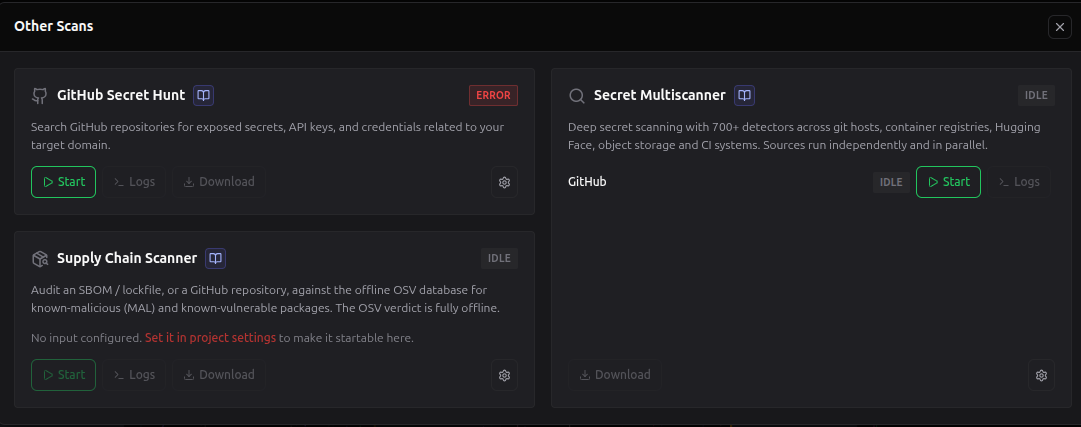
Step by step:
-
Configure what to scan first, in Project Settings > Other Scans > Supply Chain Scanner (the gear on the card links straight there). Pick one input source:
- Uploaded SBOM / lockfile (default),
- GitHub repository, or
- GitHub organization (scans every repository in an org — see below).
Provide the input for the selected source (details below) and Save. Uploads are written immediately; the other fields are saved with the form.
-
Open the project's graph (Red Zone). In the toolbar, click Other Scans.
-
Find the Supply Chain Scanner card (bottom left, below GitHub Secret Hunt). It names the input it would read; until one is configured, Start stays disabled and the card links to the settings section.
-
Click Start (or Queue org batch in organization mode). The logs drawer opens and streams the scan live. Use Pause / Resume / Stop as needed.
-
When the scan completes, the
Package/MalPackageFinding/Vulnerabilitynodes are merged into the live graph, and Download yields the raw result JSON.
Upload mode
In the settings section, click Upload file and choose a manifest. Accepted types: CycloneDX / SPDX SBOMs and lockfiles, extensions .json, .xml, .txt, .lock, .toml, .mod, .sum, .yaml, .yml (for example package-lock.json, yarn.lock, poetry.lock, go.sum, Gemfile.lock, bom.cdx.json). Max 10 MB. One file per project: a new upload replaces the current one. No API key is required for an upload.
File naming matters. OSV-Scanner picks its parser from the file basename, so keep the recognized lockfile / SBOM name (for example
package-lock.json, notdeps.json).
GitHub repository mode
In the settings section, enter a repository as owner/repo or https://github.com/owner/repo, and optionally a branch or tag. The repository is cloned shallowly inside the scan sandbox and its lockfiles are audited; the checkout is discarded afterwards.
- Public repositories clone anonymously (no token needed).
- Private repositories use the Supply Chain GitHub Token from Global Settings > API Keys. It is its own credential: GitHub Secret Hunt and the Secret Multiscanner each hold a different github.com token, so scoping or revoking one does not touch the others.
An L1 GitHub-repo scan anchors its packages to a GithubRepository node; an uploaded SBOM anchors to an SbomDocument node. Both anchors hang off the project's Domain when one exists, so the scan is part of the graph rather than a detached island.
GitHub organization mode
Auditing an organization one repository at a time does not scale, so this mode does it in bulk. In the settings section, enter a GitHub organization or user - either a bare name (letters, digits and dashes, 39 characters max) or its URL - then Queue org batch from the card in Other Scans.
Organization and user accounts share the same name rules, so which one you typed cannot be told from the string: RedAmon asks the API. It tries the organization endpoint first and falls back to the user endpoint on a 404. That fallback matters for what you can see:
| You enter | Enumerated as | Private repos |
|---|---|---|
| an organization you belong to | /orgs/<name>/repos | included, as far as your token's membership reaches |
| another person's account | /users/<name>/repos | never, whatever the token |
| your own account | /user/repos (authenticated) | included |
RedAmon enumerates the account's repositories server-side and queues one supply-chain scan per repository, which then run one after another as capacity frees up. Follow their progress in the Scans tab → Scan queue (see Scan Timeline); each finished repo also lands in Run history as a Supply chain (repo) row.
- This is a batch, not a single scan. The card replaces Start with Queue org batch while this mode is selected: Start runs the project's one configured input, whereas this queues many scans.
- The mode is saved with the project, which is how the card knows to offer the batch. Your upload and repository values are kept, so switching back to either finds the previous input intact.
- Which repositories are included is governed by the project's saved supply-chain org options: include forks, include archived, max repos, and deep analysis.
- Public organizations enumerate anonymously. Private ones need the Supply Chain GitHub Token from Global Settings > API Keys. A token that exists but lacks access is reported as an error rather than silently falling back to a partial list.
- The queued jobs are ordinary queue entries: cancel any of them from Scan queue before they start.
GitHub Enterprise
A self-hosted or custom-domain GitHub Enterprise server works in both GitHub modes, once it is registered:
- In Global Settings > API Keys, set GitHub Enterprise Host to the bare hostname (
ghe.example.com; no scheme, port or path) and GitHub Enterprise Token to a PAT for that server. - In the Supply Chain card, enter the account as a URL:
https://ghe.example.com/orgs/acme-corp(orghe.example.com/acme-corp). A bare name still means github.com.
Two rules are enforced server-side and again inside the scan container, and neither can be relaxed from the UI:
- The host must be the one you configured. The host you type is fetched by the webapp and ends up in a
git clone, so an unregistered host - or an IP literal,localhost, or a host carrying a port or credentials - is refused before any request leaves. The error names the host and tells you to register it. - Credentials are chosen by host. A GitHub Enterprise PAT is never sent to github.com, and the github.com token is never sent to your server. A host that somehow reaches the container without matching your configured one gets no credential at all.
Enumeration uses the Enterprise API root (https://<host>/api/v3), and clone URLs are rebuilt from the validated owner/repo on that host rather than from the clone_url the server returns.
If your Enterprise server uses a private CA, the webapp container needs it (NODE_EXTRA_CA_CERTS) for enumeration and the scan container needs it (GIT_SSL_CAINFO) for the clone; without it both fail on certificate verification.
Each repository is scanned exactly as in GitHub repository mode (shallow clone in the sandbox, lockfiles audited, checkout discarded), so every repo gets its own GithubRepository anchor in the graph.
Layer L2: Supply-Chain Recon (pipeline)
Against a live target with no manifest, L2 harvests the npm package set the target actually serves, verdicts it offline, and merges the same node types, anchored to the target's BaseURL nodes. It runs as GROUP 5.5 of the recon pipeline, immediately after JS Recon (whose downloaded JS and detected technologies it consumes), and is also runnable on its own as a partial-recon tool.
The harvest is pure parsing of data JS Recon already downloaded; it makes no new network request. Sources:
- Source-map mining extracts
node_modules/<pkg>names from source maps (exact names, usually no version). - Import mining collects bare specifiers from
import/require. - Technology to purl maps
http_probetechnologies (for exampleReact:18.2.0) to versioned npm purls. - retire.js (inside the hardened analyzer) reads a library name and version straight out of the served JavaScript, so it can verdict libraries the technology table misses.
Names harvested without a version are recorded as Package inventory but cannot be OSV-verdicted (OSV needs a version to match a version-specific advisory); they surface in the SCA table as unverdictable.
Configure it in the project form's JS Recon tab, under Supply Chain Recon:
| Setting | Field | Default | Meaning |
|---|---|---|---|
| Enable | supplyChainReconEnabled | Off | Runs GROUP 5.5 during a full scan |
| Ecosystems | supplyChainReconEcosystems | npm | Which ecosystems to verdict |
| Deep analysis | supplyChainReconDeepAnalysisEnabled | Off | Runs GuardDog behavioural analysis on OSV-flagged packages (opt-in) |
| Detect malicious hosts | scaIntelCorrelationEnabled | On | Compares the hosts this scan already saw against the incident catalog. Local lookup, no extra requests |
| Detect typosquatting | supplyChainTyposquatEnabled | Off | Flags names 1–2 characters from a popular package. The exact-match check against known-bad names always runs and is unaffected |
You can also run just this module with Run partial recon on the section (tool id SupplyChainRecon), which fetches the served JS from the graph's BaseURL / Endpoint URLs (plus any you supply) and runs the harvest, verdict, and graph write standalone.
GuardDog deep analysis is opt-in and flagged-package-only. After the offline OSV pass, it takes the packages OSV already flagged (capped, malicious first) and runs
guarddog <eco> scaninside the hardened analyzer image. Results becomesuspiciousfindings that attach to the existingPackagenode. A download failure becomes asoft_errorfinding (rendered as not analysed), never a silent clean.
Layer L3: agent tools
Two MCP tools the AI agent calls mid-engagement, exposed on the network_recon server inside the kali-sandbox. Neither writes graph nodes; each returns a compact text summary the agent reasons over. See the full entries in the AI Agent Guide.
execute_osv_scanneris passive and fully offline. It accepts a purl (for examplepkg:npm/lodash@4.17.21, synthesized into a one-component SBOM), a workspace lockfile path, or an SBOM path, and returns the OSV verdict.MAL-is a terminal malicious verdict;CVE-/GHSA-are known-vulnerable. Available in all phases.execute_guarddogruns GuardDog behavioural analysis of one named package (<ecosystem> <name> [version]). It is DANGEROUS (it downloads the attacker-authored tarball), so it dispatches to the hardened analyzer container rather than unpacking anything in the sandbox. A hit issuspicious, never a terminal verdict. Restricted to the informational and exploitation phases.
Reading the results: the Supply-Chain SCA table
Every layer writes into the graph; the Supply-Chain SCA table is where you read it. Open it from the Data Table tab's dropdown (PackageSearch icon, flagged NEW). It is the only view that joins the three node types, and it has three sheets:
| Sheet | One row per | Answers |
|---|---|---|
| Verdicts | MalPackageFinding | What is on fire right now |
| Packages | Package, with rolled-up counts | What am I running, and how much of it was actually checked |
| Advisories | Vulnerability{source:'osv'} | The CVE / GHSA half |
Three things the table derives rather than reads:
- Verdict is three-state:
malicious/suspicious/not analysed. A finding withsoft_erroris a package GuardDog never verdicted, rendered as unchecked rather than as a low-severity suspicious hit. unverdictableis a first-class package status and a headline count. A short verdict list next to a largeunversionedcount means "mostly unchecked", not "mostly clean".- Origin (
L1 repo/L1 SBOM/L2 live) is inferred from the anchor node. - The verdict wording follows the tool that produced it. A
suspiciousfinding from GuardDog reads as a behavioural hit; one fromtyposquatreads as a near-miss of a popular name. (Before 6.10.0 every non-malicious verdict was labelled a GuardDog hit regardless of its source.)
The Incident column appears on the Verdicts sheet when the incident catalog matched the package. Expanding it shows the write-up: summary, status, blast radius, remediation steps, the feed revision that produced the enrichment, and a link to the incident. An empty column means the package is not in the catalog or the catalog was never synced — it is not a statement that the package is safe.
Each sheet is deep-linkable (/graph?table=supplyChainSca&sheet=advisories) and exports per sheet to XLSX / JSON / MD. The table is empty until an L1 scan has run from Other Scans or a recon scan has run with Supply-Chain Recon enabled, and it needs the offline OSV database populated first (./redamon.sh supply-chain-sync npm). See the Red Zone table reference.
Graph model
Two node types are shared by all layers, so a repo scan, an SBOM upload, and a live harvest of the same project dedup onto the same nodes. See the full schema on Attack Surface Graph.
%%{init: {'theme':'base','themeVariables':{'primaryColor':'#64748b','primaryTextColor':'#ffffff','primaryBorderColor':'#475569','lineColor':'#8b949e','textColor':'#737b85','edgeLabelBackground':'#475569','clusterBkg':'transparent','clusterBorder':'#8b949e','titleColor':'#737b85'},'flowchart':{'padding':14,'nodeSpacing':36,'rankSpacing':58}}}%%
flowchart LR
    DOM[Domain]
    GR[GithubRepository - L1 repo]
    SB[SbomDocument - L1 upload]
    BU[BaseURL - L2 live]
    PK[Package]
    MF[MalPackageFinding]
    VU[Vulnerability source=osv]

    DOM -->|" HAS_REPOSITORY "| GR
    DOM -->|" HAS_SBOM_DOCUMENT "| SB
    GR -->|" DEPENDS_ON "| PK
    SB -->|" DEPENDS_ON "| PK
    BU -->|" DEPENDS_ON "| PK
    PK -->|" FLAGGED_AS "| MF
    PK -->|" HAS_VULNERABILITY "| VU
    BU -->|" CONTACTS_MALICIOUS_HOST "| TP[ThreatPulse - incident]

    classDef node fill:#64748b,stroke:#475569,color:#ffffff
    classDef finding fill:#b91c1c,stroke:#7f1d1d,color:#ffffff
    class DOM,GR,SB,BU,PK node
    class MF,VU,TP finding
Packageis a discovered dependency (purl,ecosystem,name,version,source,source_path). Merge key(purl, user_id, project_id).MalPackageFindingis a verdict about a package (verdict=malicious/suspicious,source_tool=osv/guarddog/typosquat,advisory_id,severity,soft_error,aliases). Merge key(finding_id, user_id, project_id). When the incident catalog matched, it also carriesincident_id,incident_url,incident_summary,incident_blast_radius,incident_remediation,incident_statusandincident_feed_revised.ThreatPulseis reused for a matched incident (pulse_idprefixedsca-), reached byCONTACTS_MALICIOUS_HOSTfrom theBaseURLthat contacted it. That edge is notAPPEARS_IN_PULSE: the OTX edge means "this asset of mine is named in the report", while this one means "my target reached someone else's malicious host". The attacker host is never a node; it rides the relationship inmatched_host, which is part of the merge key so several hosts under one incident do not collapse onto a single edge.- All writes MERGE (idempotent), every key is tenant-scoped, and only OSV
MAL-ids becomeverdict=malicious.
Security posture
The feature separates the code that touches untrusted bytes from the code that holds secrets. Package tarballs, target-served JS, and registry metadata are all attacker-influenceable; the Neo4j password and the GitHub token are not.
- DIRTY zone (the analyzer container):
cap_drop=ALL, read-only rootfs + tmpfs, non-root, memory / pids / cpu caps, no secrets, on an isolated network. It runs GuardDog and retire.js and emits only a schema-validated JSON artifact. - CLEAN zone (the L1 scan writer and the recon container): holds the Neo4j credentials, validates the artifact (charset + caps + shape) before it crosses the boundary, and writes the graph.
- Offline by default: the OSV verdict path makes zero network calls. GuardDog's registry egress is opt-in and fails closed.
- NO-INSTALL invariant: RedAmon never runs
npm/pip installon a target manifest (lifecycle scripts are RCE); it parses statically only.
For the container topology, the broker allowlist, and the full artifact schema, see README.SUPPLY_CHAIN.md.