
TypeSafe Jev
🎬 Prefer slides? Watch the animated walkthrough: Jev Meets the Recon Pipeline. An 18-slide visual explainer of how Jev plugs into the recon pipeline and what each of the eight hooks decides. It opens on redamon.org.
Jev, from TypeSafe AI, is a decision model. RedAmon can use it instead of an LLM for four of the small decisions the recon pipeline makes on its own: which file extensions FFuf should try, which Nuclei tags to run, whether a WAF sits in front of a host, and whether a takeover candidate is really a WAF block page. Four more decisions run only on Jev: what kind of page each probed URL is, which discovered directories FFuf smart-fuzzes, which hosts Hakrawler crawls first under its URL cap, and whether a tool's empty result with odd error output was a transient failure. You switch it on per hook. Everything else in RedAmon (the agent, triage, reports, every other AI feature) keeps using your chat LLM.
This page explains what Jev is, where it plugs into the pipeline, what it is asked, what its answers can and cannot change, and how to set it up. For the AI hooks themselves and the LLM engine, see AI in the Recon Pipeline.
On this page
- What Jev is
- Why use it for recon decisions
- Where it plugs into the pipeline
- How a Jev call flows
- Hook by hook
- Decision records
- Setting it up
- How the switches combine
- Whose token a scan uses
- What contains a bad answer
- When Jev is unavailable
- Your token and your data
- Cost and limits
- Using it over MCP
- Watching it work
- Troubleshooting
- Settings reference
- See also
What Jev is
A chat model takes a prompt and writes text, and your code then has to parse that text into a decision. Jev skips the text. You send it two things:
- a state: the facts to decide on (here, a target's response headers, a body sample, a tech fingerprint);
- a set of named questions, each with a declared answer type.
It returns exactly one typed answer per question:
| Answer type | What comes back | What RedAmon uses it for |
|---|---|---|
Yes/no (noul) | The probability, from 0 to 1, that the statement is true | Each FFuf extension, each Nuclei tag, "a WAF or CDN edge produced this response", "this is a WAF block page", each page class, each discovered directory, each host, "this error output is a transient failure" |
Pick one (choice) | One option from the list the question gave | The WAF vendor, out of 14 |
| Score | A value on a scale the question defines | Not used |
Jev never writes free text, so there is nothing to parse, no JSON to repair, and no reply that apologises or invents an option. A yes/no answer is a number, and a pick-one answer is always one of the options offered.
RedAmon pins the model to jev-1.13.0, not the moving jev-latest alias. The thresholds below are calibrated against that version, so a newer Jev only arrives as a deliberate RedAmon change.
Jev is not a chat model. It never appears in a model picker and cannot run the agent, a triage review or a report. A Jev token alone does not let you create a project: you still need one chat provider (see AI Model Providers).
Why use it for recon decisions
The recon pipeline is deterministic by design (see AI in the Recon Pipeline). Each AI hook makes one narrow decision and hands control straight back. Those decisions are classification problems: keep or drop, WAF or no WAF, block page or real page. A typed decision model fits them better than a text generator:
- The answer is always well-formed. A hook can never receive a malformed reply, a tag that does not exist, or an essay instead of a verdict.
- Every option gets its own score. The FFuf hook asks about each of 40 extensions separately and ranks them by Jev's score. An LLM only returns the short list it chose.
- It is fast and cheap. A hook's call is a few hundred to a few thousand input tokens (see Cost and limits), and the whole FFuf question set goes in one request.
- The questions are fixed. RedAmon asks the same questions every time, so a given target fingerprint is judged the same way on every scan.
You can still keep a hook on the LLM. The switch is per hook, and the LLM path is unchanged.
Where it plugs into the pipeline
| Hook | Pipeline step | What Jev is asked | What the answer changes | Engine field |
|---|---|---|---|---|
| FFuf extension planner | Resource enumeration (and the web-crawling partial recon), per target | For each of 40 extensions: "is it likely to find real files on this server?" | The extensions FFuf fuzzes on that target | ffufAiUseJev |
| Nuclei tag selector | Vulnerability scanning setup, once per scan | For each candidate tag: "should it run for this tech stack?" | The -tags Nuclei runs | nucleiTagsAiUseJev |
| WAF classifier | Security checks (direct-IP and WAF-bypass checks), per response | "Did a WAF or CDN edge produce this response?" and "which vendor?" | Whether a response counts as WAF-fronted | wafAiUseJev |
| Takeover classifier | Subdomain takeover triage, per ambiguous candidate | "Is this a WAF block page rather than the provider's unclaimed-site page?" | The candidate's score (down by 40) | takeoverAiUseJev |
Four more hooks have no LLM version. They run only on Jev:
| Hook | Pipeline step | What Jev is asked | What the answer changes | Setting |
|---|---|---|---|---|
| Page-type labels | HTTP probing (full scan and partial Httpx), per distinct page | For each of five classes: "is this page a login wall / parked / a default install page / a placeholder / an error page?" | A page_class label on each URL and on its Endpoint in the graph: app unless one class wins | httpxJevPageType |
| FFuf base-path ranking | Resource enumeration (and the FFuf partial recon), once per scan when smart fuzz finds more directories than its cap | For each discovered directory: "likely to hold sensitive, administrative or application content?" | Which directories fill the smart-fuzz cap: FFuf fuzzes the ones Jev ranks highest | ffufJevBasePaths |
| Hakrawler seed order | Resource enumeration, once per scan | For each probed host: "likely to have a rich web application surface?" | The order Hakrawler crawls its seeds in: the promising hosts first | hakrawlerJevSeedOrder |
| Tool health | Resource enumeration, after the crawlers and collectors | For each empty result with unexplained error output: "a transient failure a second run could fix?" | Jev's transient-or-permanent verdict, recorded next to the coverage gap | resourceEnumJevToolHealth |
The Nuclei false-positive filter stays on the LLM. The Nuclei false-positive response filter has no Jev option, on purpose. It can delete a finding based on bytes the target controls, and a decision model can be steered by crafted input. Every Jev hook can only rank, tune or annotate. None of them can remove a finding.
How a Jev call flows
%%{init: {'theme':'base','themeVariables':{'primaryColor':'#64748b','primaryTextColor':'#ffffff','primaryBorderColor':'#475569','lineColor':'#8b949e','textColor':'#737b85','edgeLabelBackground':'#475569','clusterBkg':'transparent','clusterBorder':'#8b949e','titleColor':'#737b85'},'flowchart':{'padding':14,'nodeSpacing':36,'rankSpacing':52}}}%%
flowchart TB
H["Recon container: AI hook<br/>engine = jev (holds no key)"]
subgraph Agent["Agent container"]
E["/jev/* endpoint<br/>internal key, rate limit"]
O["Owner check<br/>project belongs to user"]
K["Owner's Jev token"]
Q["Questions +<br/>wrapped, clipped state"]
M["Answers mapped to<br/>the /llm/* shape"]
end
T["api.typesafe.ai<br/>jev-1.13.0"]
V["Recon container: validator<br/>or static fallback"]
H -->|" target data "| E --> O --> K --> Q
Q -->|" ≤ 200 questions per request "| T
T -->|" typed answers "| M
M -->|" same shape as the LLM "| V
classDef step fill:#64748b,stroke:#475569,color:#ffffff
classDef recon fill:#1d4ed8,stroke:#1e3a8a,color:#ffffff
classDef secret fill:#b45309,stroke:#78350f,color:#ffffff
classDef ext fill:#6d28d9,stroke:#4c1d95,color:#ffffff
classDef guard fill:#0f766e,stroke:#134e4a,color:#ffffff
class E,Q,M step
class H,V recon
class O guard
class K secret
class T ext
style Agent fill:transparent,stroke:#8b949e,stroke-dasharray:6 4,color:#737b85
- The hook reads its engine field. On Jev, it calls the agent's
/jev/<hook>endpoint instead of/llm/<hook>. The request body is identical, so caching and validation in recon don't change. A Jev-only hook calls its own/jev/<hook>endpoint, with a request and an answer shape of its own that recon validates. - The agent checks the caller. The same internal key, per-user rate limit and daily call cap as the LLM endpoints apply. Then the agent confirms the project belongs to the user the scan runs as (it fails closed: if that can't be checked, nothing is sent), and only after that loads the project owner's Jev token.
- The agent builds the questions. Target data goes into the state, wrapped as untrusted data and clipped to a fixed size. It is never pasted into a question's wording.
- One request to TypeSafe, or several for a large set. Sets above 200 questions are split into sequential requests, and if any of them fails the whole hook fails, so a half-answered set never narrows coverage. Each request has a 5-second timeout and no retry; recon's breaker decides when to try again.
- The answers are mapped back to the exact shape the LLM endpoint returns, with the floors and closed answer sets applied (see What contains a bad answer). A Jev-only hook whose items are themselves target data (pages, hosts, directories) puts them in the state and asks about each one by index (
page_3), and splits the items across requests so each request carries only its own. - Recon validates the answer the same way it validates the LLM's, and on any failure falls back to the hook's static value.
Hook by hook
Every yes/no answer at 0.5 or above reads as "yes". The WAF and takeover hooks act on a verdict only at a confidence of 70 or more, the same bar the LLM must clear.
FFuf extension planner
Asked: for each extension in a fixed catalog of 40: "Is the file extension .x likely to find real files on this server, given its response headers and URL?" The state is the target URL and the response headers of a single HEAD request.
The catalog Jev ranks over:
.php .asp .aspx .jsp .do .action .html .htm .js .json .xml .txt
.bak .old .orig .save .swp .tmp .zip .tar .gz .7z .rar .sql .db .sqlite .log
.conf .config .ini .env .yml .yaml .cfg .inc .cgi .pl .py .rb .map
Result: .bak and .old always come first, whatever Jev says, so Jev never finds fewer backup files than a scan with no AI. After them come the extensions Jev scored "yes", highest score first, for at most 6 in total. Jev cannot add an extension that is not in the catalog.
Cache: per header fingerprint (Server, X-Powered-By, ...), as on the LLM path, so a hundred hosts behind one stack cost one Jev call.
On failure: the hook's safe default list (.bak, .old, .config, .zip).
Nuclei tag selector
Asked: for each candidate tag: "Should the Nuclei template tag x be included for a scan of a host with the detected technology stack?" The candidates are read from the installed templates (around 130 tags today). The state is the detected technologies and Server headers.
Result: the universal high-impact tags cve, exposure, misconfig, default-login, kev, oast and takeover are always kept when they are among the candidates. Then the tags Jev scored "yes" are added, highest score first, up to 15 tags. When the cap is tight, even the universal tags are ordered by Jev's score for this target, so the least relevant one drops first, not the last in alphabetical order. Only tags of the shape recon accepts are ever put in a question.
Cache: none needed. It runs once per scan.
On failure: your static Nuclei tag list, unchanged.
WAF classifier
Asked: two questions about one response. "A WAF or CDN edge produced this HTTP response" (yes/no), and "If so, which vendor is it?" (pick one of cloudflare, akamai, aws_waf, imperva, sucuri, fastly, azure_frontdoor, cloudfront, modsecurity, f5, fortinet, barracuda, stackpath, custom). The state is the URL, status code, response time, headers and a body sample.
Result: the confidence is Jev's yes-probability × 100. At 70 or more the response counts as WAF-fronted even though the static header check missed it. That is what lets the WAF-bypass check report WAF Bypass via Direct IP Access behind a WAF that strips its headers. The finding's evidence names the vendor and confidence. Its detection_method is jev_classifier, not ai_classifier, so you can tell which engine made the call.
Cache: per response fingerprint.
On failure: "no WAF detected", so the static verdict stands.
Takeover classifier
Asked: one question. "This response is a WAF or edge block page, not the unclaimed-site page of the claimed third-party provider." The state is the hostname, the provider the takeover fingerprint claimed, the status code, headers and a response sample.
It runs only in the ambiguous middle case: a candidate already flagged by Subjack or Nuclei, with a response and no third-party vendor token (Heroku-Request-Id, x-amz-bucket-region, ...). A clear vendor token or a failed probe skips the call.
Result: when Jev says "block page" with a confidence of 70 or more, the finding is marked ai_waf_likely and ai_engine: "jev", and its score drops by 40 points. That is usually enough to move it down a verdict, for example from confirmed to likely or from likely to manual_review. The finding is never deleted: you still see it, ranked lower.
Cache: per response fingerprint.
On failure: "not a WAF block", so the candidate keeps its static score.
Page-type labels
Asked: for each page, five yes/no questions, one per class: "Item page_N is only a login or single-sign-on wall", "... a domain-parking or domain-for-sale page", "... a web server's or vendor's default landing page", "... a placeholder such as a 'coming soon' page", "... an error page rather than real content". The state is the page's status code, sizes, word and line counts, response time and CDN flag (computed by RedAmon), and its URL, host, CNAME, title, Server, headers and the first 4 KB of body (from the target, so wrapped). A page with no body is judged on its title and size; a page with neither is skipped.
A deterministic pre-filter knows the easy cases with no call: known default-install titles (Welcome to nginx!, IIS Windows Server, It works!), parking titles and parking-provider CNAMEs, Coming soon titles, error statuses and soft-404 titles, obvious login paths, and empty HTML bodies (a tiny JSON or text answer is an API, so it is left to Jev). Its label stands for any page Jev gives no answer for. Jev is asked about every page, the pre-filtered ones included, and its label wins.
Each page is asked about in its own request. Measured on jev-1.13.0, a login page sharing a request with other pages scored 0.55 for login wall, and 0.92 on its own: with a dozen fields per page, the answers blur across pages.
Result: the class with the highest yes-probability at 0.70 or above, else app. An unsure answer is app. The label is written onto the URL entry in the recon output and onto the page's Endpoint in the graph as page_class, with page_class_confidence and page_class_source (jev_classifier, or prefilter where Jev gave no answer). It changes nothing about what is scanned. At most 300 distinct pages per scan are asked about, within 60 seconds; the rest keep the pre-filter's label, if it has one, and one drawer line says how many.
Cache: pages with the same title, body, status, size bucket and Server share one answer, failures included, so identical pages are asked about once.
On failure: the pre-filter's label stands; a page it cannot place gets no label.
FFuf base-path ranking
Asked: for each directory smart fuzz discovered: "Is the directory in item path_N likely to hold sensitive, administrative or application content, rather than static assets?" The directory names come from the target's own links, so they are wrapped state, never question text. At most 400 directories are asked about; above that, a random 400. In a partial recon the candidates are every endpoint path in the project's graph, as smart fuzz already uses there.
It runs only when the crawl found more directories than ffufSmartFuzzMaxBasePaths (default 20). Under the cap, every directory is fuzzed and there is nothing to rank.
Result: the directories ordered by Jev's score (ties by name), first cap kept, and smart fuzz runs its wordlist under those. Jev cannot add a directory, and the cap cuts the same number either way.
Cache: none. It runs once per scan.
On failure: the random pick smart fuzz uses without AI.
Hakrawler seed order
Asked: for each probed host: "Is the host in item host_N likely to have a rich web application surface (many pages, forms, APIs or an admin area) rather than a thin or static site?" The state is the status, size, word and line counts of the host's root page (or of its largest probed page) and its seed count (computed by RedAmon), and its hostname, title and Server (wrapped). At most 400 hosts are scored; above that, a sample chosen by a hash of the hostname, which is stable between runs.
Hakrawler crawls one seed at a time per worker, in list order, and stops at hakrawlerMaxUrls. With a cap that binds, hosts late in the alphabet are never reached. Katana is not affected: its limit is time, not order.
Result: the seeds grouped by host, hosts ordered by Jev's score, unscored hosts after them alphabetically, and Hakrawler crawls in that order, so the promising hosts are reached before the URL cap. Every seed stays in the list. Partial recon keeps the alphabetical order, because its probe data (rebuilt from the graph) has no title, size or word count to rank on.
Cache: none. It runs once per scan.
On failure: the alphabetical order.
Tool health
This hook sits on a deterministic check that runs on every scan, with or without Jev. When a crawler or collector (Katana, Hakrawler, GAU, ParamSpider, Kiterunner, FFuf, Arjun) returns nothing, RedAmon classifies the empty result from its exit code and error output:
- a timeout, a kill, a crash or a non-zero exit is a failure;
- error output that names a failure (an error, a timeout, a refusal, a rate limit) is a failure, even with exit code 0 (ParamSpider gives up on an archive and exits 0);
- other error output, once each tool's routine lines are set aside, is undecided;
- a clean exit with nothing on stderr is a genuine empty result.
A failure or an undecided result is recorded as a coverage gap on the run, one entry per tool. When Katana or Hakrawler failed and jsluice extracts secrets, the previous run's jsluice secrets are kept out of the end-of-run prune, because the JS files that feed jsluice were not re-crawled. A partial recon never prunes, so there the gaps are informational. Some failures leave no trace at all: GAU without --verbose, and FFuf in silent mode, exit 0 with nothing on stderr even when every request failed, so no check, and no model, can tell them from an empty result.
Asked: only about undecided results: "The tool's error output in the state describes a transient failure (a timeout, a network or rate-limit error, a crashed or killed container) rather than a permanent one." The state is the tool name, exit code, elapsed time and seed count (computed by RedAmon), and the error output, with configured header values, the authenticated-session profile's headers and anything shaped like a credential redacted before it leaves recon, then wrapped.
Result: "transient" at 0.5 or above, with Jev's confidence. The verdict is kept in the recon output next to the coverage gap, so you can see which gaps are likely worth a second run. The gap itself stays as recorded: Jev never turns it back into a genuine empty result, and no tool is re-run.
Cache: none. At most 20 questions per run.
On failure: nothing changes; the gap is already recorded.
Decision records
Every Jev-only hook keeps a record of each decision it made, next to what the pipeline would have decided without Jev. That is how you check, on your own targets, how often the two agree and where they differ.
What a hook leaves behind:
-
Up to 50 lines per hook per run in the recon drawer, one per decision, then one line saying how many more were not printed. Items are named by index, never by URL, host or path:
jev-shadow page_type: project=<project id> item=page_12 jev=parked conf=88 baseline=app agreed=false model=jev-1.13.0 -
One summary line per hook, always: decisions, the share Jev agreed with the deterministic answer, mean confidence, and how many calls fell back.
jev-shadow page_type: summary decisions=118 agreed=91% mean_conf=84 fallbacks=0 model=jev-1.13.0 -
Every record, in the recon output of a full scan, under
jev_shadow.<hook>(download it from the project's recon data). Here the item itself is kept next to the index: the URL, directory, host or tool. A partial recon writes no recon output file, so it keeps the drawer lines and the summary only.
What each hook compares against:
| Hook | Jev's answer | The deterministic answer |
|---|---|---|
| Page-type labels | The label | The pre-filter's label, or app |
| FFuf base-path ranking | keep / cut per directory | The first cap directories in name order (a fresh random draw would make the overlap meaningless) |
| Hakrawler seed order | Whether a host lands in the first or second half of the list | The same, in alphabetical order |
| Tool health | retry / no_retry | no_retry |
conf is Jev's confidence in the answer it gave (the winning yes-probability, or one minus it for app, no_retry or cut); for the base-path and seed-order hooks it is Jev's score for that item, the number the order is built from. The page-type hook asks about every page, the pre-filter's included, so each one has a deterministic label to compare with.
Setting it up
1. Get a key
Create an API key at console.typesafe.ai/keys. It looks like apikey_….
2. Save it on your account
The token belongs to your account, not to a project. You can add it in either of two places, and both save the same thing:
-
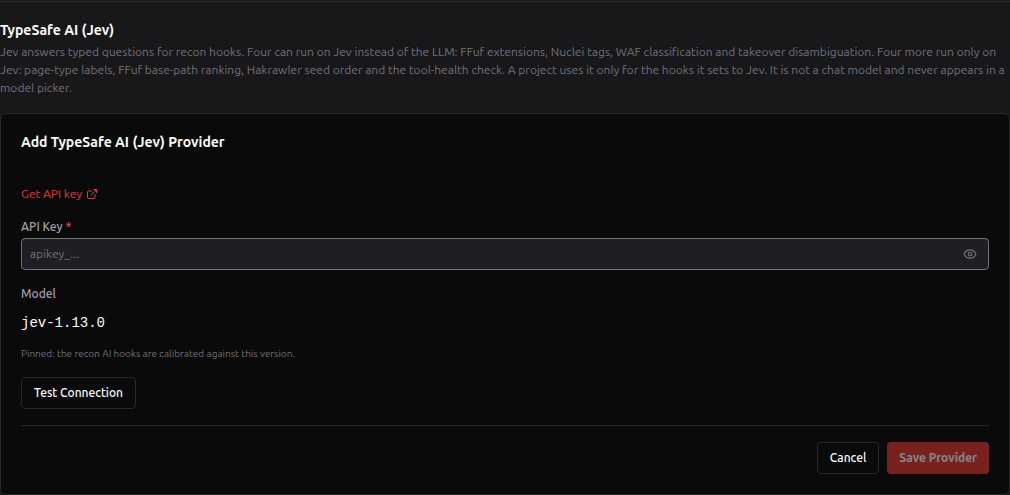
Global Settings → LLM Providers → TypeSafe AI (Jev), the section between your providers and Models by feature. Click Add token, paste the key, click Test Connection, then Save Provider.
-
Inside a project: Target & Modules tab → AI in Pipeline panel, in the Jev engine column next to the AI model (it appears once Enable AI in Pipeline is on). Without a token it shows the same input with Test Connection and Save token. Once a token exists it shows Your Jev token is included with the masked key and a Manage link that opens Global Settings in a new tab, so your unsaved project edits stay where they are.
Rules for the token:
- One per account. A second add is refused; edit the existing one to rotate the key.
- The model is pinned. You cannot set a model, a base URL or headers. The key can only ever be sent to
api.typesafe.ai. - Test Connection is free. It lists the models your key can use and spends no credit.
- Check API usage in the LLM Providers tab includes the token. TypeSafe has no balance endpoint, so the check asks one tiny question (about 300 input tokens) to prove the account can still pay, and reports Valid, Rejected or Quota used up. See Global Settings.
3. Switch hooks to Jev
In the project form, open Target & Modules and turn on Enable AI in Pipeline. Each hook has its own card with an Engine row: pick LLM or Jev. The Nuclei false-positive filter shows LLM only. The four Jev-only hooks follow, each with a Jev only row: pick Off or Jev.
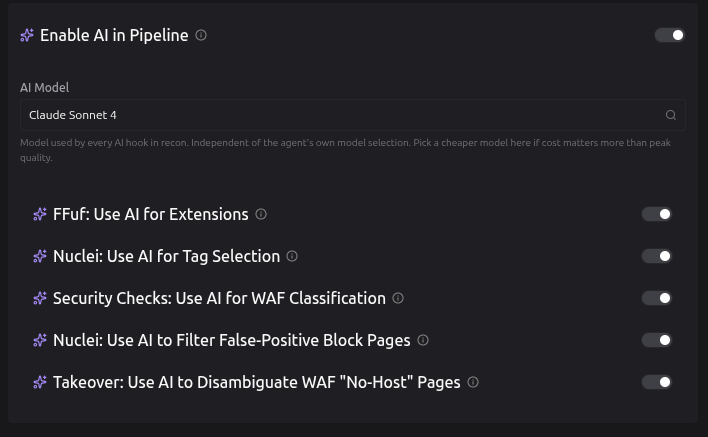
The same Engine control also appears under each hook's toggle in its own tool section (FFuf under Resource Enum, Nuclei under Vulnerability Scanning, the WAF classifier under Security Checks, and takeover under Subdomain Takeover). The Off | Jev controls appear in the httpx section (Page Type (Jev)), the FFuf section under smart fuzz, the Hakrawler section's options, and the Endpoint AI Classifier section (Tool Health (Jev)). Both controls of a hook are bound to the same field.
Jev can be clicked only when AI in Pipeline (and, for an engine switch, the hook) is on and you have a token. Hover it to see which is missing. Then save the project.
4. Run a scan
Start a full scan or a partial recon as usual. The live recon drawer shows [*][FFuf-Jev], [*][Nuclei-Jev], [*][WAF-Jev] and [*][Takeover-Jev] lines when a hook runs on Jev, and [*][PageType-Jev], [*][FFuf-BasePaths-Jev], [*][CrawlOrder-Jev], [*][ToolHealth-Jev] and jev-shadow decision lines for the Jev-only hooks. See Watching it work.
How the switches combine
Three settings decide what a hook does:
- AI in Pipeline (
aiInPipeline), the master switch. At scan start it forces every per-hook AI flag on or off with it. - The hook's AI flag (
ffufAiExtensions,nucleiAiTags,wafAiClassifier,takeoverAiClassifier). It enables the hook's engine control in the form. - The hook's engine (
ffufAiUseJev,nucleiTagsAiUseJev,wafAiUseJev,takeoverAiUseJev).falsemeans the LLM in the AI Model picker,truemeans Jev.
| AI in Pipeline | Engine | Owner has a Jev token | What the hook does at scan time |
|---|---|---|---|
| Off | anything | anything | Static behaviour. No LLM and no Jev calls |
| On | LLM | anything | Asks the LLM in aiPipelineModel |
| On | Jev | yes | Asks Jev |
| On | Jev | no | Static fallback. It never re-routes to the LLM |
Things that are easy to miss:
- The master switch never changes an engine. Turning AI in Pipeline off and on again keeps every LLM/Jev choice.
- Presets keep your Jev settings unless they name them. Built-in Recon Presets never set the Jev fields, so applying one leaves your choices as they are: whether Jev can serve a hook depends on a token no preset knows about. A preset you saved yourself, or one the AI generator wrote, can name them; applying it is refused if it would switch a hook onto Jev for an owner without a token.
- Importing a project keeps the bundle's engines. A project exported from an account with a token still imports on one without: the hooks set to Jev stay on Jev, use their static fallback, and show the No Jev token badge in the form until you add a token or switch them back. See Data Export & Import.
- The AI Model picker still matters. Hooks left on the LLM, and the Nuclei false-positive filter, use it.
The Jev-only hooks have two levels: AI in Pipeline, then the hook's own setting (ffufJevBasePaths, httpxJevPageType, resourceEnumJevToolHealth, hakrawlerJevSeedOrder). There is no per-hook AI flag and no LLM engine, and AI in Pipeline does not set or reset them. On with no token, the hook does what it does without AI.
Whose token a scan uses
Recon resolves credentials from the project owner, so a scan always spends the owner's Jev token, whoever starts it. The server enforces this on every write:
- Switching a hook onto Jev requires the project owner to have a token. That covers an engine switch and turning on a Jev-only hook. The project form, the MCP tools, applying a preset and creating a project all refuse otherwise, with: "Can't use Jev for ffufAiUseJev (FFuf extensions): the project owner has no TypeSafe AI (Jev) token. Add one in Settings → LLM Providers." If the check itself fails, the write is refused too (fails closed).
- Only a switch-on is checked. Switching back to the LLM always works, and a project already set to Jev still saves normally.
- A stored Jev choice is never reset for you. If the owner deletes the token later, the engine stays on Jev and the form shows a badge, No Jev token: this hook uses its static fallback, until you switch it back or add a token.
- Deleting the token mid-scan has the same effect on the next call: that hook falls back to static for the rest of the run.
What contains a bad answer
A decision model can be wrong, and the target can try to steer it, since the state is built from bytes the target sends. RedAmon does not rely on Jev behaving. These guards are in code:
- Closed answer sets. FFuf can only get extensions from the 40-entry catalog, Nuclei only tags from the installed candidates, the WAF vendor only one of 14 names, and a page only one of six labels. The base-path and seed-order hooks answer a score per item they were given, and recon keeps only items it sent. Anything else is impossible, not just filtered.
- Floors.
.bak/.oldand the universal Nuclei tags are kept whatever Jev answers, so Jev can only add coverage on top of them. A page isappunless one class clears 0.70. The base-path cap keeps the same number of directories, and the seed order keeps every seed. - Annotate, never delete. The WAF classifier only adds a verdict, the takeover classifier only lowers a score, and the Jev-only hooks only label, rank or reorder. No host, URL or finding is dropped because of a Jev answer, and the one hook that could delete a finding (the false-positive filter) has no Jev option. The tool-health answer can never turn a recorded coverage gap back into a genuine empty result.
- Target data is data. Headers, body samples, URLs and hostnames go into the state wrapped as untrusted content and clipped (16,000 characters of headers, 8,000 of body or fingerprint, 2,000 of URL or hostname; and per item for the Jev-only hooks: 4,000 of body, 2,000 of headers, 500 of URL, 300 of a title, Server, host or CNAME, 200 of a directory name, 4,000 of error output). They are never part of a question. So are the items a Jev-only hook ranks: a directory name, a hostname or a page is named by its index in the question, never quoted.
- Provenance comes from the caller.
jev_classifierandai_engine: "jev"are stamped from the engine recon asked for, not read from the answer, so a response cannot pass itself off as the other engine. - Validation is the same as for the LLM. Every answer goes through the recon validator the LLM path uses, and anything that fails it falls back.
When Jev is unavailable
A Jev failure never breaks a scan and never returns an empty result. The hook uses its static fallback and the run continues. Jev has its own circuit breaker, separate from the LLM one, so an empty Jev balance does not switch off the LLM hooks or the agent.
| What happened | error_type | What the run does |
|---|---|---|
| No Jev token on the project owner's account | jev_not_configured | Stops calling Jev for the rest of this run; every Jev hook uses its fallback |
| TypeSafe rejected the key | jev_auth | Same |
| The TypeSafe account has no credit left | jev_no_credit | Same |
| The project does not belong to the scan's user | jev_forbidden | Same |
| TypeSafe rate limit reached | jev_rate_limited | Waits out TypeSafe's retry-after; a second one in a row pauses Jev |
| Timeout (5 s), TypeSafe unavailable, unexpected answer, the token could not be loaded, a refused request | jev_timeout, jev_overloaded, jev_bad_response, jev_unavailable, jev_bad_request | That call falls back. Three in a row pause Jev for 120 s, then one call tries again; the pause doubles each time it reopens, up to 30 minutes |
The drawer says which case you hit, for example:
[!][FFuf-Jev] Agent returned HTTP 503: {"error_type":"jev_no_credit","error":"The TypeSafe account has no credit left"}. Using safe fallback.
[!][Agent-Jev] ... jev_no_credit - stopped for the rest of this run
[!][Nuclei-Jev] Agent LLM paused (breaker open) - using the fallback.
The last line says "Agent LLM" for every hook, but under a -Jev tag it refers to the Jev breaker. The error texts are fixed strings: TypeSafe's own error text, the key and the request never reach the drawer.
Your token and your data
The token is stored once per account in the user_llm_providers table and is read only by the agent container. The recon and scan containers never receive it: recon calls the agent, and the agent calls TypeSafe. It goes only to the fixed address https://api.typesafe.ai, with redirects off. It is never written to a log, and the agent's log filter masks the TypeSafe key format in case one ever slips into a message. Its type is locked both ways: a Jev token can never be sent to another provider, and a chat key can never be sent to TypeSafe.
Target data. When a hook runs on Jev, the data it decides on goes to TypeSafe:
| Hook | Sent to api.typesafe.ai |
|---|---|
| FFuf | The target URL and its response headers |
| Nuclei | The detected technologies and Server header values |
| WAF | URL, status code, response time, headers, body sample |
| Takeover | Hostname, claimed provider, status code, headers, response sample |
| Page-type labels | Per page: URL, host, CNAME, title, Server, headers, the first 4 KB of body, status code, sizes, word and line counts, response time, CDN flag |
| FFuf base-path ranking | The discovered directory names (up to 400), never their content |
| Hakrawler seed order | Per host: hostname, root page title and Server, status code, size, word and line counts, seed count |
| Tool health | The tool name, exit code, elapsed time, seed count and its error output, with configured header values, the authenticated-session headers and credential-shaped tokens redacted |
That makes TypeSafe a third party that receives target-derived data for the hooks you switch to Jev, just as your LLM provider does for hooks on the LLM. If the engagement's rules restrict where target data may go, keep those hooks on the LLM (or on a local model), or AI in Pipeline off. The agent logs one line per call with the user, project, number of questions, model, latency and outcome. It never logs the key, the state or the answers.
Cost and limits
TypeSafe bills input tokens; see typesafe.ai for current pricing. Measured on jev-1.13.0, a question costs about 20 input tokens and each request adds about 280, plus the state:
| Hook | Questions per call | How often |
|---|---|---|
| FFuf | 40 | Once per distinct header fingerprint |
| Nuclei | One per candidate tag (around 130) | Once per scan |
| WAF | 2 | Once per distinct response the static check missed |
| Takeover | 1 | Once per ambiguous takeover candidate |
| Page-type labels | 5 per distinct page, one request per page, 4 pages per agent call | At most 300 distinct pages per scan, within 60 seconds. Measured at about 0.4 s per page, so a large pass ends on the time budget, around 150 pages, before it reaches the cap |
| FFuf base-path ranking | One per directory, up to 400 (two requests) | Once per scan, and only when the crawl found more directories than the cap |
| Hakrawler seed order | One per probed host, up to 400 (two requests) | Once per scan |
| Tool health | 1 | Once per undecided empty result, at most 20 per run |
Limits that apply:
- RedAmon: at most 200 questions per request, sent one after another and never in parallel, so a single scan stays well under TypeSafe's per-account rate. Jev calls count against the same per-user rate limit and daily cap as the recon LLM hooks.
- TypeSafe: about 64k tokens per request, which is why target data is clipped, and a per-account request rate.
- Check API usage spends about 300 input tokens each time it runs.
Using it over MCP
An external agent connected through the MCP Server sees and sets the engine fields like any other recon setting:
describe_recon_settingslists the Jev fields with their meaning, and its notes explain the three-level model above and the two-level one of the Jev-only hooks.get_recon_settingsreturns their current values.update_recon_settingscan set them. A switch onto Jev is refused, with the message quoted above, when the project owner has no token.apply_recon_presetfollows the same preset rule and the same owner check as the UI.preflight_scope_checkreturns anaiHooksblock: for each hook, itskind, the engine the project asks for and the one that will actually run. Anenginehook (the four with an LLM version) asks forllmorjev; anenablehook (the four Jev-only ones) asks forofforjev. What will run isoff,llm,jev,jev → static fallback (no Jev token on the owner's account), orjev (could not check the owner's Jev token). It counts the owner's Jev tokens and never reads one.
The token itself is not reachable over MCP. See the MCP API Reference for the full tool contracts.
Watching it work
In the recon drawer, every Jev hook logs under its own tag:
| Tag | Example line |
|---|---|
[FFuf-Jev] | [+][FFuf-Jev] Selected extensions for https://app.example.test: ['.bak', '.old', '.php', '.inc'] |
[Nuclei-Jev] | [*][Nuclei-Jev] Calling agent http://…/jev/nuclei-tags with model=… (3 techs, 1 servers, 131 candidates) |
[WAF-Jev] | [+][WAF-Jev] cloudflare detected (confidence=86) |
[Takeover-Jev] | [+][Takeover-Jev] WAF block masquerading as takeover (confidence=78): ... |
[PageType-Jev] | [*][PageType-Jev] 140 pages, 31 placed by the pre-filter, 62 distinct to ask |
[FFuf-BasePaths-Jev] | [+][FFuf-BasePaths-Jev] Jev keeps 20; 6 of them are in the deterministic first 20 |
[CrawlOrder-Jev] | [+][CrawlOrder-Jev] Jev moved 9 host(s) from the second half of the list into the first |
[ToolHealth] | [!][ToolHealth] paramspider: 3 empty result(s) look like a failure, recorded as a coverage gap (the deterministic check, with or without Jev) |
[ToolHealth-Jev] | [*][ToolHealth-Jev] 2 empty result(s) with unexplained error output; asking about 2 |
jev-shadow | One line per decision and one summary per Jev-only hook; see Decision records |
[*] and [+] lines are decisions Jev made, [!] lines are fallbacks to the static value. The Jev-only hooks print counts and indexes only: a URL or hostname in a drawer line could match the drawer's phase detection (a host called portal.example.test/scan reads as port scanning). The Nuclei call line prints the AI Model picker's value because the request body is shared with the LLM path; Jev ignores it and always uses jev-1.13.0.
In the results, a WAF-bypass finding decided by Jev carries detection_method: "jev_classifier", and a takeover finding Jev down-scored carries ai_engine: "jev" with ai_confidence.
In the agent log, one line per call:
jev ffuf-extensions: user=<user id> project=<project id> questions=40 model=jev-1.13.0 latency=412ms ok
Troubleshooting
| Symptom | Cause | What to do |
|---|---|---|
| The Jev button is greyed out | AI in Pipeline or the hook is off, or your account has no Jev token. The tooltip says which | Turn AI in Pipeline or the hook on, or add a token (step 2) |
| Couldn't check your Jev token with Retry | The token lookup failed. The form does not assume you have none | Click Retry. The engine control stays as stored meanwhile |
| Badge No Jev token: this hook uses its static fallback | The hook is stored on Jev but the owner's account has no token | Add a token, or switch the hook back to LLM |
| Saving the project fails with Can't use Jev for … | You switched a hook to Jev, or turned on a Jev-only hook, on a project whose owner has no token | The owner adds a token, or keep the hook on the LLM (or off) |
Drawer shows jev_no_credit and stopped for the rest of this run | The TypeSafe balance is used up | Top up at TypeSafe. The next scan uses Jev again. The LLM hooks in this run were not affected |
Drawer shows jev_auth | The key was revoked or mistyped | Edit the token in Global Settings → LLM Providers and click Test Connection |
Drawer shows jev_not_configured but you have a token | The scan runs on the owner's token, and the project belongs to someone else | The owner adds their own token |
No -Jev lines at all | AI in Pipeline is off, or the hooks are still on the LLM | Check the hook cards in the Target & Modules tab |
| A Jev-only hook is on but prints nothing | It had nothing to decide: smart fuzz found no more directories than its cap, fewer than two hosts were probed, or no empty result had unexplained error output | Nothing to fix. The page-type hook always prints its counts and a summary |
No page_class on the Endpoints in the graph | The page-type hook is off, there is no Jev token, or the pages had no signal (no title, body or size) | Turn the hook on (step 3) and re-run the httpx step |
No jev_shadow block in a partial recon's output | A partial recon writes no recon output file | Read the drawer's jev-shadow lines and summary |
Settings reference
| Setting | Runtime key | Default | Hook | Over MCP |
|---|---|---|---|---|
ffufAiUseJev | FFUF_AI_USE_JEV | false | FFuf extension planner | settable |
nucleiTagsAiUseJev | NUCLEI_TAGS_AI_USE_JEV | false | Nuclei tag selector | settable |
wafAiUseJev | WAF_AI_USE_JEV | false | WAF classifier | settable |
takeoverAiUseJev | TAKEOVER_AI_USE_JEV | false | Takeover classifier | settable |
httpxJevPageType | HTTPX_JEV_PAGE_TYPE | false | Page-type labels | settable |
ffufJevBasePaths | FFUF_JEV_BASE_PATHS | false | FFuf base-path ranking | settable |
hakrawlerJevSeedOrder | HAKRAWLER_JEV_SEED_ORDER | false | Hakrawler seed order | settable |
resourceEnumJevToolHealth | RESOURCE_ENUM_JEV_TOOL_HEALTH | false | Tool health | settable |
For the first four, false uses the LLM in aiPipelineModel and true uses TypeSafe Jev. For the last four, false means the hook is off and true runs it on Jev. Each takes effect only when aiInPipeline is on. The full generated entries are in the Project Settings Registry.
See also
- AI in the Recon Pipeline: the five AI hooks, their contracts and the LLM engine.
- Recon Pipeline Workflow: where each hook sits in the pipeline.
- AI Model Providers: the Jev token next to the chat providers.
- Global Settings: where the token lives, and Check API usage.
- Subdomain Takeover Detection: the scanner the takeover classifier ranks for.
- MCP Server: driving these settings from your own agent.