
Muted Nodes
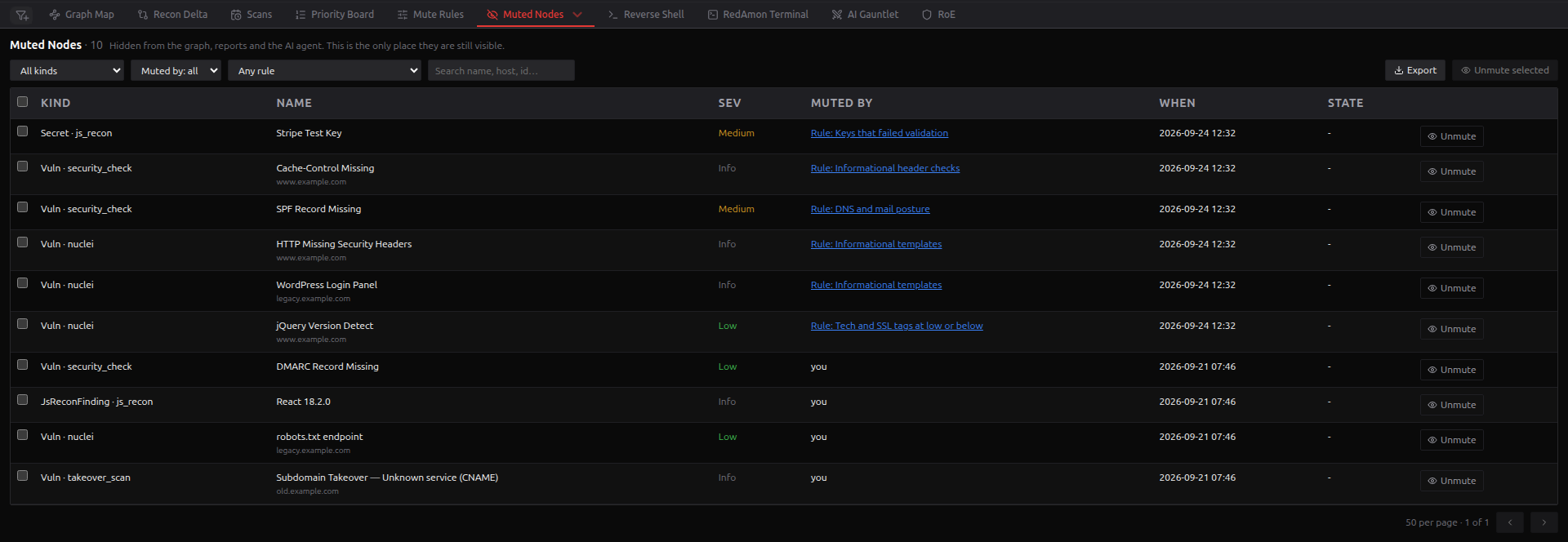
A muted finding is hidden from the Graph Map, the AI agent, analytics and reports. Muted Nodes lists every muted finding in the project and is where you bring one back. It shows all four kinds of mute: a person pressing Mute (on the Priority Board, in the Node Drawer, or in any node table's Mute column), a person muting several similar findings at once with Multi mute, a rule from Mute Rules, and an external agent muting over the MCP server with one of your access tokens.
Where to find it
On the Red Zone, there are three ways in:
- open the ▾ menu on the node-table tab (it reads All Nodes or Node Inspector, whichever you used last) and choose Muted Nodes;
- press Muted in the Priority Board header;
- after you mute a finding anywhere (Priority Board, node drawer or a node table), press View muted on the "Finding muted" notification.
The project owner, or an admin acting as them, opens the list and unmutes. With project sharing on, a collaborator at Read opens the list, and one at Read & Write also unmutes.
Mute state belongs to the live graph. While you are viewing a past version, the table is replaced by a notice that it reflects the active version; switch back to it, or activate the version you are viewing, to see its muted findings.
The table
The header shows Muted Nodes · N, the number of findings that match the current filters. The newest mute comes first, 50 rows per page.
| Column | What it holds |
|---|---|
| Node ID | The finding's graph id, pinned leftmost; click to copy. For pointing only, not stable across rescans; see Node ID and Mute columns |
| Kind | The finding's type and, when it has one, its source: Vuln · nuclei, Secret · js_recon, JsReconFinding · js_recon |
| Name | The finding, with its host underneath when it has one |
| Sev | The severity the scanner reported |
| Muted by | you for a mute you made; you · Multi mute mm-… for a Multi mute, with the id of the batch it came from; Rule: <name> for a rule mute, which opens that rule in Mute Rules; Rule: Allowlist: not kept by any rule for a mute made in allowlist mode; Rule (deleted): <reason> once the rule no longer exists; Agent (MCP) · rdmn_mcp_…, badged and with its reason underneath, for a mute an external agent made with that access token. An agent's mute carries your user id, because the token is yours, but it is never shown as you: it was the agent's call, not yours. A mute carried over from another account, such as in an imported project, shows that account's id. |
| When | When it was muted, in UTC |
| State | resolved: no longer reported once the scanner has stopped reporting a finding a person muted; otherwise - |
A finding a rule muted never shows as resolved: when its scanner stops reporting it, it is removed from the graph, like any other finding nobody decided on.
Filters
| Filter | Options |
|---|---|
| Kind | All kinds, or one graph label with its count, such as Vulnerability (8) |
| Muted by | Muted by: all, People, Multi mute (N), Agent (MCP) (N), Rules, Deleted rules. People leaves out Multi mutes |
| Rule | Any rule, or one rule with the number of findings it muted |
| Token | Any token, or one access token's prefix with the number of findings it muted |
| Search | Name, host, id and mute reason |
The counts in the Kind, Rule and Token menus cover the whole project, whatever else is filtered. The rule menu is the quickest way to spot a rule that hides far more, or less, than you meant, and the token menu does the same for an agent.
Any muted finding can appear here: vulnerabilities, JS Recon findings, secrets, Secret Multiscanner findings, GitHub secrets and sensitive files, malicious packages and GVM exploits.
Unmuting
Press Unmute on a row, or tick rows and press Unmute selected (N). The checkbox in the header selects the current page. There is no confirmation step; a notification confirms it: Unmuted. It is visible again everywhere.
An unmute removes only the mute. Every relationship, property and verdict the finding had was kept while it was muted, so it comes back complete. The Graph Map shows it again the next time it loads the graph; reload the page to see it at once.
An unmute sticks. It records an exemption, so no rule mutes that finding again, even if a rule muted it in the first place. A person can still mute it by hand. The exemptions are counted in Mute Rules, where they can be cleared. If the exemption cannot be saved, the finding is still unmuted and a warning says a rule may mute it again.
Unmuting waits for an apply. While mute rules are being applied to the current graph, or when the app cannot tell whether they are, unmuting is refused with a message saying so. The running apply read the exemptions when it started and would mute the finding again. Muting and unmuting are also refused while a version is being activated: activation swaps the graph out and back, and a change made in between would be lost.
A rule can briefly mute it again after a scan. A recon scan that was already running when you unmuted read the exemptions when it started, so its end-of-scan sweep can mute a finding a rule had muted once more. The exemption you recorded stays, and the next apply or scan releases it again; nothing needs doing.
Reverting what an agent muted. Set Muted by to Agent (MCP), pick the token in Token, tick the header checkbox and press Unmute selected. Each page is 50 rows, so repeat until the list is empty. Deleting or expiring the token does not undo its mutes; the token dialogs say so and name the prefix to filter by.
Reverting a Multi mute. While its dialog is still open, Undo is the clean way back (see Undo). Afterwards, set Muted by to Multi mute and unmute from here; the View muted button on the notification you get when closing the dialog lists just that batch. An unmute from this list records the usual exemption; Undo does not.
To undo a whole rule rather than a few of its findings, disable the rule in Mute Rules and apply to the current graph. Findings muted by a rule you deleted are released the same way, at the next apply to the current graph.
Every unmute is audited: how many findings, which ones, and who did it, including an admin acting as another user.
Multi mute
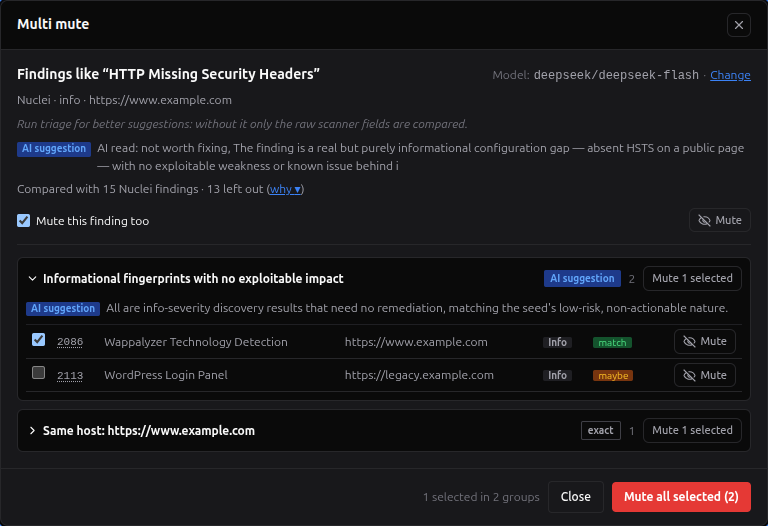
Noise tends to come in dozens: one version banner on forty hosts, one placeholder key in every bundle. Multi sits next to every Mute: in the Red Zone tables, the node drawer, the graph data tables and the Priority Board. Press it on the finding you are about to mute, the seed, and your Multi mute model looks for the other findings of the same kind that you would mute for the same reason. They come back as groups in a dialog, and you decide what to mute.
Multi is disabled on a saved version, which is read-only, on anything that is not a finding, on GVM exploits (ExploitGvm) and on JS file containers.
The first time, the dialog asks you to choose a model, with Save and run. The model is saved to your account and used in all your projects; change it with Change in the dialog, or in Global Settings → Models by feature. Multi mute also needs the internal key that ./redamon.sh install generates; without it the dialog says Multi mute is disabled.
What it compares
Only findings of the seed's kind are compared: its Mute Rules kind, such as Nuclei, Security checks or Secrets, or the same type and source for finding types Mute Rules has no kind for yet. A finding is never proposed when it is:
- of another kind;
- already muted, or no longer reported by its scanner;
- a JS file container;
- proven: judged Real, carrying a proof from a triage run, or confirmed by an attack chain;
- kept visible: a finding a person brought back from this list;
- carrying proof the seed lacks: a validated secret, a malicious package, a Confirmed tier;
- above the seed: a higher severity, or a more urgent triage tier when both are triaged.
The dialog says how many findings it compared, and why ▾ lists how many were left out for each reason. A False positive verdict someone recorded does not protect a finding: it makes it a better candidate.
The groups
The model first decides why the seed is being muted: it is a false positive, not worth fixing, not our asset, or unclear. That decides the order of the groups.
| Group | Built by | Members |
|---|---|---|
| Same issue elsewhere | RedAmon | The findings triage puts in the seed's fix group, such as the same CVE on other hosts |
| Same detector | RedAmon | The findings from the same template, check or detector |
| Same host: <host> | RedAmon | The findings on the seed's host |
| Up to four groups the model names, marked AI suggestion | The model | Findings with the same false-positive pattern, or the same low-risk weakness |
Groups with the same members merge into one card that carries both names. A finding can sit in several groups: it has one checkbox, shared by all of them, and is muted once.
RedAmon decides what is ticked for you, not the model. A finding is pre-ticked only when the model judged it a match and it is in one of the three exact groups, or the model quoted text that RedAmon found in that finding's own evidence: the response body or what the scanner extracted, never the HTTP headers, which every response from a server shares. When the model's reading is unclear, nothing is pre-ticked. Findings the model judged unlikely sit in a collapsed Probably not list under their group.
The model reads one example of each set of look-alike findings (the same detector, severity and evidence, on any host), and its verdict covers the others only when they share what it judged. When the seed reads as not our asset, a verdict covers the findings on the example's host only. When the findings stored no evidence at all, it covers the example alone. The rest show as not judged and start unticked.
Each row shows the Node ID, the name, the host, the severity, the model's verdict and a Mute button. Hover the verdict to read the model's reason and quote.
Muting
| Action | What it mutes | Asks first |
|---|---|---|
| Mute on a row | That finding | No |
| Mute N selected on a group | The group's ticked findings | When they include a high or critical finding, or one that only an AI group proposed |
| Mute all selected | Every ticked finding in every group, plus the seed while Mute this finding too is ticked, which it is by default | Always |
The muted rows grey out as Muted. A finding that changed after the suggestion was made (rescanned at a higher severity, validated, judged Real, brought back or muted by someone else) is skipped, and its row says so.
Undo
The bar at the bottom of the dialog keeps an Undo for each action while the dialog is open. Undo brings back exactly what that action muted. Unlike an unmute in this list it records no exemption: the findings return to how they were, so a Mute Rule may still mute them later. If Undo is refused because a version is being activated or mute rules are being applied, the message says so and Undo stays for another try.
When you close the dialog after muting, one notification says Muted N findings, with View muted to open this list filtered to that batch. When the mutes empty CypherFix work items, it also says how many will update at the next triage run (after the run in progress while one is running).
What keeps it safe
- The AI never mutes. The suggestion only reads. RedAmon keeps it on the server as a batch for 60 minutes (after that: This suggestion expired; run Multi mute again), and a mute accepts only findings from that batch. Every rule under What it compares is checked again at the moment of muting.
- No model text is stored. RedAmon writes the mute reason itself from the group and the seed's name, for example
Multi mute mm-3f9a2c1d · Same detector · like "Nginx version disclosure". - Scanner output is treated as untrusted. The evidence sent to the model is marked as data, never instructions, and redacted first: secret values, authorization headers and cookies in nuclei requests and responses, and hard-coded keys in JS findings.
- One search per person. Starting a new one replaces yours, and at most three run at once on the whole instance (Too many Multi mute searches right now; try again in a moment).
- Refused while a version is being activated (A version is being activated; try again when it finishes.).
- Not available over MCP. An external agent mutes only with
mute_findings.
Who it counts as
A Multi mute is your mute: you confirmed it. You chose it in bulk from AI suggestions, though, so it is never presented as findings reviewed one by one:
- here it reads you · Multi mute
mm-…, under its own Multi mute filter; - over MCP it is reported as
muted_via: multi, a person's mute chosen in bulk from AI suggestions; - the pentest report counts it among the findings suppressed by people, on its own line.
Everything else treats it as a person's mute: Mute Rules never touch it, and when its scanner stops reporting the finding it stays, marked resolved: no longer reported. On the node it carries muted_by (your user id), muted_channel = multi and muted_token (the batch id).
A Multi mute is a snapshot. It mutes the findings that exist now; new ones a later scan brings in stay visible. To keep hiding a whole class, write a Mute Rule. The card of an exact group links to creating one on that kind.
Worth knowing
- CypherFix work items. A muted finding leaves triage. At the next triage run, a work item whose findings are all muted is removed if nobody has touched it, or kept with no live findings if someone owns it.
- Version comparison. Each version hides its own muted findings, so a comparison against a version saved before a Multi mute (or its Undo) shows those findings as resolved (or added), although nothing changed on the target. The same is true of an agent's mute over MCP.
- Export and import. The batch id travels with each mute; see Data Export & Import.
- Once the seed is muted, it cannot start a new search. Change or Retry after muting it keeps the groups and the Undo on screen and says so; undo the seed's mute to search from it again.
Export
Export downloads the current filtered view, not just the visible page, as CSV or JSON, up to 5,000 rows; a notification says when the list was cut. The file carries the Node ID, the id, kind, name, severity, host, who muted it and how (person, multi, mcp or rule), the rule, the token prefix of an agent's mute or the batch id of a Multi mute, the mute reason, the time and the state.
Every CSV cell that starts with =, +, -, @, a tab or a carriage return is prefixed with '. Finding names and hosts come from the target, and a spreadsheet would otherwise run them as formulas.
States
- Nothing is muted in this project. No finding is muted, by anyone.
- No muted nodes match these filters., with Clear filters.
- If the list cannot be loaded, the table says why and offers Retry.
FAQ
I unmuted a finding, and it is still missing from the Graph Map. The map shows it the next time it loads the graph. Reload the page.
A finding a rule muted disappeared from this list after a scan. Its scanner stopped reporting it. A rule mute is not a person's decision, so the finding was removed like any other stale finding. A finding a person muted would have stayed, marked resolved: no longer reported.
Why is Unmute refused? Mute rules are being applied to the current graph, or a version is being activated. Try again when it ends.
Why is Mute refused? A version is being activated, and a mute written now could be lost when the graph is swapped; the message says so, and nothing is reloaded. Try again when it ends. If instead the message says the finding changed while the page was open, a rescan or an activation replaced it: the page reloads, and you can mute it again. A finding someone else muted in the meantime (a rule, an agent or another tab) is left exactly as it was, and the notification says This finding was already muted.
Can other tools see muted findings?
External agents connected over MCP can list and search them with list_muted_findings and search_muted_findings (the triage:read permission). With the separate, never pre-ticked triage:mute permission they can also mute and unmute, within the limits described on MCP Server: never a proven finding or one you brought back, never over an existing mute, with a reason and a daily cap. Every such mute appears here as Agent (MCP).
Does a person's unmute survive an agent?
Yes. The exemption your unmute records stops an agent from muting that finding again as well as a rule; the agent is told kept_visible and can only report it. That holds even when you unmute while an agent's mute of the same finding is still running: the call checks the exemptions again after its write and brings the finding back.
See also
- Mute Rules: mute whole classes of findings by rule
- Priority Board: what "muted" actually means, and per-finding mute
- Models by feature: the model Multi mute runs on