
JS Reconnaissance
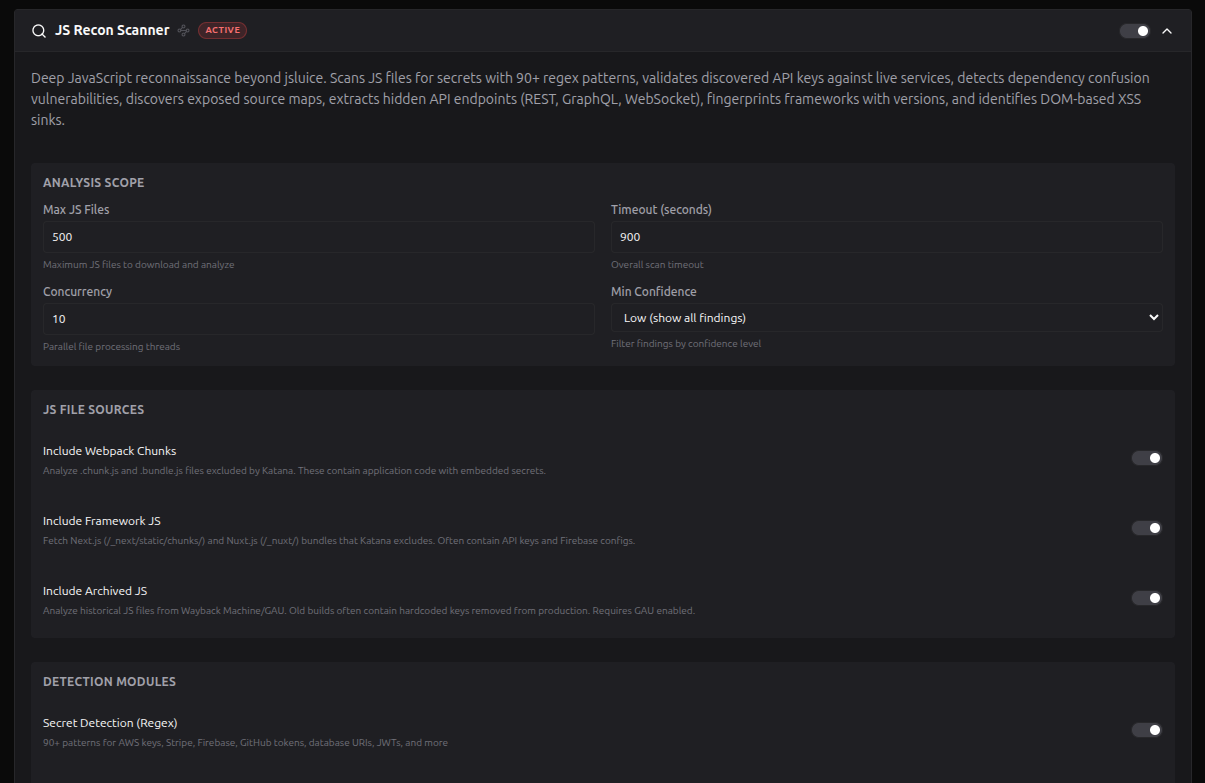
JS Recon is RedAmon's deep JavaScript reconnaissance engine. It runs as GROUP 5b in the recon pipeline -- immediately after resource enumeration -- and analyzes every JavaScript file discovered by crawlers (Katana, Hakrawler, GAU) plus any manually uploaded files. The goal is to extract secrets, endpoints, dependency confusion risks, source map exposures, DOM XSS sinks, and framework fingerprints embedded in client-side code.
Pipeline position: GROUP 5b runs whenever
JS_RECON_ENABLEDis true, independently of resource enumeration. When resource_enum is active, JS Recon analyzes the JS files it discovered. When resource_enum is disabled, JS Recon still runs and analyzes any manually uploaded files. JS Recon feeds discovered subdomains back into the pipeline and updates the Neo4j graph in a background thread.
What JS Recon Discovers
JS Recon runs seven parallel analysis modules via ThreadPoolExecutor(max_workers=4):
| Module | What It Finds | Severity Range |
|---|---|---|
| Pattern Scanning | 90+ secret patterns (cloud credentials, payment keys, auth tokens, infrastructure URLs, info leaks) | Critical - Info |
| Secret Validation | Live validation of 21 secret types against their APIs (GitHub, Stripe, Slack, AWS, etc.) | Critical - High |
| Source Map Discovery | Exposed .map files via comment parsing, HTTP headers, and path probing | Critical - Medium |
| Dependency Confusion | Scoped npm packages not registered on public npm (attacker could register them) | Critical - High |
| Endpoint Extraction | REST APIs, GraphQL, WebSocket, router definitions, admin/debug paths, API docs | High - Info |
| Framework & Security | Framework detection (12 built-in), DOM XSS sinks (15 patterns), dev comments with sensitive keywords | Critical - Info |
| AI SDK Detection (Phase 6) | LLM/vector-DB SDK imports, hard-coded provider keys, dangerouslyAllowBrowser opt-in, AI-frontend product markers in JS chunks, provider base URLs | Critical - Info |
Module Details
1. Pattern Scanning (Secrets Detection)
Scans every JS file against 90+ hardcoded regex patterns organized into seven categories:
| Category | Examples |
|---|---|
| Cloud | AWS Access Key, GCP API Key, Azure Client Secret, DigitalOcean Token, Firebase Config |
| Payment | Stripe Secret/Publishable Key, Square Access Token, PayPal Client ID, Razorpay Key |
| Auth | GitHub Token, GitLab PAT, Slack Token/Webhook, Discord Bot Token, Twilio SID, Telegram Bot Token |
| JS Services | Sentry DSN, Algolia API Key, Mapbox Token, Supabase Key, OpenAI API Key |
| General Secrets | JWT tokens, generic API keys, private keys, database URIs, NPM tokens |
| Infrastructure | S3 bucket URLs, GCP Storage URLs, Azure Blob Storage URLs |
| Info Leaks | Email addresses, private IPs (RFC 1918), UUIDs, debug flags |
Each finding includes a confidence level (high/medium/low), severity, redacted value, line number, and surrounding code context. A minimum confidence filter (JS_RECON_MIN_CONFIDENCE) controls which findings are kept.
Custom patterns: Upload a JSON or TXT file with additional regex patterns via the project settings UI.
2. Secret Validation
When JS_RECON_VALIDATE_KEYS is enabled, discovered secrets are tested against their respective service APIs with a single, minimally-scoped request per secret. Per-service rate limiting (1 req/sec) prevents abuse.
Supported services (21):
| Service | Validation Method |
|---|---|
| AWS | STS GetCallerIdentity |
| GitHub | /user endpoint |
| GitLab | /api/v4/user |
| Slack | auth.test |
| Stripe | /v1/charges?limit=1 |
| Google Maps | Geocode API |
| Twilio | /Accounts |
| SendGrid | /v3/scopes |
| Mailgun | /domains |
| Mailchimp | /3.0/ping |
| HubSpot | /crm/v3/objects/contacts |
| Heroku | /account |
| Firebase | identitytoolkit |
| DigitalOcean | /v2/account |
| Telegram | /getMe |
| Discord | /users/@me |
| Postmark | /server |
| Okta | /api/v1/users?limit=1 |
| Shopify | /admin/api/shop.json |
| Cloudflare | /client/v4/user |
| OpenAI | /v1/models |
Each validation returns one of the following statuses, plus scope/permissions info when available:
| Status | Badge | Meaning |
|---|---|---|
validated | LIVE (red) | API call confirmed the key is active and working. The scope/permissions field shows what access the key grants (e.g., user=admin, 3 scopes, database publicly readable). This is a confirmed, exploitable finding. |
invalid | invalid (green) | API call confirmed the key is dead, revoked, or expired. The key was real at some point but no longer works. Low priority but worth noting -- the key format reveals what service was integrated. |
unvalidated | n/a (grey) | No automated validator exists for this secret type, or the pattern did not include a validator_ref. The key may or may not be live -- manual verification is needed. Most generic regex matches (e.g., Generic API Key) fall into this category. |
incomplete | incomplete | A validator exists but requires additional context that was not found alongside the key. For example, AWS validation needs both the Access Key ID and Secret Key; Twilio needs both the Account SID and Auth Token. Only one half was discovered. |
skipped | skipped | Validation was not attempted. This happens when: (1) the Validate Keys setting is disabled in project settings, or (2) the finding has low confidence and was excluded from validation to avoid false API calls. |
3. Source Map Discovery
Discovers exposed source maps through three methods:
- Comment parsing -- extracts
//# sourceMappingURL=and/*# sourceMappingURL=directives - HTTP header checking -- looks for
SourceMapandX-SourceMapresponse headers - Path probing -- tests 8 default paths (e.g.,
{url}.map,{url}.js.map) plus custom probe paths
When a source map is accessible, JS Recon:
- Extracts original source filenames (up to 100)
- Scans embedded source content for secrets
- Reports as
source_map_exposure(accessible) orsource_map_reference(referenced but not accessible)
Custom probe paths: Upload a TXT file with additional URL templates to test.
4. Dependency Confusion Detection
Extracts scoped npm packages (@scope/package) from JavaScript code using multiple patterns:
- ES6 imports (
import ... from '@scope/pkg') - CommonJS requires (
require('@scope/pkg')) - Dynamic imports (
import('@scope/pkg')) - Export statements (
export ... from '@scope/pkg') - Webpack chunk names
Each scoped package is checked against the public npm registry:
| Condition | Severity | Risk |
|---|---|---|
| Package not on public npm | Critical | Attacker can register the package name and inject malicious code |
| Package exists but marked "internal" | High | Verify ownership -- could be a squatted name |
Well-known public scopes (100+) are automatically filtered to reduce noise.
Custom packages: Upload a TXT file listing known internal package names to skip.
5. Endpoint Extraction
Deep pattern-based parsing extracts multiple endpoint types:
| Type | Detection Method |
|---|---|
| REST API | fetch(), axios, $.ajax, XMLHttpRequest, Node http clients, superagent |
| GraphQL | GraphQL endpoint URLs, introspection queries |
| WebSocket | new WebSocket(), socket.io connections |
| Router definitions | React Router, Vue Router, Express route patterns |
| Config objects | baseURL, apiUrl, serverUrl patterns |
| API documentation | Swagger, OpenAPI, GraphQL Playground paths |
| Admin/Debug | Admin panels, debug endpoints, internal tools (classified as HIGH severity) |
Endpoints are categorized (api, admin_debug, authentication, file_upload, etc.) and deduplicated by signature. Query parameters are extracted from URL patterns.
Custom keywords: Upload a TXT file with additional endpoint search keywords.
6. Framework Detection, DOM Sinks & Dev Comments
Framework detection identifies 12 built-in frameworks with version extraction:
React, Next.js, Vue.js, Nuxt, Angular, jQuery, Svelte, Ember.js, Backbone.js, Lodash, Moment.js, Bootstrap
DOM sink detection flags 15 XSS-vulnerable patterns:
| Sink Type | Examples |
|---|---|
| Direct injection | innerHTML, outerHTML, document.write() |
| Code execution | eval(), Function(), setTimeout(string), setInterval(string) |
| Navigation | location.href, location.assign(), window.open() |
| Prototype pollution | __proto__, constructor.prototype, Object.assign misuse |
| React-specific | dangerouslySetInnerHTML |
Dev comment extraction finds TODO/FIXME/HACK comments containing sensitive keywords (password, secret, admin, bypass, hardcoded).
Custom frameworks: Upload a JSON file with additional framework signatures.
7. AI SDK Detection (Phase 6 — Adversarial AI rollout)
Detects AI/LLM signals inside every JavaScript file the previous modules already downloaded. Reads from recon/helpers/ai_signal_catalog.py — the same single source of truth used by every other Adversarial AI hook. Pure pattern matching; sends no additional traffic to the target.
Five new JsReconFinding.finding_type values:
finding_type | What it catches | Typical severity |
|---|---|---|
ai-sdk-client | Vendor SDK imports shipped to the browser. openai, @anthropic-ai/sdk, @google/genai, @langchain/* (12 sub-packages), @llamaindex/*, ai/react + @ai-sdk/* (12 providers), @modelcontextprotocol/sdk, Pinecone/Qdrant/Chroma/Weaviate clients, langfuse, langsmith, portkey-ai, ollama. 65 SDK families total. | medium–high |
ai-sdk-key-literal | Hard-coded provider API keys. Two tiers: prefix-anchored (OpenAI sk-proj-*T3BlbkFJ*, Anthropic sk-ant-api03-*AA, HuggingFace hf_*, Groq gsk_*, Replicate r8_*, Langfuse sk-lf-*, Pinecone pcsk_*, OpenRouter sk-or-v1-*, etc.) and constructor-context (paired with the SDK class to suppress false positives). Includes NEXT_PUBLIC_* env-var hydration leaks and Bearer <key>/x-api-key header literals. | critical |
ai-sdk-browser-allowed | The OpenAI/Anthropic SDK dangerouslyAllowBrowser: true escape hatch. Catches bareword JS, terser-minified !0, and JSON-stringified "dangerouslyAllowBrowser":true (the form seen in Next.js __NEXT_DATA__ blobs). | critical |
ai-frontend-detected | AI-product markers in shipped JS chunks the http_probe HTML/title channels cannot see (those live in async-loaded chunks). Open WebUI WEBUI_* constants, Gradio customElements.define("gradio-app",...), Streamlit stApp testids, Flowise chatflowid, LobeChat @lobehub/*, AnythingLLM, NextChat, BetterChatGPT, SillyTavern, ComfyUI, AUTOMATIC1111, InvokeAI, Jupyter-AI, Chainlit. | medium–high |
ai-provider-url | Provider base URLs hard-coded in bundles. OpenAI, Anthropic, Cohere, Gemini, Vertex AI, HuggingFace Inference, Replicate, Groq, Together, DeepSeek, Perplexity, Fireworks, Mistral, xAI, OpenRouter, AWS Bedrock regional endpoints, Azure OpenAI, Helicone/Portkey/Cloudflare AI gateways, Langfuse Cloud, LangSmith API. | medium |
Catalogue size: 164 patterns across the 5 channels (33 prefix-anchored keys + 18 constructor-context + 65 SDK imports + 3 browser flags + 23 frontend markers + 22 provider URLs).
Constructor-context suppression. The pattern new OpenAI({apiKey: "sk-proj-...T3BlbkFJ..."}) would match both the constructor-context regex AND the prefix-anchored regex. Without dedup that's two findings for one underlying problem. The matcher records each constructor match's byte range in a "claimed" set; subsequent prefix matches whose span falls inside a claimed range are suppressed. Result: exactly one finding per leaked key, attributed to its SDK (OpenAI SDK constructor rather than generic OpenAI API Key).
Gemini disambiguation. Google's AIzaSy[A-Za-z0-9_-]{33} key shape is shared by Gemini, Maps, Firebase, YouTube Data, Translate, and Cloud Functions. A naive match would flood reports with false positives. The catalogue scans ±2KB around each match for Gemini-specific tokens (@google/genai, @google/generative-ai, GoogleGenerativeAI, generativelanguage.googleapis.com, gemini-1.5, x-goog-api-key); if any are present the finding escalates to Google Gemini API Key / critical, otherwise it stays at Google API Key (likely Maps/Firebase) / medium.
Secret enrichment (value-prefixed reuse). When an ai-sdk-key-literal finding's captured value overlaps an existing Secret node (caught earlier by the legacy JS_SECRET_PATTERNS scan), the matching Secret gets ai_provider and ai_finding_id properties set. The Cypher dedup is gated on the Secret's matched_text starting with a known AI-key prefix (sk-, hf_, lsv2_, gsk_, r8_, pcsk_, pplx-, xai-, csk-, tgp_, pa-, AIzaSy, co_, rpa_, pk-lf-, fw_) so Stripe/Slack/AWS literals that happen to co-locate in the same JS file are never wrongly enriched. Existing "show me all leaked API keys" queries automatically gain AI context: MATCH (s:Secret) WHERE s.ai_provider IS NOT NULL.
Toggle. JS Recon → AI SDK Detection (default on). Disabling skips the pass entirely; existing js_recon findings are unaffected.
Example queries.
// Sites shipping an LLM SDK to the browser
MATCH (b:BaseURL)-[:HAS_JS_FILE]->(:JsReconFinding {finding_type:'js_file'})
  -[:HAS_JS_FINDING]->(jf:JsReconFinding {finding_type:'ai-sdk-client'})
RETURN b.url, jf.sdk_name, jf.source_url AS js_file
ORDER BY b.url;

// CRITICAL: hard-coded keys in client-shipped JS
MATCH (jf:JsReconFinding {finding_type:'ai-sdk-key-literal', severity:'critical'})
RETURN jf.source_url, jf.sdk_name, jf.sample;

// Pivot from generic Secret to AI provider
MATCH (s:Secret) WHERE s.ai_provider IS NOT NULL
RETURN s.source_url, s.secret_type, s.ai_provider, s.validation_status;
For the full catalogue rationale, signal channel architecture, and per-vendor cite list see Adversarial AI Recon → JS Recon AI SDK Detection.
File Collection
JS Recon collects files from two sources:
- Pipeline output -- JS URLs discovered by Katana, Hakrawler, GAU, and jsluice during resource enumeration
- Manual uploads -- files uploaded via the JS Recon Upload API (
/api/js-recon/{projectId}/upload)
Filtering rules:
- Accepted extensions:
.js,.mjs,.jsx,.ts,.tsx - Skipped:
node_modules/, CDN libraries, jQuery/Bootstrap minified files - Optional: framework chunks (
.chunk.js,.bundle.js), archived URLs from GAU/Wayback
Limits:
- Max files: 500 (configurable via
JS_RECON_MAX_FILES) - Max file size: 10 MB per file
- Download concurrency: 10 threads (configurable)
- Lines longer than 500k characters are skipped to prevent regex DoS
JS File Sources (toggles)
Three toggles control which JS files are collected beyond the default crawler output:
| Toggle | Default | Description |
|---|---|---|
| Include Webpack Chunks | On | Analyze .chunk.js and .bundle.js files that Katana may exclude. These contain application code with embedded secrets |
| Include Framework JS | On | Fetch Next.js (/_next/static/chunks/) and Nuxt.js (/_nuxt/) bundles that Katana excludes. Often contain API keys and Firebase configs |
| Include Archived JS | On | Analyze historical JS files from Wayback Machine/GAU. Old builds often contain hardcoded keys removed from production. Requires GAU enabled |
Manual JS File Upload
Upload JS files directly for analysis without crawling. This is useful for files obtained from:
- Burp Suite -- exported JS responses from intercepted traffic
- Mobile APKs -- extracted JavaScript bundles from hybrid mobile apps
- Browser DevTools -- saved JS files from authenticated areas
- Internal apps -- JS files from applications not reachable by crawlers
How to use:
- Open your project settings and expand the JS Recon Scanner section
- Scroll to Manual JS File Upload at the bottom
- Click Upload JS Files and select one or more files
- Uploaded files appear in a list with size and a delete button
Manual upload is only available in edit mode (after the project has been created).
Constraints:
| Rule | Value |
|---|---|
| Accepted extensions | .js, .mjs, .map, .json |
| Max file size | 10 MB per file |
| Multiple files | Yes (select multiple in the file dialog) |
| Storage location | /data/js-recon-uploads/{projectId}/ |
Uploaded files are automatically merged with pipeline-discovered JS files during the scan. They can also be analyzed standalone when JS Recon runs in manual_upload mode.
Custom Extension Files
Five upload slots let you extend the built-in detection capabilities with target-specific data. These are additive -- they run alongside the defaults, never replacing them. Each upload type has client-side validation that runs before the file is sent to the server; if validation fails, a modal shows the exact error.
Custom extension files are only available in edit mode (after the project has been created). Click the Custom Extension Files collapsible header in the JS Recon settings to reveal all five slots.
Each upload slot has:
- An Upload button to select the file
- A display of the current file name and size (if uploaded)
- A Delete button to remove the current file
- A ? icon that opens a format guide modal with examples and how-it-works explanation
Upload 1: Custom Secret Patterns
Purpose: Add your own regex patterns to detect company-specific secrets, internal API key formats, or custom tokens that the built-in 90+ patterns do not cover.
Accepted formats: .json or .txt
JSON Schema
[
  {
    "name": "MyCompany API Key",
    "regex": "MYCO-[a-f0-9]{32}",
    "severity": "critical",
    "confidence": "high"
  },
  {
    "name": "Internal Service Token",
    "regex": "svc_tok_[A-Za-z0-9]{40}",
    "severity": "high",
    "confidence": "medium"
  }
]
| Field | Type | Required | Values |
|---|---|---|---|
name | string | Yes | Display name for the pattern |
regex | string | Yes | Python-compatible regex (compiled via re module) |
severity | string | No | critical, high, medium, low, info (default: medium) |
confidence | string | No | high, medium, low (default: medium) |
TXT Format
One pattern per line, pipe-delimited:
MyCompany API Key|MYCO-[a-f0-9]{32}|critical|high
Internal Token|svc_tok_[A-Za-z0-9]{40}|high|medium
# Lines starting with # are comments
Field order: name | regex | severity | confidence (severity and confidence are optional).
Validation Rules
- JSON: Must be a non-empty array. Each item must have
name(string) andregex(string). Each regex is compiled to verify syntax.severitymust be one ofcritical/high/medium/low/info.confidencemust be one ofhigh/medium/low. - TXT: Each non-comment line must have at least 2 pipe-separated fields (
name|regex). Each regex is compiled to verify syntax.
How It Works
Each pattern is compiled as a Python regex and applied line-by-line to every downloaded JS file. When a match is found, a finding is created with the specified severity and confidence. The matched text is redacted in the output (first 6 + last 4 chars shown). Patterns with a high false-positive rate should use confidence low.
Regex syntax: Patterns run in Python (
remodule), not JavaScript. Avoid JS-only syntax like(?<name>...)named groups -- use(?P<name>...)or plain capture groups instead.
Upload 2: Source Map Probe Paths
Purpose: Add extra URL path templates to probe when looking for .map source map files. The scanner already tries 8 default paths. Use this to add paths specific to your target application's build tool or CDN structure.
Accepted format: .txt
File Format
One path template per line:
{base}/assets/maps/{filename}.map
{base}/sourcemaps/{filename}.map
{base}/build/static/js/{filename}.map
{base}/_assets/{filename}.map
# Lines starting with # are comments
Template Variables
| Variable | Expands To | Example |
|---|---|---|
{url} | Full JS file URL | https://example.com/js/app.js |
{base} | Scheme + host | https://example.com |
{filename} | JS filename only | app.js |
Validation Rules
- File must contain at least one non-comment line
- Each line must contain either a
{template variable or a/path separator
How It Works
For each downloaded JS file, the scanner first checks for a sourceMappingURL comment and SourceMap HTTP header. If neither is found, it probes each path template by replacing {url}, {base}, and {filename} with actual values and making an HTTP GET request. If a valid source map JSON (with "version" and "sources" fields) is returned, the scanner parses it, extracts original source filenames, and scans any embedded sourcesContent for secrets.
Upload 3: Internal Package Names
Purpose: List known internal/private npm package names used by the target organization. These are ALWAYS checked against the public npm registry, even if not found in the JS code via import/require statements. This is useful when minified JS strips import names.
Accepted format: .txt
File Format
One scoped package name per line:
@mycompany/auth-sdk
@mycompany/api-client
@mycompany/shared-utils
@internal/config
@targetcorp/payment-lib
# Lines starting with # are comments
Validation Rules
- File must contain at least one non-comment line
- Every line must use the
@scope/nameformat (must start with@and contain/) - Well-known public scopes (
@types,@babel,@angular,@vue,@react, etc. -- 100+ scopes) are automatically skipped during scanning
How It Works
For each package name, the scanner makes a GET request to https://registry.npmjs.org/{package}:
| npm Registry Response | Finding Severity | Meaning |
|---|---|---|
| 404 (not found) | Critical | Package does not exist on public npm. An attacker could register it and inject malicious code when the target runs npm install |
| 200 (exists) | High | Package exists but is listed as "internal." Verify ownership -- could be a squatted name |
Results appear in the Dependencies tab of the JS Recon dashboard.
Upload 4: Endpoint Keywords
Purpose: Add extra keywords to search for in JavaScript content. When a keyword is found inside a quoted string in the JS code, the surrounding URL is extracted as a discovered endpoint. Use this for target-specific API paths that the built-in patterns might miss.
Accepted format: .txt
File Format
One keyword per line:
/internal-api/v2/
/backoffice/
mycompany-service
admin-panel
graphql-gateway
/legacy/api/
# Lines starting with # are comments
Validation Rules
- File must contain at least one non-comment line
- Each keyword must be at least 2 characters long
Tips
- Use path fragments like
/internal-api/for precision - Use service names like
mycompany-servicefor broader matching - Avoid very short keywords (< 4 chars) to reduce false positives
How It Works
For each keyword, the scanner searches all JS file content using a case-insensitive regex. When a match is found, it extracts the surrounding quoted string (the URL/path containing the keyword). Each discovered URL is classified by category (admin, debug, auth, api, etc.) and assigned a severity. Results appear in the Endpoints tab of the JS Recon dashboard.
Upload 5: Framework Signatures
Purpose: Add detection signatures for custom or internal JavaScript frameworks not covered by the 12 built-in ones. Each signature defines regex patterns that identify the framework and optionally extract its version.
Accepted format: .json
JSON Schema
[
  {
    "name": "MyCompanyFramework",
    "patterns": [
      "MyFramework\\.init",
      "__MY_FRAMEWORK__",
      "myfw-version"
    ],
    "version_regex": "MyFramework\\.version\\s*=\\s*[\"']([0-9.]+)[\"']"
  },
  {
    "name": "InternalRouter",
    "patterns": [
      "InternalRouter\\.navigate",
      "__INTERNAL_ROUTER__"
    ],
    "version_regex": null
  }
]
| Field | Type | Required | Description |
|---|---|---|---|
name | string | Yes | Display name for the framework |
patterns | string[] | Yes | Non-empty array of regex strings. If any pattern matches, the framework is detected |
version_regex | string or null | No | Regex with capture group 1 for version extraction. Set to null if not needed |
JSON Escaping Rules
Since regexes live inside JSON strings, backslashes need double-escaping:
| Regex Intent | In JSON | Notes |
|---|---|---|
| Literal dot | \\. | One backslash + dot in JSON string |
Whitespace \s | \\s | One backslash + s in JSON string |
| Quote in regex | [\"'] or ['\"] | Escaped quote inside JSON |
Validation Rules
- Must be a non-empty JSON array
- Each item must have
name(string) andpatterns(non-empty array of strings) - Every pattern string is compiled as a regex to verify syntax
version_regex(if not null) is compiled as a regex to verify syntax
How It Works
Each signature's patterns are compiled as Python regexes (re module) and searched in the JS file content. If any pattern matches, the framework is detected. The version_regex (if provided) is then used to extract the version number from capture group 1. Detected frameworks appear in the Security tab of the JS Recon dashboard under "Frameworks." Version information enables targeted CVE lookups.
Regex syntax: Use Python regex syntax. Avoid JS-only features like
(?<name>...)named groups -- use(?P<name>...)instead.
Subdomain Feedback Loop
JS Recon extracts hostnames from discovered endpoints, source map URLs, and cloud asset URLs. New in-scope subdomains are merged back into combined_result['dns']['subdomains'] with source='js_recon', making them available to downstream pipeline modules.
Graph Integration
JS Recon creates and updates the following Neo4j node types:
| Node Type | Relationship | Created When |
|---|---|---|
JsReconFinding (finding_type='js_file') | (BaseURL)-[:HAS_JS_FILE]->(JsReconFinding) (or Domain for uploaded files) | One per analyzed JS file; acts as the parent for all other findings |
| JsReconFinding (finding types below) | (JsReconFinding{js_file})-[:HAS_JS_FINDING]->(JsReconFinding) | Dependency confusion, source maps, DOM sinks, frameworks, dev comments, emails, internal IPs, object references (UUID/IDOR candidates), cloud assets |
JsReconFinding (finding_type='external_domain') | (Domain)-[:HAS_JS_FINDING]->(JsReconFinding) | 3rd-party domains leaked in JS URLs (no single parent JS file) |
| Secret | (JsReconFinding{js_file})-[:HAS_SECRET]->(Secret) | Discovered secrets (with source='js_recon') |
| Endpoint | (JsReconFinding{js_file})-[:HAS_ENDPOINT]->(Endpoint) | Discovered endpoints (with source='js_recon' or js_recon_source=true) |
All nodes include user_id and project_id for multi-tenant isolation. Graph updates run in a dedicated background thread.
JsReconFinding finding_type values: js_file, dependency_confusion, source_map_exposure, dom_sink, dev_comment, framework, email, internal_ip, object_reference, cloud_asset, external_domain, plus the Phase 6 AI SDK values: ai-sdk-client, ai-sdk-key-literal, ai-sdk-browser-allowed, ai-frontend-detected, ai-provider-url
AI SDK findings carry extra properties beyond the core set: sdk_name (canonical vendor product name), ai_provider (mirror of sdk_name for prefix-consistent queries), sample (redacted form of captured key — first 6 chars + ... + last 4, never the full secret), byte_offset (stable across re-scans for idempotent MERGE), detection_method='ai_sdk_catalogue'.
Secret enrichment. For ai-sdk-key-literal findings, the Phase 6 mixin also enriches matching Secret nodes (caught by the legacy JS_SECRET_PATTERNS scan) with ai_provider and ai_finding_id. This means existing "all leaked secrets" queries automatically gain AI context without a parallel taxonomy.
JsReconFinding core properties: id, finding_type, severity, confidence, title, detail, evidence, source_url, base_url, source, discovered_at, user_id, project_id, updated_at
JsReconFinding type-specific properties:
cloud_asset->cloud_provider(aws/gcp/azure),cloud_asset_typeexternal_domain->times_seen,sample_urlsobject_reference->potential_idor(boolean; heuristic flag, not actual IDOR detection -- only means the value matched a UUID v4 pattern and could be worth testing manually)
Security Measures
- Secret redaction -- plaintext secret values are never stored; only redacted form (first 6 + last 4 characters) persists in output and graph
- Rate limiting -- per-service 1 req/sec rate limit during secret validation
- File size limits -- 10 MB per JS file download, 10 MB per manual upload
- Project isolation -- uploaded files stored in
/data/js-recon-uploads/{projectId}/ - Regex DoS prevention -- lines exceeding 500k characters are skipped
API Endpoints
| Method | Path | Description |
|---|---|---|
| GET | /api/js-recon/{projectId}/upload | List uploaded JS files |
| POST | /api/js-recon/{projectId}/upload | Upload a JS file for analysis (max 10 MB; .js, .mjs, .map, .json) |
| DELETE | /api/js-recon/{projectId}/upload?name=filename.js | Delete an uploaded file |
| GET | /api/js-recon/{projectId}/download | Download JS Recon scan results |
Frontend: JsReconTable
JS Recon results are displayed in the Red Zone via a dedicated table component with six sub-tabs:
| Tab | Content |
|---|---|
| Secrets | Severity badges, redacted values, validation status, confidence, category |
| Endpoints | Method, path, full URL, type (REST/GraphQL/WS), category, source JS file |
| Dependencies | Package name, scope, npm registry status, severity, recommendation |
| Source Maps | JS URL, map URL, accessible status, discovery method, file count, embedded secrets |
| Security | Frameworks (name, version), DOM sinks (type, pattern, severity), dev comments, IDOR candidates |
| Attack Surface | New subdomains, cloud assets (S3/GCP/Azure), emails, internal IPs, external domains |
Features: full-text search across all fields, pagination (50 items/page), and three export formats — XLSX (one worksheet per category), JSON (object keyed by section name), and MD (one ## Section per category, GFM table per section). See Data Export & Import for format details.
Configuration Reference
See Project Settings Reference > JS Reconnaissance for the complete parameter table.
Quick overview:
| Setting | Default | Purpose |
|---|---|---|
| JS_RECON_ENABLED | false | Master toggle |
| JS_RECON_MAX_FILES | 500 | Max JS files to download |
| JS_RECON_CONCURRENCY | 10 | Download threads |
| JS_RECON_TIMEOUT | 900 | Total timeout (seconds) |
| JS_RECON_REGEX_PATTERNS | true | Secret pattern scanning |
| JS_RECON_SOURCE_MAPS | true | Source map discovery |
| JS_RECON_DEPENDENCY_CHECK | true | npm dependency confusion |
| JS_RECON_EXTRACT_ENDPOINTS | true | Endpoint extraction |
| JS_RECON_DOM_SINKS | true | DOM sink detection |
| JS_RECON_FRAMEWORK_DETECT | true | Framework detection |
| JS_RECON_DEV_COMMENTS | true | Dev comment extraction |
| JS_RECON_VALIDATE_KEYS | true | Live secret validation |
| JS_RECON_MIN_CONFIDENCE | low | Minimum confidence filter |
Output Structure
The full JS Recon output is stored in combined_result['js_recon'] and includes:
js_recon/
  scan_metadata/       -- timestamp, mode, file count, duration
  secrets[]            -- id, name, severity, redacted_value, validation status
  endpoints[]          -- id, method, path, type, category, source_js
  dependencies[]       -- package_name, scope, npm_exists, severity
  source_maps[]        -- js_url, map_url, accessible, source_files
  dom_sinks[]          -- type, pattern, severity, line
  frameworks[]         -- name, version, confidence
  dev_comments[]       -- content, type, severity, line
  cloud_assets[]       -- provider, type, url
  emails[]             -- email, category, context
  ip_addresses[]       -- ip, type (private), context
  object_references[]  -- type (uuid), value, potential_idor
  discovered_subdomains[]  -- new in-scope subdomains
  external_domains[]   -- out-of-scope domains with frequency
  summary/             -- aggregated counts by severity, type, and category
Execution Modes
| Mode | Trigger | File Source |
|---|---|---|
| post_recon | Pipeline GROUP 5b (automatic) | JS URLs from resource_enum + http_probe, merged with any uploaded files |
| standalone | Manual trigger via orchestrator | Crawls target domain then analyzes (bypasses pipeline) |
| manual_upload | Uploaded files present during post_recon | Uploaded files merged with pipeline-discovered URLs |
JS Recon runs independently of resource enumeration. When resource_enum is active, pipeline-discovered JS URLs are merged with any uploaded files. When resource_enum is disabled, JS Recon analyzes uploaded files only. If neither source has files, JS Recon exits gracefully with zero findings.
Next Steps
- Running Reconnaissance -- see how JS Recon fits in the full pipeline (GROUP 5b)
- Attack Surface Graph -- understand the JsReconFinding node type
- Project Settings Reference -- complete parameter reference
- Red Zone -- explore JS Recon findings in the graph and data table