
MCP Server
MCP Server turns RedAmon into an MCP server, so an AI agent you control can connect into RedAmon and drive recon on your behalf. It could be your own Claude Code session, an internal agent, or a nightly script: anything that speaks the Model Context Protocol. With an access token it can list your projects, start a full recon pipeline, ask the attack-surface graph questions in plain English, and adjust recon tuning. It acts as you, inside your own projects, limited to the permissions you tick.
Two MCP tabs, opposite directions. MCP Tool Plugins is outbound: RedAmon's agent connecting out to tools you register. MCP Server is inbound: other agents connecting in to RedAmon. Same protocol, opposite roles.
Looking for the technical deep dive? See docs/readmes/README.MCP.SERVER.md for the security model, the settings allowlist and the nginx wiring.
Why you might want this
RedAmon's own agent is good at driving an engagement from inside the product. But plenty of work happens outside it: a nightly job that rescans a portfolio, a triage assistant that already has your ticketing context, a research agent you have taught your own methodology. Those agents have everything they need except the recon data, and no safe way to ask for it.
A token gives them a narrow, revocable way in. They ask "what did the last scan find on this domain" in plain English and get rows back. They start a scan when something changes. They never see another user's data, never touch your credentials, and never change what RedAmon is pointed at.
How it works, in one picture
%%{init: {'theme':'base','themeVariables':{'primaryColor':'#64748b','primaryTextColor':'#ffffff','primaryBorderColor':'#475569','lineColor':'#8b949e','textColor':'#737b85','edgeLabelBackground':'#475569','clusterBkg':'transparent','clusterBorder':'#8b949e','titleColor':'#737b85'},'flowchart':{'padding':18,'nodeSpacing':32,'rankSpacing':64,'wrappingWidth':320}}}%%
flowchart LR
agent(["<b>Your AI agent</b><br/>any MCP client"])
subgraph redamon["RedAmon"]
web("<b>/api/mcp-server</b> (webapp)<br/><br/><b>every call:</b> token, permission,<br/>project ownership, rate limit<br/><b>every row back:</b> re-checked<br/>against your tenant")
orch("<b>Recon orchestrator</b>")
graphapi("<b>Agent /graph/*</b><br/>read-only, tenant-scoped")
neo[("<b>Neo4j</b>")]
end
agent <-->|" HTTPS + Bearer token "| web
web -->|" scans, settings "| orch
web <-->|" graph reads, rows "| graphapi
graphapi <--> neo
classDef actor fill:#1d4ed8,stroke:#1e3a8a,color:#ffffff
classDef guard fill:#b91c1c,stroke:#7f1d1d,color:#ffffff
classDef step fill:#64748b,stroke:#475569,color:#ffffff
classDef store fill:#0f766e,stroke:#134e4a,color:#ffffff
class agent actor
class web guard
class orch,graphapi step
class neo store
style redamon fill:transparent,stroke:#8b949e,stroke-dasharray:6 4,color:#737b85
- Every call is stateless. The token is checked again on every single call, so a revoke or an expiry takes effect on the agent's next call, not its next reconnect.
- The server never trusts who the caller says it is. The token resolves to exactly one user, and that identity is what reaches the graph.
- Graph reads never talk to Neo4j directly from the webapp. They go through the agent, which rewrites every query so it can only match your project's nodes, and runs it in a read-only database session.
The tools
| Tool | What the agent gets | Needs |
|---|---|---|
list_projects | Your projects (id, name, targets). The only way it discovers a project id, and it cannot see anyone else's. | recon:read |
get_recon_status | Whether a scan is running, its phase, start and end time, and whether it failed. | recon:read |
get_recon_settings | Every setting it may change, plus the read-only engagement scope and the project's updatedAt for safe writes. Credentials are never returned. | recon:read |
graph_summary | A count per node type and per relationship type, which web hosts JS Recon and Nuclei actually checked, and whether the graph is settled right now. | recon:read |
graph_schema | What the graph means: node types, properties, relationships. Reads no data. | recon:read |
query_graph | "Which subdomains have an open admin panel?" Ask in English; it handles the schema. | recon:read (+ graph:cypher for raw Cypher) |
kali_toolbox | What the Kali sandbox carries, by category. A list, not a licence: nothing here runs it. | recon:read |
start_recon | Start the full recon pipeline. | recon:scan (+ recon:overwrite for overwrite mode) |
stop_recon | Stop the full recon scan running on the project. | recon:scan |
update_recon_settings | Change any settable field of an existing project: the whole recon pipeline, the agent's settings AND the engagement's own limits. | recon:settings |
kali_exec | A shell in the Kali sandbox: bash -c, full toolset, no target check. | kali:exec |
kali_output | Read a running command's output, paged from a byte cursor. | kali:exec |
kali_cancel | Stop a command it started. | kali:exec |
list_findings | What the scans found, in one ordered list across all eight finding types, with the rules-only score, which layer set the final one, and each finding's disposition (reportable, candidate with its blocker, info, excluded). Says when nothing is ranked yet. | recon:read |
list_muted_findings | The findings someone suppressed as noise. Hidden from every other tool, which is why this exists. | triage:read |
list_remediations | What to fix: priority, CVSS, CVE/CWE/CAPEC, exploit availability, CISA KEV, fix complexity. | triage:read |
get_project_activity | Everything running on the project right now, and whether a scan start would be refused. | recon:read |
list_scan_versions | The saved graph versions, and which of them will survive retention. | recon:read |
compare_scan_versions | What changed between two versions of the attack surface. | recon:read |
describe_recon_settings | Every settable field, what it means and its real bounds. Reads no data. | recon:read |
list_recon_presets | The 26 built-in presets and the presets you saved, optionally with the values each holds. | recon:read |
create_recon_preset | Save a preset: from values it writes, a copy of another preset, or a capture of one of your projects. | preset:write |
update_recon_preset | Rename one of your presets or change its values. Built-in presets cannot be changed. | preset:write |
delete_recon_preset | Delete one of your presets. | preset:write |
apply_recon_preset | Load a preset into a project, exactly as the form's Load preset does: it replaces the configuration. Has a dry run. | preset:apply |
get_attack_surface_overview | One picture of what the project exposes, from hosts to findings by severity. Finding counts leave out what a person judged a false positive and what the Priority Board resolved, as the client report does, and count those apart. | recon:read |
list_exploit_paths | Vulnerable technology paired with CVE, ranked by observed exploit then CVSS. | recon:read |
get_blast_radius | Which single technology touches the most of the surface. The highest-leverage fix. | recon:read |
list_graph_views | The graph queries a person already saved, by name; mayNeedUpdate marks a view whose query names a domain the current scope no longer has (never the query itself). | recon:read |
run_graph_view | Run one of them. No AI call, no budget spent, same answer every time. | recon:read + graph:cypher |
queue_recon | Queue a full recon for when the host is free, instead of being refused. | recon:queue |
cancel_queued_scan | Cancel a job it queued, before it starts. | recon:queue |
get_scan_status | Whether one of the other six scanners is running: GVM, GitHub hunt, supply chain, TruffleHog, AI attack surface, partial recon. | recon:read |
set_finding_verdict | Mark a finding Real (raises its score), False positive, or reset a decision it made. Durable; rescored at once. Never a decision a person made in the app; refused on a muted finding, and by an agent image older than the webapp. | triage:write |
get_finding_triage | Why a finding ranks where it does: the final score and the rules, review and decision behind it. | triage:read |
get_finding_evidence | The redacted evidence a reviewer reads, its hash, whether the finding can be reviewed, and the review vocabulary. | triage:read |
submit_finding_review | Correct the factors behind a finding's score with quotes from its evidence. RedAmon checks the quotes and recomputes the score. | triage:review |
get_triage_status | Where the ranking stands: the live run and its progress, recent runs, what a run would do, when the next MCP start is allowed. | triage:read |
start_triage_run | Re-rank the project. Spaced 30 minutes apart per project, 12 a day, at most 1,000 reviews. | triage:run |
stop_triage_run | Stop a run before it publishes. | triage:run |
mute_findings | Hide 1-5,000 findings as noise, with a reason, as if you had pressed Mute. Never a proven finding or one a person brought back; marked as the agent's. | triage:mute |
unmute_findings | Bring up to 5,000 muted findings back, each becoming exempt from the Mute Rules. A rule's mute only when explicitly asked. | triage:mute |
search_muted_findings | Page through every muted finding with the Muted Nodes filters, including per rule and per token. The only way to learn a muted finding's id. | triage:read |
create_project | Open a NEW engagement: its targeting mode, its settings and the record of what authorized it, written atomically. Scope is fixed here and nowhere else. | project:create |
attach_engagement_authorization | Record the scope document that permits this engagement: its digest, kind, source and issue date. Append-only. | engagement:authorize |
list_engagement_authorizations | Read that history: what authorized the engagement, when, and which token recorded it. | recon:read |
preflight_scope_check | Read-only proof that the configured pipeline fits the engagement. Reports RESOLVED values, not written ones, and whether the settings or the Rules of Engagement document changed since the last run (lastRun.settingsChangedSince, lastRun.roeChangedSince). | recon:read |
update_project_scope | Change an existing project's target LISTS: a batch project's hosts and the other scanners' targets. Never the domain, the address list or the targeting mode. | project:rescope |
Full API reference: every argument, type, constraint, example call and JSON Schema is on the MCP API Reference page. It is generated from the server itself, so if it ever disagrees with the table above, the reference is right. See Regenerating the API reference.
Not exposed, deliberately: the agent chat, partial recon, deleting projects, your API keys, guardrails, the engagement record (the client, the contacts, the dates, the uploaded document), starting the other scanners (GVM, TruffleHog, supply chain, AI attack surface), captured HTTP traffic, activating or deleting a saved version, setting a finding's score directly, and any write to the graph beyond the verdicts, reviews, mutes and triage runs described here.
Scope is a special case, and the rule is stricter than "not exposed". An agent with project:create can open a NEW engagement and set its targeting mode there — exactly one of targetDomain, targetIps or domainBatchHosts. After that the target domain, the address list and the targeting mode are immutable through every route on this surface: update_recon_settings refuses a targeting column by name, and refuses it by classification rather than by a list, so a targeting column added tomorrow is refused the day it is added. A different target means a different project, which is why create_project exists rather than a way to re-point an existing one. This matters because the documents an agent reads are attacker-influenceable: a target can hand you a "scope document" whose appendix asks for three more hosts.
The one exception is narrow and has its own permission. update_project_scope, under project:rescope, can change the target lists the project form also lets you edit after creation — a batch project's host list, the GitHub hunt's organisation and repositories, the GVM target strategy, and the supply-chain organisation, repository, ref and scope — and nothing else. See changing a project's target lists.
The engagement's limits are a deliberate exception and go the other way: the rate ceiling, the never-touch hosts, the scanning window and the agent's denylists are ordinary settings here, reachable through update_recon_settings, in either direction. See Rules of Engagement for why a one-direction write rule was the wrong control — and what replaced it.
Their findings are readable (a finding is a finding whichever scanner wrote it) and so is their status, but starting those scans is not. An agent can also record a verdict on a finding, and, with triage:review, submit a quoted review of its evidence, both of which rank it; with the opt-in triage:run it can start or stop a Priority Board run. See reviewing findings and triage runs. With a separate, opt-in permission, triage:mute, it can mute or unmute one, which hides or reveals it. Muting is the single action that makes a finding invisible to every other tool here, so that permission is never ticked for you and is bounded in code: see hiding and revealing findings. RedAmon's own AI triage still never mutes anything.
kali_exec is a shell, and it is the exception to everything above. Every other tool here is read-only and tenant-scoped. That one is bash -c with the sandbox's whole toolset and no check on what you point it at, exactly like the in-app agent. It is on by default at three independent levels, each of which can be switched off, and the third cannot be changed over MCP.
The tool descriptions teach the agent a working order: graph_summary first, then query_graph, and graph_schema only when a query returns nothing or something surprising.
graph_summary: telling "clean" apart from "never scanned"
If an agent asks "list malicious dependencies" and gets nothing back, three very different things could be true: the supply-chain scan ran and your project is clean, it never ran at all, or you muted every such finding. An agent that cannot tell them apart writes "no malicious dependencies found", which is a false negative in a security tool.
graph_summary is where an agent starts telling them apart. A node type missing from its counts means any of the three, so the agent also reads the coverage block below and, with triage:read, the muted findings before it calls anything clean. The tool description and the onboarding pack teach exactly that order. It also reports a liveGraphState:
| State | Meaning |
|---|---|
stable | Nothing is rewriting the graph. The counts are trustworthy. |
scan_running | A scan is writing the graph. Counts can be mid-rebuild. This covers all seven scan kinds: full and partial recon, GVM, GitHub Secret Hunt, TruffleHog, supply chain and AI attack surface. |
agent_writing | A triage run, an in-app agent session or a Mute Rules apply is writing the graph. |
activating | A saved version is being swapped in. Counts can be near zero for a moment. |
unknown | RedAmon could not determine whether anything is writing. The counts cannot be trusted, and this is never reported as stable. |
When the state is not stable, the answer carries a warning telling the agent to check again later. Counts are counts only, never sample values, and they skip findings you have muted and findings a later scan no longer reports.
The answer also carries hiddenFromCounts.stale: how many findings were left out because a later scan stopped reporting them. That number is what reconciles a graph_summary count with a query_graph count, which includes stale findings by default. If the figure cannot be read the key is absent, never 0, because a fabricated zero would be the same false negative one field down. Muted findings have no equivalent count here; list_muted_findings is where that number lives.
Which hosts were actually checked: coverage
For each module that records what it did per web host (coverage stamps), coverage counts the project's web hosts (BaseURL nodes) by what that module's last run did on them. Today the modules are JS Recon (js_recon) and Nuclei (nuclei):
| Field | Meaning |
|---|---|
complete | The module checked everything it had for the host. Only these hosts are "checked and clean" for that module. |
partial | Part was cut: the JS file cap, an unreachable host, an analyzer that timed out, the Nuclei runtime cap, a Nuclei container that stopped early. |
no_input | A live host with nothing to check: JS Recon found no JavaScript on it. |
failed | Nothing was checked: every file was lost, or Nuclei could not start (no Docker, no templates). |
not_scanned | Live hosts (ones http_probe got an answer from) the module never looked at. |
A module that stamped no host at all reads { "recorded": false }. The project was scanned before coverage was recorded, or the module never ran: that says nothing either way and is never "not scanned". The block comes from the same call as the counts, so it costs nothing extra; when it cannot be read it is absent, never zeros.
A lost graph is not an empty project
A reset Neo4j volume or a failed restore leaves a project scanned yesterday with no nodes, which would read as "never scanned". When the state is stable and the graph holds less than a tenth of the nodes of the current version (a restored version records its size) or of the newest saved one, or holds nothing although a full scan completed, warning is "graph_data_missing" and graphDataMissing says what was expected: liveNodes, expectedNodes, the basis (scan_version or completed_scan) and the version number. Treat everything in that project as unknown until the data is restored or rescanned. A scope cut by more than nine tenths since the last saved version raises the same warning, which the text says.
The analytics views count findings as the client report does
get_attack_surface_overview, list_exploit_paths and get_blast_radius apply the Priority Board's verdict the way the client report and Insights do. A finding a person marked False positive, and one the board resolved (fixed, gone, inactive), is left out of every finding count, and an exploit record in either state no longer marks a CVE as exploited. For vulnerabilities the overview counts them apart, as judgedFalsePositiveVulnerabilities and resolvedVulnerabilities. A finding only an AI review called a false positive is still counted, and aiFlaggedVulnerabilities says how many: a reviewer reads text the target controls, so its verdict alone never hides a finding. graph_summary counts nodes per label and applies none of this.
query_graph: a question or raw Cypher
Send exactly one of question or cypher.
question(the default): RedAmon's own LLM turns it into a query using your configured AI model and API key. The answer includes thecypherit generated, so the agent can see what its question became. If generation fails, the error says to rephrase; if running the query fails, it says to narrow the query.cypher: the agent writes the query itself. No LLM runs and no budget is spent. This needs thegraph:cypherpermission. See Raw Cypher below.
Either way the answer stops at 1,000 rows and then says so with truncated: true. An answer over 2 MB is refused with "narrow your query". Neither is ever cut silently, so a partial answer cannot pass for a complete one. A question can take up to 2 minutes; a raw Cypher call gives up after 1 minute.
Everything the graph returns is data about a live target. Page titles, headers, JS comments and certificate fields are written by whoever runs that site. The tools tell the agent to treat this text as data, never as instructions. The permissions below are what actually stop a manipulated agent from doing damage.
kali_toolbox: what the sandbox carries
RedAmon's Kali sandbox is a specific image, not a stock Kali install. Niche tools an agent assumes are present are frequently absent, and an agent that guesses wrong wastes a call finding out.
kali_toolbox returns the catalogue by category: exploitation, password cracking, web and infrastructure scanning, DNS, Windows and Active Directory, API and GraphQL, secrets, tunnelling, the wordlist paths with their sizes, and the pre-staged post-exploitation toolkits. It is the same catalogue RedAmon's own agent is given, read from one place, so it cannot describe an image the product does not ship.
All of it is runnable. kali_exec is a shell, so anything listed can be run.
It takes no arguments and reads no project data, so it answers even when the Kali sandbox is stopped and when a scan is mid-flight. It costs a read against the cheap rate limit and spends no LLM budget.
kali_exec: a shell in the sandbox
This is the most powerful thing on this surface, and it is deliberately the same access RedAmon's own in-app agent has.
{ "projectId": "<id>", "command": "subfinder -d your-target.tld -silent | httpx -silent -sc | tee /tmp/live.txt" }
It is a real shell. bash -c with the sandbox's full toolset: pipelines, redirection, command substitution, loops and every installed binary. No allowlist. sqlmap, ffuf, nmap --script, hydra, nc and the rest are all available, exactly as they are to the in-app agent.
It waits briefly and returns the output if the command finished. If it is still running you get a jobId: poll kali_output with it, and kali_cancel stops it. Output is paged from a byte cursor, never silently cut.
Nothing checks what you aim at
There is no target check on this path. Not the project's scope, not its engagement limits, not its excluded-host list. If a command names a host, that host is contacted. This is the one place in RedAmon where the scope boundary is not enforced in software.
That is the same position the in-app agent is in — its engagement gate matches tool names and never reads a command string — with one difference that matters: there is no human clicking a confirmation. In the app, a person approves each dangerous tool before it runs. A token has nobody.
Grant
kali:execonly to an agent you would trust with a terminal on that box.
Three switches, all of which must be on, each owned by a different person:
| # | Switch | Who sets it | Where |
|---|---|---|---|
| 1 | MCP_KALI_EXEC_ENABLED=true | the operator, once per install | .env |
| 2 | Shell access to the Kali sandbox | you, password-confirmed | the token's permissions |
| 3 | Allow MCP Sandbox Commands | a human, per engagement | the project form |
All three are on by default, so the sandbox works as soon as the MCP server is enabled: the variable defaults to true, the permission is ticked on every new token whatever its profile, and new projects start with the toggle on. Any one of them turned off stops every command. Switch 1 off also withdraws kali_toolbox, kali_exec, kali_output and kali_cancel from tools/list entirely, the same way MCP_DISABLED_TOOLS withdraws a tool, so an agent never plans around a shell it cannot use. The one you decide per token is switch 2: untick Shell access to the Kali sandbox for any agent that should not have a shell.
Switch 3 cannot be set over MCP. It is denied to update_recon_settings by name, so a token can never grant itself the ability to run commands.
Two limits that are not about safety:
- 300 seconds per command. The sandbox caps every command, and a broad
nuclei -severity info,low,mediumor a fulltestsslwill exceed it. A run that hits the cap comes backstatus: failedwith the reason and whatever it printed first — never as a clean result. Split the work rather than having it killed. - Output is not streamed.
kali_shellreturns everything when the process exits, sokali_outputreads nothing until the command finishes. Poll with a budget longer than 300 seconds, or a slow command is indistinguishable from a killed one.
/tmp persists between calls, so multi-step work can be staged through files.
Recon presets: list, create, update, delete and apply_recon_preset
A preset is a whole scan configuration: the 26 built-ins named by engagement type, and the ones you saved with Save as Preset. An agent can now work with both.
- Reading them needs only
recon:read.list_recon_presetsreturns the built-ins and your own presets; with apresetIdandincludeSettingsit returns the values one holds. If your saved presets cannot be read it says so, rather than listing none. - Keeping your library needs
preset:write(Manage your recon preset library). An agent can save a preset from values it chooses, as a copy of another preset, or as a capture of one of your projects; rename it, change or drop values; and delete it. Built-in presets cannot be changed. Names are unique per account, ignoring case, and an account holds at most 200. - Applying one needs
preset:apply(Apply a recon preset to a project). It is the form's Load preset, run by the server: every preset field takes the preset's value, and every one the preset does not name goes back to the default. The two LLM model choices are kept, as in the form. The project shows Preset applied afterwards. Run it withdryRunfirst: it lists what will change, and which of those change only because the preset did not name them.
What keeps it safe:
- A preset never carries the target or scope, the engagement's limits or record, a credential, an uploaded file, or the MCP sandbox switch. Every value an agent stores is checked against the same bounds as a settings change, and one bad value refuses the whole call. Applying never touches those fields, so the engagement's rate ceiling still caps every rate at scan start.
- Apply is refused while anything reads or writes the project's graph (a scan, a triage run, an in-app agent session), and when the recon and agent backends' defaults cannot be read. Nothing is written in either case.
- An agent-written preset is badged. In My Presets and in the preset picker, a preset an agent wrote last shows Edited by an MCP agent, with the token's prefix, until a person saves it again. A person applying a preset later can see where it came from before trusting it.
- Presets are yours alone. Another account's preset id answers exactly like one that does not exist.
- Every change is audited with a before and an after, and deleting a preset keeps what it held in the audit log. That is the only way back: there is no undo here.
- The badge follows the preset. Renaming a preset renames the Preset applied badge on the projects that loaded it (
badgesRenamed), and deleting one clears it (badgesCleared). Their settings do not move either way.
Holding both preset:write and preset:apply amounts to Change recon tuning settings over every field a preset covers, which is why neither is ticked for you except by Research and training.
update_project_scope: changing a project's target lists
A project's target domain, address list and targeting mode are fixed when it is created. Its other target lists are not: the project form has always let you edit a batch project's host list and point the other scanners elsewhere. update_project_scope gives an agent exactly those eight fields and nothing else, under its own permission, project:rescope (Change an existing project's target lists), which no profile ticks for you.
- Batch hosts. The new list replaces the old one, and only on a project created in batch mode. The server works out the scope groups (by registrable domain, from the Public Suffix List), and every listed host, every scan root and every registrable domain goes through the permanent guardrail; a refusal names the host. A list that admits a host the old one did not is a widening; regrouping or narrowing the same hosts is not.
- Validated like the form. The GVM strategy is
both,ips_onlyorhostnames_only. GitHub names follow GitHub's rules, and a repository list holds repository names only. A supply-chain repository must be on github.com or a GitHub Enterprise host you registered. - Widening a third-party engagement needs a record of what authorized it. A new host or root, a wildcard, a new GitHub organisation, more repositories, or a new supply-chain organisation or repository is refused unless the call carries an
authorization, written in the same transaction. Passing one also needs Record what authorized an engagement. Removing targets needs neither. - Refused while anything reads or writes the graph, and a new registrable domain is added to the graph right away so a partial recon can target it. On a graph built before the current scope model (domain nodes named after old scan roots) nothing is seeded and the result reports
legacyGraph; a full recon rebuilds it. - A batch that gains hosts pauses the project's scheduled scans, in the same write. A scheduled scan is a full recon of the whole batch that nobody watches start, so it must not be the first thing to reach a host an agent added. The answer lists them in
pausedSchedules; turn them back on in the Scans tab once you have looked at the new scope. Removing hosts and changing the other scanners' targets pause nothing.
A token holding both Change an existing project's target lists and Record what authorized an engagement can record an authorization for any document and widen with it. That claim carries the token's id, so it is attributable, but nothing can verify it. Give both only to an agent you would trust to widen an engagement.
mute_findings and unmute_findings: hiding and revealing findings
A verdict ranks a finding. A mute hides it: from the graph views, the reports, RedAmon's own agent and every other tool on this surface, including from the agent that muted it. For a long time that was reserved for a person, because "this is a false positive, mute it" is exactly what a target would write into a page title to hide a real issue from an agent reading it. Handing it to an agent is therefore opt-in, and what bounds it is enforced in code, not asked for in a prompt.
It needs its own permission. triage:mute (Mute and unmute findings) is never ticked by any profile, not even Triage assistance, which offers it as "recommended, tick it yourself". Adding it to an existing token counts as widening, so it asks for your password.
What it will not do, whatever the agent asks:
| Refused | Reported as | Why |
|---|---|---|
Muting a proven finding: confirmed, carrying a proof, or confirmed by an attack chain | proven | Evidence outranks an agent's opinion. |
| Muting a finding a person brought back (it has a Mute Rules exemption) | kept_visible | Your unmute stands. |
| Changing any existing mute: a person's, a rule's, another token's | alreadyMuted | A re-mute could re-attribute your judgement to an agent. |
| Muting an asset (an IP, a port, an endpoint) | not_a_finding | Only the eight finding types can be muted. |
Unmuting a finding a Mute Rule muted, unless includeRuleMutes is passed | skippedRuleMutes | Each such unmute is a standing exception to project policy. |
| Unmuting a rule's mute while a recon scan runs | busy | The scan's own end-of-run sweep would mute it again. |
| Anything while a version is being activated, or a rules apply is running | busy | Activation swaps the graph; a mute written mid-swap is lost. |
Each check runs inside the graph write, under the finding's lock, so nothing read beforehand can go stale.
One check cannot run there: your exemptions live in Postgres, so the write is handed the list read just before it, and the call can then wait at the findings service for up to a minute. If you unmute a finding in that window, the agent's call reads the exemptions again after its write and unmutes that finding again, reporting it as kept_visible like any other finding you brought back. If that undo fails, the answer carries a warning naming the finding.
Every mute is marked, and bounded per call. It needs a reason (3-500 characters), which people read in Muted Nodes. One call mutes or unmutes at most 5,000 findings, and a token makes at most 200 mute or unmute calls a minute (MCP_RATE_MUTE_PER_MIN). Nothing caps how many findings a token mutes in total, so what limits an agent that has been talked into something is your review of what it muted, described below. A mute keeps your user id as muted_by, because the token carries your authority, and is stamped muted_channel = mcp plus the token's prefix (never the token). That is why it shows as Agent (MCP) in Muted Nodes, counts apart from people's mutes in the pentest report, and is never presented to a client as your judgement.
An unmute sticks. Each unmuted finding gets the same Mute Rules exemption your own unmute writes, so no rule hides it again until you clear that on the Mute Rules page. The agent writes the exemption before the graph write, so an answer lost in transit can never leave a finding unmuted with nothing stopping the next sweep from hiding it again. The verdict is kept.
A lost answer is said out loud. If the connection drops after the request was sent, or the findings service answers with a server error (the write may have committed just before it failed), the tool answers mute_outcome_unknown or unmute_outcome_unknown, never "unavailable" or "refused": the write may have happened. An unknown unmute keeps the exemptions it wrote. The agent is told to check with search_muted_findings and then retry; a retry is safe, because an already-muted finding is reported and never changed. Only an error the service marks as "nothing was changed" (the finding was locked, or the graph was busy) is reported as a plain refusal.
The codes are in the message. An MCP client receives a failed call as its text only, so each code an agent is told to act on starts that text: Refused (busy): …, Outcome unknown (mute_outcome_unknown): ….
Reviewing and reverting what an agent did. In Muted Nodes, filter Muted by to Agent (MCP) and pick one token in the Token filter: every mute that token made is listed together, with its reason, and can be unmuted in one go. The audit log records each mute and unmute with the token id, prefix, items and reason (muted_nodes.muted, muted_nodes.unmuted, source mcp). Deleting a token does not undo its mutes; its prefix is the only record of which token made them, which is why the delete dialog shows it.
The emergency lever is MCP_DISABLED_TOOLS=mute_findings,unmute_findings, which withdraws both without touching any data.
Two side effects worth knowing: muting every finding a remediation covers removes that remediation at the next triage run, and a comparison against a version frozen before a mute (or an unmute) shows that finding as resolved (or added), although nothing changed on the target.
A person's Multi mute is reported apart. The muted-findings tools report a Multi mute as muted_via: multi: a person's mute, chosen in bulk from AI suggestions of findings like one they were muting. The person confirmed it but did not judge each finding, so an agent should report it apart from person mutes and never as reviewed one by one. Multi mute itself is not available over MCP.
Reviewing findings over MCP
A finding's Priority Board score has three layers: the rules, a review, and
a person's decision, which always wins. With triage:review an agent can be a
second reviewer next to RedAmon's own:
get_finding_triageshows why the finding ranks where it does, layer by layer. Review text (the why, the quotes and the fix lever) comes back only withincludeQuotes, marked as untrusted.proof.countis proof of this finding;proof.onProvenHostsays only that something else on its host was proven.get_finding_evidencereturns the evidence the built-in reviewer is shown (secret-shaped values and credential headers redacted, volatile headers dropped), itsevidenceHash, whether the finding is reviewable, whether it isproven, and the vocabulary: four verdicts, eight disputable facts, the multiplier range.submit_finding_reviewsends the verdict, disputes and an optional impact multiplier, each with a quote copied from the evidence, plus the unchangedevidenceHash.
RedAmon checks every quote; a quote that is not in the evidence is returned under
dropped and its correction with it. It then recomputes the score with the same
rules as everything else and answers with the score before and after. The agent
never sets a number.
A review is refused on a finding a person decided, on a proven finding when it
would lower anything (one that only raises it is accepted), when the evidence
changed since it was read (Refused (evidence_changed): read it again), and on
findings that are not ranked or whose source is never reviewed. It is labelled
Agent on the board with its token prefix, is replaced by a newer review,
expires when the evidence changes, and is kept by later triage runs rather than
reviewed over. Its text never reaches the CypherFix fix list, and an agent's false
positive keeps its finding in its fix group. Reviews on TruffleHog findings and
GVM exploits vanish at the next scan of that source, because those findings are
recreated.
A verdict (set_finding_verdict, triage:write) is the operator's decision:
Real raises the score, False positive moves it to the false-positive section
at once, and unreviewed resets a decision the agent made. A decision a person
made in the app can never be changed or reset over MCP, and an agent's verdicts do
not teach the board's detector learning. An agent image older than the webapp
cannot enforce that rule, so while it runs every verdict over MCP is refused as
Refused (agent_outdated) until the agent image is rebuilt.
Triage runs over MCP
With the opt-in triage:run, start_triage_run re-ranks the project and
stop_triage_run stops a run before it publishes. get_triage_status (with
triage:read) shows the live run's phase and progress, the last runs, what a new
run would do, and when the next start is allowed.
- Runs started over MCP are spaced 30 minutes apart per project and capped at 12 a day, across every token; a refusal names when the next start is allowed. Runs you start in the app are not limited.
- A run reviews at most 1,000 findings, whatever the project stores, and with no review model configured it ranks on the rules alone.
- While a run works, version activation, Recon Delta on the current graph, Mute
Rules apply,
start_reconand comparisons against the current graph wait for it. - A stop is refused once the run is publishing: it finishes in moments. A stop ends the run in every open tab too, and a second stop while the run is already ending is answered without being applied again.
- The board shows Started over MCP · rdmn_mcp_… for a run an agent started.
Turning it on
The server is controlled by one switch:
# in .env
MCP_SERVER_ENABLED=true

# On by default. Set false to withdraw kali_exec from every token.
MCP_KALI_EXEC_ENABLED=true
then docker compose up -d webapp.
./redamon.sh installwritesMCP_SERVER_ENABLED=false, so a normal install starts with it off. The repository's.env.examplesets it totruefor a local stack, so if you built your.envfrom that file it is already on. That is safe on its own: until someone mints a token, the endpoint answers401to everyone.- On a server deploy it defaults to off and is refused over plain HTTP (see below).
- RedAmon refuses to enable it if
INTERNAL_API_KEYis missing or stillchangeme. In that state the agent's own authentication is disabled, so the isolation this feature depends on would not actually be running../redamon.sh installgenerates the secrets.
When the switch is off, the endpoint answers 404 and does no database work at all. The error message says the server is disabled on this deployment and names MCP_SERVER_ENABLED, so it cannot be mistaken for a wrong URL. It is the same whatever token is sent, so it reveals nothing about whether a token is valid.
Withdrawing a single tool
If one tool misbehaves you do not have to take the whole surface down. MCP_DISABLED_TOOLS is a comma-separated list of tool names to withdraw:
# in .env, then: docker compose up -d webapp
MCP_DISABLED_TOOLS=compare_scan_versions,queue_recon
A withdrawn tool disappears from the tool list rather than staying visible and refusing, so a connected agent never plans around a tool it cannot use. A name that matches no tool is ignored, because an emergency lever must not be the reason the server fails to start.
Note that the MCP API Reference describes a build, not your deployment: it lists every tool, including any you have withdrawn. Ask the server itself for the authoritative set on one host.
Minting a token
Global Settings → MCP Server → New token.
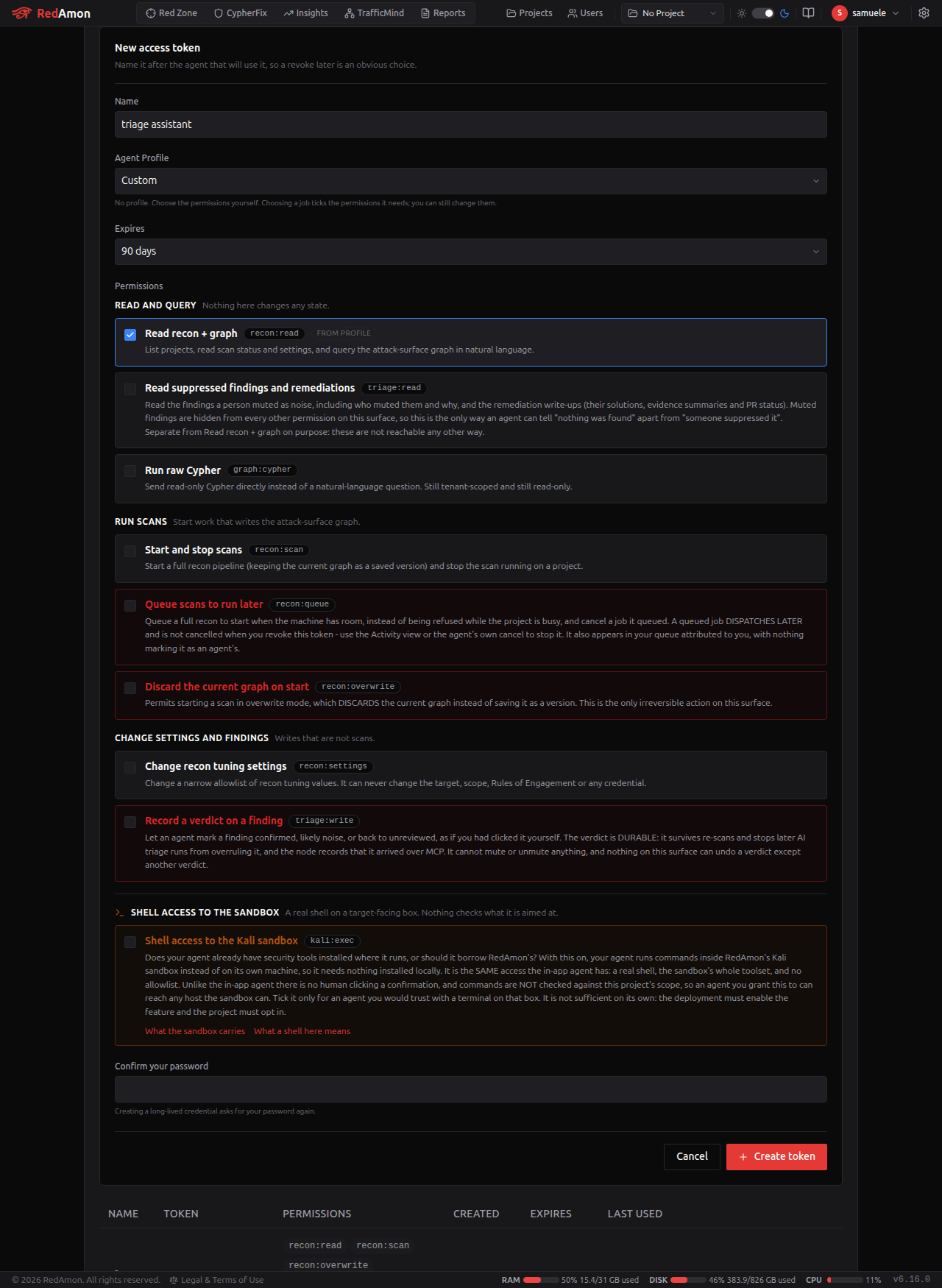
- Name it for the agent that will hold it (
CI nightly rescan,triage assistant). Up to 64 characters. - Pick an Agent Profile - the job this agent is for. Choosing one ticks the permissions that job needs, so you are picking a purpose rather than assembling a permission set. Custom leaves it to you.
- Adjust the permissions if you want to. The profile is a starting point, not a lock: tick or untick anything. Whatever the profile, Shell access to the Kali sandbox is always ticked and Discard the current graph on start never is - see below.
- Pick an expiry. 30, 60 or 90 days, 1 year, or no expiry. Default 90 days.
- Confirm your password. Too many wrong attempts lock the form for a while, the same way the login page does.
- Copy the token. It is shown once, next to a ready-to-paste client config and an Export onboarding button. Afterwards you only ever see its first 8 characters.
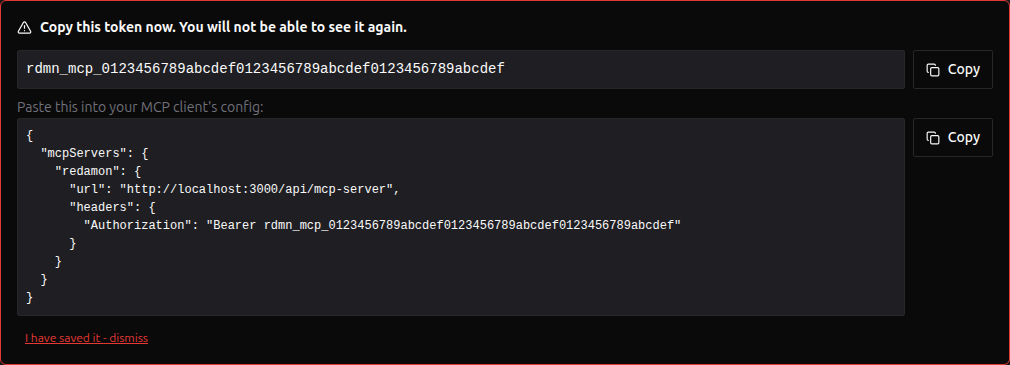
Tokens look like rdmn_mcp_ followed by 48 hex characters. RedAmon stores only a SHA-256 hash of the token, so it cannot show it to you again, and neither can anyone who reads the database.
The permissions
The form groups them the way you should think about them, and this table follows the same order.
Read and query. Nothing here changes any state.
| Permission | UI label | Lets the agent | Default |
|---|---|---|---|
recon:read | Read recon + graph | List projects, read status and settings, query the graph in natural language | on |
triage:read | Read suppressed findings, remediations and triage detail | Read and search the muted findings (who muted them - a person, an agent or a rule - and why), the remediation write-ups, and for any finding the breakdown behind its Priority Board score and the evidence a reviewer reads | off |
graph:cypher | Run raw Cypher | Send raw read-only Cypher instead of a question | off |
Run scans and triage. Start work that writes the attack-surface graph.
| Permission | UI label | Lets the agent | Default |
|---|---|---|---|
recon:scan | Start and stop scans | Start a scan (saving the current graph as a version first), and stop the running scan | off |
recon:queue | Queue scans to run later | Queue a full recon for when the host is free, and cancel one it queued. A queued job outlives the token | off |
recon:overwrite | Discard the current graph on start | Start a scan that discards the current graph instead of saving it | off |
triage:run | Start and stop triage runs | Start a Priority Board run (it re-ranks the project, rewrites the fix list and spends your review model's budget) or stop one before it publishes. Spaced and capped per project | off, opt-in on Triage assistance |
Change settings and findings. Writes that are not scans.
| Permission | UI label | Lets the agent | Default |
|---|---|---|---|
recon:settings | Change recon tuning settings | Change any settable field of an existing project: the whole pipeline, the agent's settings and the engagement's limits | off |
preset:write | Manage your recon preset library | Create, change and delete your own presets. Built-ins cannot be changed; an agent-written preset is badged | off |
preset:apply | Apply a recon preset to a project | Load a preset into a project, replacing its configuration, as the form's Load preset does | off |
triage:write | Record a verdict on a finding | Mark a finding Real or False positive, or reset a decision it made, as if you had clicked it. Never a decision you made in the app. A verdict ranks a finding and never hides one | off |
triage:review | Submit evidence reviews | Act as a second reviewer: correct the factors behind a finding's score, quoting its evidence. RedAmon checks every quote and computes the score; the review is labelled as an agent's and never overrides your decision | off |
triage:mute | Mute and unmute findings | Hide a finding as noise or bring a muted one back, as if you had pressed Mute or Unmute. Never a proven finding or one a person brought back; a reason on every mute, up to 5,000 findings a call with no daily limit, and marked as the agent's. See hiding and revealing findings | off, never ticked by a profile |
Open an engagement. Writes that create a project or record what permitted it.
| Permission | UI label | Lets the agent | Default |
|---|---|---|---|
project:create | Open a new engagement | Create a project with its targeting mode, settings and authorization record, atomically. The domain, the address list and the targeting mode are fixed at creation and immutable afterwards. A third-party engagement without a non-zero rate ceiling and an authorization record is refused outright | off |
engagement:authorize | Record what authorized an engagement | Attach a scope document's digest, kind, source and issue date. Append-only: there is no tool here that edits or deletes one, and the record carries the id of the token that wrote it, so a revoked credential is still attributable | off |
project:rescope | Change an existing project's target lists | Edit a batch project's host list and the other scanners' targets. Never the domain, the address list or the targeting mode; a third-party widening also needs an authorization record | off, never ticked by a profile |
Only the digest of a scope document is ever stored, never the document. Treat writing one of these as a durable claim you are making: it is what an incident review reads afterwards to establish that a scan was permitted.
Run commands at the target. Set apart in the form, because it is the only permission that reaches a live target outside a scan and the only one that needs three more switches nobody in that form controls.
| Permission | UI label | Lets the agent | Default |
|---|---|---|---|
kali:exec | Shell access to the Kali sandbox | bash -c with the full toolset, no allowlist and no target check, plus reading and stopping it | on |
The defaults now come from the profile you picked, with two fixed points. kali:exec is ticked by every profile, including Custom, so a new token can use the sandbox unless you untick it. recon:overwrite is never ticked by a profile, not even by the one that recommends it: it appears as "recommended, tick it yourself" with the box clear, because irreversible graph destruction must be a deliberate choice, not a side effect of choosing from a dropdown.
Write permissions do not include reading. A token with only recon:scan can start a scan but cannot call list_projects to find the project id, so in practice every token also needs recon:read.
kali:exec also needs a deployment switch and a project toggle. Ticking it is not enough on its own: MCP_KALI_EXEC_ENABLED must be on for the server and Allow MCP Sandbox Commands on for the project. Both are on by default, so in practice the tick decides. This is the only permission that reaches a live target outside a scan. Inside the product the equivalent action is gated by a person clicking a confirmation. A token has no person, and nothing replaces that check - which is exactly why your judgement about which agent keeps this ticked is what the safety rests on.
recon:overwrite is split from recon:scan on purpose. Discarding the current graph is the only thing on this surface you cannot undo. The graph is full of text scraped from live targets, and an agent reading that text can be talked into acting on it. Making destruction a separate, off-by-default permission means the containment is a code check, not a line in a prompt.
Agent Onboarding
Connecting an agent tells it that the tools exist. It does not tell it what RedAmon is, what its recon pipeline produces, or which of its tools to reach for first. Agent Onboarding writes those instructions for you, tailored to the job you picked and to exactly what the token can do.
Agent Skills teach RedAmon's agent. Agent Onboarding teaches yours. RedAmon's built-in Agent Skills, Chat Skills and Community Agent Skills all point inward: they make RedAmon's agent better. This one points outward.
Reach it from Global Settings → MCP Server: the Agent Onboarding button in the tab header, the Onboard button on any token row, or the reveal panel right after you mint a token.
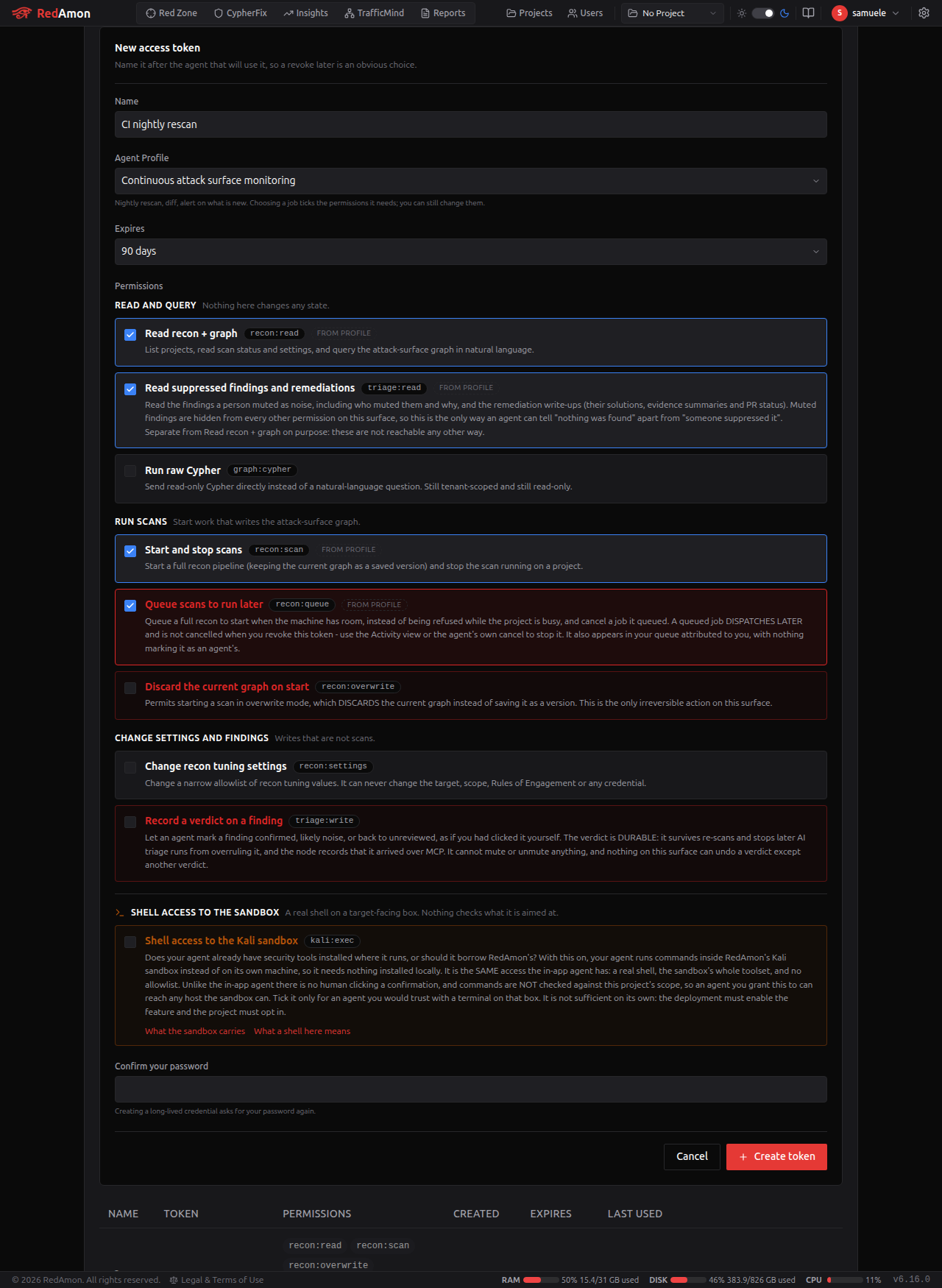
The Agent Profile
A token is minted for a job. The profile names that job, and it does two things: it ticks the permissions that job needs, and it decides which half of RedAmon the generated instructions concentrate on.
| Profile | What the agent is for | Permissions it ticks |
|---|---|---|
| Bug bounty | Breadth, dedup, exploitability ranking, program-submittable reports | recon:read, kali:exec, recon:scan, triage:read, graph:cypher |
| Penetration testing | Rules-of-engagement bounded, evidence-backed, client-safe | recon:read, kali:exec, recon:scan, triage:read, graph:cypher |
| Continuous attack surface monitoring | Nightly rescan, diff, alert on what is new | recon:read, kali:exec, recon:scan, triage:read, recon:queue |
| Vulnerability management | Turn remediations into tickets someone can work | recon:read, kali:exec, triage:read |
| Triage assistance | Dedupe, prioritize, write verdicts back | recon:read, kali:exec, triage:read, triage:write, triage:review |
| Asset inventory / CMDB | What do we actually expose | recon:read, kali:exec, graph:cypher |
| Compliance and audit evidence | Scan history, versions, proof of coverage | recon:read, kali:exec, triage:read |
| DevSecOps CI gating | Fail a build when a new critical appears | recon:read, kali:exec, triage:read, recon:queue |
| Reporting and dashboards | Exec summaries fed from the graph | recon:read, kali:exec, triage:read, graph:cypher |
| M&A and third-party risk | Map an unfamiliar estate and judge its posture | recon:read, kali:exec, recon:scan, triage:read, graph:cypher |
| Threat intel correlation | Pivot CVE to CWE to CAPEC | recon:read, kali:exec, triage:read, graph:cypher |
| SOC enrichment | Is this alerting host part of our known surface | recon:read, kali:exec, graph:cypher |
| Research and training | Safe targets, reproducible graphs, throwaway projects | recon:read, kali:exec, recon:scan, recon:settings, preset:write, preset:apply, triage:read, graph:cypher |
| Custom | A job none of the others describes | recon:read, kali:exec |
Every profile ticks kali:exec (see below). Apart from that, seven of the thirteen grant no write of any kind. A profile that does not need to start a scan does not get recon:scan, triage:write and triage:review go to exactly one profile (Triage assistance, which also offers triage:run as an opt-in), and recon:settings and the two preset permissions are ticked only by Research and training. Bug bounty and Penetration testing offer recon:settings and preset:apply as opt-ins, and Continuous attack surface monitoring offers preset:apply. The two unattended profiles (Continuous attack surface monitoring and DevSecOps CI gating) get recon:queue, because a job with nobody watching that can only start immediately simply fails whenever the project is busy.
Always ticked, never ticked
kali:exec is always ticked, whatever profile you choose, Custom included. The sandbox is meant to work out of the box. That makes the box the thing to look at before you mint: kali:exec is a real shell with no allowlist and no per-command target check, and with the deployment switch and the project toggle both on by default, unticking it is what stands between an agent and any host that sandbox can reach.
recon:overwrite is always left unticked, whatever profile you choose. Research and training recommends it, but renders it as "recommended, tick it yourself" with the box clear and the danger callout showing. Irreversibly destroying a graph should never arrive as a side effect of choosing an item from a dropdown.
triage:mute is always left unticked too. Triage assistance is the one profile that offers it, as "recommended, tick it yourself" with the box clear: a mute hides a finding from everyone, so an agent should get that power only because you decided it should, never because you picked a job from a list.
project:rescope is always left unticked for the same reason. It changes an existing project's target lists, which every other permission treats as fixed at creation. Continuous attack surface monitoring offers it as "recommended, tick it yourself", because watching an estate can mean adding a newly found property to a batch project.
A profile is not a permission
The profile is a label plus a starting point. Only the ticked permissions are ever enforced: nothing in RedAmon's token resolution, permission checks or rate limiting reads the profile at all. A token's power is exactly its permission list, whatever its profile says.
This matters in the direction people get wrong: switching a token to a narrower-looking profile does not lock it down. If you want it to do less, untick permissions.
Profile and permissions may disagree
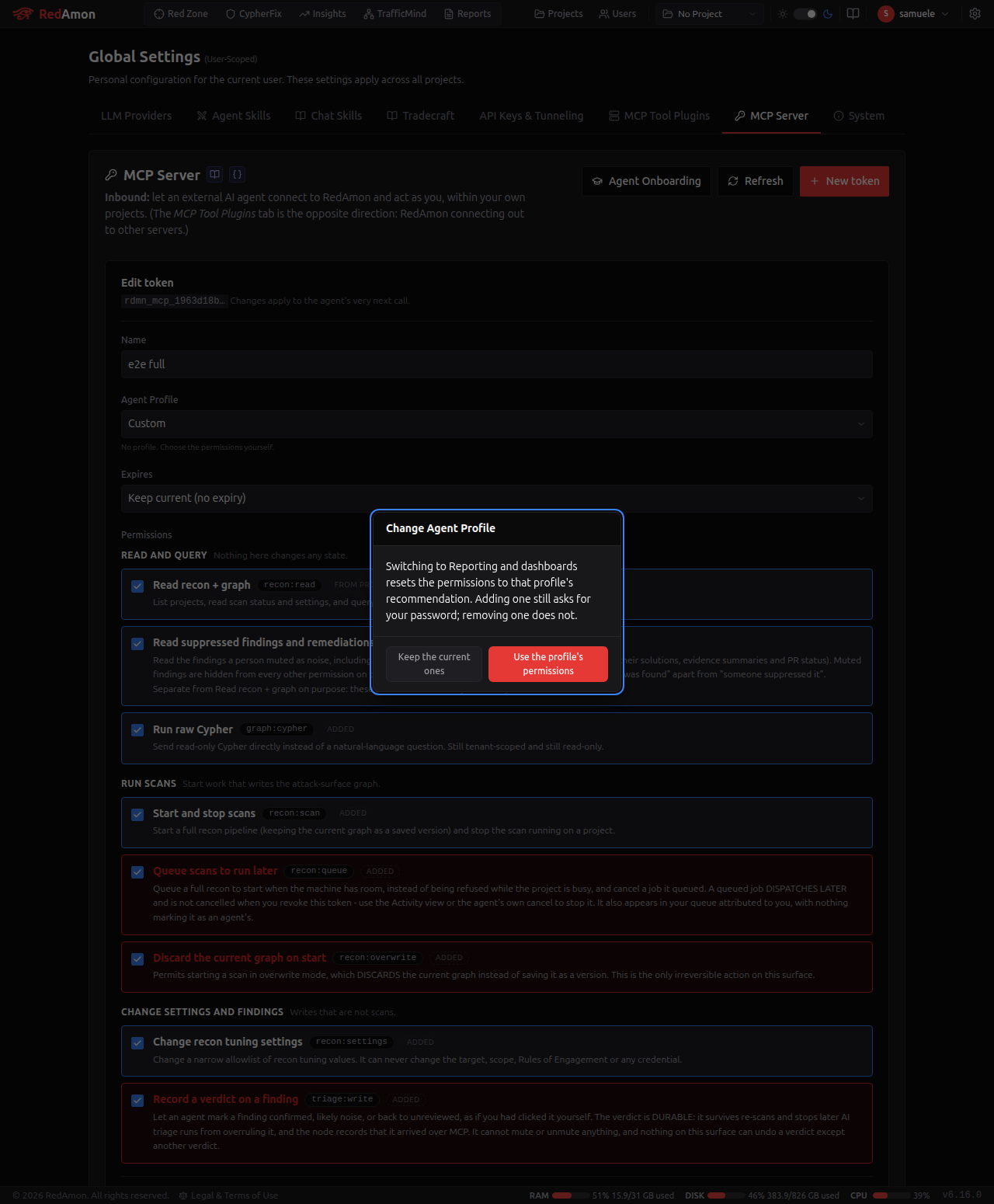
Hand-edit freely. When your permissions no longer match the profile's recommendation, the form says so quietly and leaves both alone: a Penetration testing token with kali:exec removed is still a pentest token, and the editorial intent is still worth keeping.
The generated pack always describes only the tools the token can actually call, so divergence can never produce instructions that promise something the agent will be refused.
What is in the pack
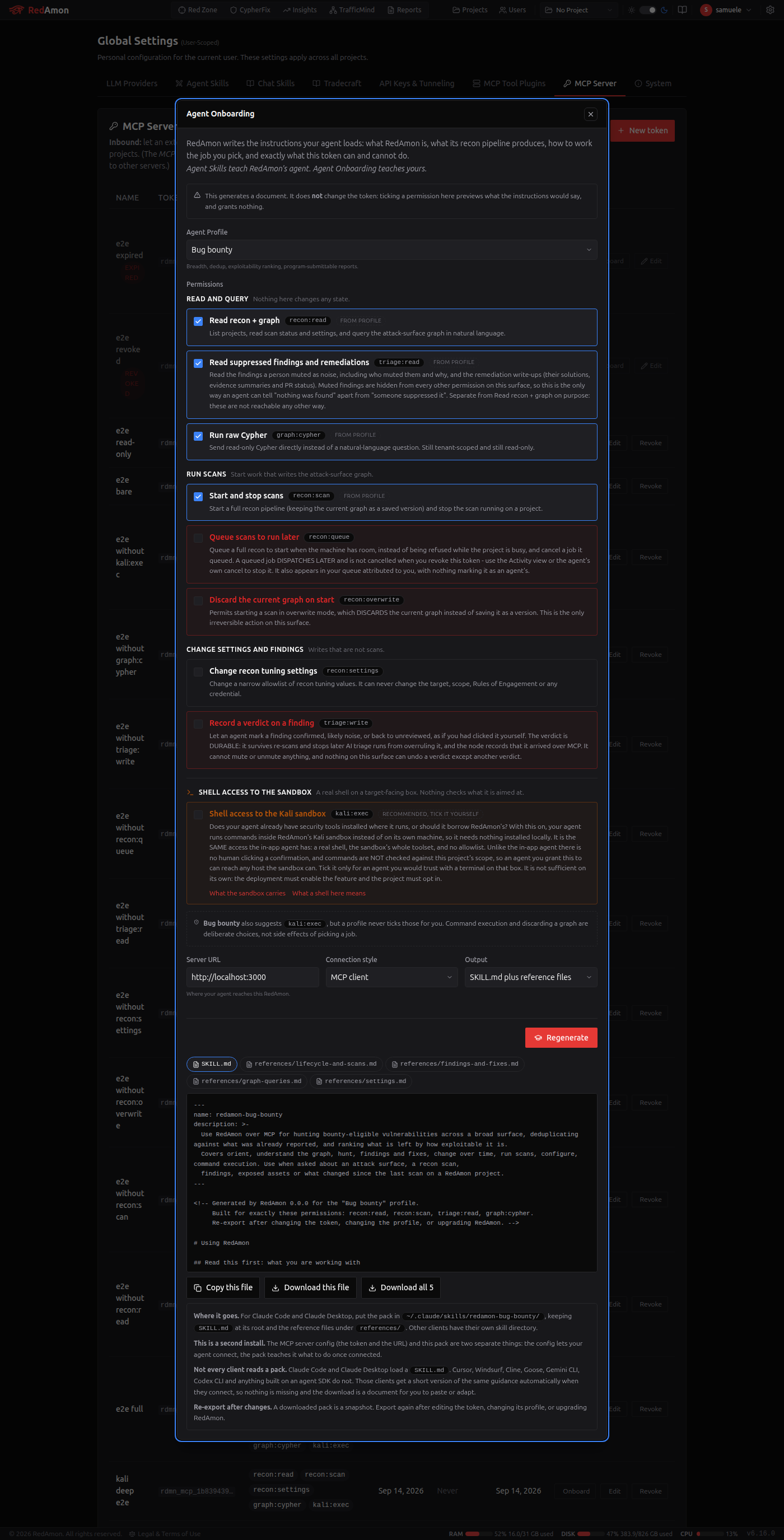
Every export, whatever the profile, opens with the same full explanation and only then narrows:
- The operating model. RedAmon has already done the reconnaissance; the agent's job is to mine the graph, and to validate against the live target only where a human authorized it. Stated first, because the most common wrong turn is an agent hunting for an "attack" tool that deliberately does not exist.
- What RedAmon is, and what the recon pipeline produces.
- The graph's shape - the node taxonomy, the eight finding labels, the CVE-to-CWE-to-CAPEC pivot, and the two states (
Muted,stale_since) that change what a finding means. - What the MCP surface can do, by capability area.
- Your profile's way of working - the posture, the tool sequence for the routine task, what this job leans on and why, what to ignore, how to report, and the traps specific to that job.
- What this token can and cannot do, tool by tool, with the permission each missing one needs.
- The ground rules - the untrusted-data rule, the bar for calling something "clean", and the reporting contract.
The tool facts are read from the server's own tool list at export time, so a pack cannot describe a tool differently from how the server serves it, and a tool withdrawn with MCP_DISABLED_TOOLS is absent from the pack automatically.
Two deliveries, one source
| Who gets it | When | |
|---|---|---|
The pack (SKILL.md plus reference files) | Claude Code, Claude Desktop, and anything else that loads a skill file | You download it and install it |
| Inline onboarding | Every client, including Cursor, Windsurf, Cline, Goose, Gemini CLI, Codex CLI and anything built on an agent SDK | Automatically, at connect |
Most MCP clients never read a skill file. They get a shorter version of the same guidance the moment they connect, so nothing is missing for them and the download is a document for you to paste or adapt. If you use one of those clients, the export has not failed.
Where to put it
For Claude Code and Claude Desktop, the pack goes in its own skill directory:
~/.claude/skills/redamon-<profile>/
  SKILL.md
  references/
    lifecycle-and-scans.md
    findings-and-fixes.md
    graph-queries.md
    settings.md
    kali-exec.md        (only when the token has kali:exec)
The directory is named after the profile, so two profiles can live side by side in one agent's skill directory.
This is a second install. The MCP server config from Connecting your client lets your agent connect; the pack teaches it what to do. They are separate steps.
Re-export after changes
A downloaded pack is a snapshot, and it stamps the RedAmon version, the profile and the exact permissions it was built for in its header. Export again after you edit the token, change its profile, or upgrade RedAmon. The tab offers to do it for you right after an edit that changes what the token can do.
Raw Cypher (graph:cypher)
With this permission, query_graph accepts a cypher argument in place of a question:
{ "projectId": "<id>", "cypher": "MATCH (d:Domain)-[r]->(s:Subdomain) RETURN s.name LIMIT 50" }
It is exactly as safe as the natural-language path, because both end in the same place. What happens to the query:
- Writes are refused.
CREATE,MERGE,SET,DELETE,REMOVE,DROP,LOAD CSVand similar are rejected before anything runs. On top of that, the database session itself is opened read-only, so even a cleverly disguised write is refused by Neo4j. - Every node needs a label. A bare
MATCH (n)that dumps the whole graph is refused. - Procedures and APOC functions are blocked.
CALLis limited to a few read-only schema procedures. Anything likeapoc.cypher.run("..."), which would hide a second query inside a string, is refused, and so is any otherapoc.*call, including the function forms that need noCALL(apoc.cypher.runFirstColumn*,apoc.load.*). - Variable-length paths are refused. A
[*]or[:REL*1..3]hop, or a quantified path pattern ({1,3}), walks through intermediate nodes that are never written as patterns, so they cannot be scoped to your project. Write the hops out one by one instead:(a:Subdomain)-[:RESOLVES_TO]->(i:IP)-[:HAS_PORT]->(p:Port). - Every node pattern is rewritten to your project. Your query:
MATCH (s:Subdomain) RETURN s.nameMATCH (s:Subdomain&!Muted {user_id: $tenant_user_id, project_id: $tenant_project_id}) RETURN s.name - Every returned row is checked again on the way out. If any node belongs to another user or project, the whole answer is discarded and a security event is logged.
Things to know when writing Cypher for it:
- Look a node up by its Node ID. Every node in a result carries
nodeId, the number the RedAmon tables show in their leftmost Node ID column. A user can paste one to you and you can ask about it in English ("what is node 1234 and what is it connected to?") without knowing its type. In raw Cypher compareid(n)with an integer, nevern.id(a different property) and never a string, and name the label:MATCH (n:Vulnerability) WHERE id(n) = 1234. The shared CVE, CWE and CAPEC nodes cannot be reached by Node ID; look them up by their public id. A Node ID is only valid until the next rescan of that data. list_findingsreturns two ids.idis the finding's key and is whatset_finding_verdicttakes;nodeIdis the graph Node ID. A verdict sent to a Node ID matches no finding, is not recorded, and the error says to pass the finding'sidinstead.- Report only what
list_findingscallsreportable. Each finding carries adisposition, the same answer the Priority Board and the client report give:reportable(proven, or a person confirmed it),candidate(verify first; itsblockersays what is missing: the first report gate it failed, such asshared edge, orunknown: <gate>for one the run could not check),info(no impact even if real) orexcluded(a person judged it a false positive, or it is resolved). An AI review's "likely false positive" leaves a finding acandidate. Thedispositionfilter, likeseverityandsection, applies to the highest-ranked window the tool reads. - Put the label in the pattern. Write
MATCH (p:Package), notMATCH (n) WHERE n:Package. The error message tells you which pattern it could not scope. - The write check reads the raw text, so a harmless filter such as
WHERE p.title CONTAINS 'set'is refused because the wordsetappears in it. Use a different way to phrase it, or ask in English. - Muted findings are invisible. You cannot match them, and mentioning the
Mutedlabel at all is refused. - CVE, MITRE and CAPEC nodes are shared reference data. You can reach them by walking from your own findings, but
MATCH (c:CVE) RETURN con its own is refused. - Resolved findings are still in the graph. A finding a later scan stopped reporting is kept and stamped with
stale_since. AddWHERE x.stale_since IS NULLif you only want current findings. - Raw Cypher uses the cheap read rate limit and spends no LLM budget.
Starting and stopping scans
start_recon takes a mode:
| Mode | What happens | Needs |
|---|---|---|
new (default) | The current graph is saved as a version in the Scan Timeline, then the scan rebuilds it. This uses up one version slot, so the oldest unpinned version is eventually trimmed. | recon:scan |
overwrite | The current graph is discarded. It cannot be recovered. | recon:scan + recon:overwrite |
The answer includes the scanJobId, the new version, and a plain note saying whether the previous graph was saved or discarded.
It is refused when:
- Something else is working on the project's graph: a recon scan, the in-app agent, a triage run, a version being restored, or a GVM, GitHub Secret Hunt, supply-chain, Secret Multiscanner or AI attack-surface scan. If RedAmon cannot check one of these, it counts as busy. A full scan would wipe the graph underneath them. The UI button is less strict because you can see both; an unattended agent cannot.
- A scan was already started on that project in the last 5 minutes. This limit is per project, not per token, so holding several tokens does not raise it. A start refused because the project was busy does not use up the 5-minute slot.
- The project has no target domain or IPs configured.
If RedAmon cannot tell whether the start went through, it says so and tells the agent to call get_recon_status before retrying.
stop_recon stops the full recon scan running on the project, whoever started it. If the orchestrator cannot be reached, it reports that the outcome is unknown rather than claiming the scan stopped.
Changing recon settings
update_recon_settings takes a map of setting name to value. Call get_recon_settings first: it lists what is settable and the current values.
- Most of the platform's settings are settable: per-tool enable flags, rate limits, thread and worker counts, timeouts, retries, depth and max caps, severity and status-code lists, container images, wordlists, custom headers, the agent's settings and which pipeline phases run. What each one accepts comes from the settings registry, so this surface and the form enforce the same bounds. The rest are the create-only columns (the engagement's targeting and scope, fixed when the project is opened) and the ones closed outright (credentials, the engagement record, another user's data). The tool's own description lists every one of them, and it is built from the same registry, so it cannot drift from what is enforced; the generated Project Settings Registry gives the counts and each setting's disposition.
- Numbers must fall within the same min and max as the project form. An out-of-range value is refused, naming the limit. Nothing is quietly clamped.
- Any other field is refused by name, with the reason (for example:
'targetDomain' cannot be changed over MCP: engagement scope). One bad key refuses the whole call, so nothing is half-applied. - Safe concurrent edits. Every write is a compare-and-swap on the project's
updatedAt. PassexpectedUpdatedAt(theupdatedAtyou got fromget_recon_settings) and a change you have not seen refuses the call with a conflict instead of being silently overwritten. Without it the write still refuses when the project changes between the tool's own read and write. Nothing retries for you. The same protection runs the other way: a project form left open answers 409 on save instead of reverting what the agent changed. - Refused while a scan is running. A scan reads its settings once, when it starts, so a change made afterwards would do nothing.
The answer lists what changed and adds two warnings when they apply:
queuedJobsNeedingReview:{ count, jobIds }, the queued scans whose settings no longer match what they were queued with, computed exactly as the dispatcher computes it. They are parked until a human reviews them, so the agent should not wait for them.affectedSchedules: enabled scheduled scans that will pick up the new values on their next run.
Rate limits and budgets
All limits are per token unless noted. When one is hit, the error tells the agent how many seconds to wait.
| Limit | Default | Applies to | .env knob |
|---|---|---|---|
| Reads | 120 / minute | Everything not named below: list_projects, status, settings, summary, schema, raw Cypher, the findings, remediation, version and reference tools | MCP_RATE_READ_PER_MIN |
| Questions | 20 / minute | query_graph with question, run_graph_view, the three analytics views, and get_project_activity | MCP_RATE_QUERY_PER_MIN |
| Writes | 10 / minute | stop_recon, update_recon_settings, cancel_queued_scan, set_finding_verdict, submit_finding_review, start_triage_run, stop_triage_run, the four preset writes (create_, update_, delete_ and apply_recon_preset, dry runs included), update_project_scope | MCP_RATE_WRITE_PER_MIN |
| Mutes and unmutes | 200 / minute | mute_findings, unmute_findings. One call names up to 5,000 findings, and nothing caps a token's total | MCP_RATE_MUTE_PER_MIN |
| Scan starts | 1 per 5 minutes, per project | start_recon, queue_recon | MCP_RATE_START_PER_WINDOW, MCP_RATE_START_WINDOW_MS |
| Graph comparisons | 2 per 5 minutes, per project | compare_scan_versions | MCP_RATE_COMPARE_PER_WINDOW, MCP_RATE_COMPARE_WINDOW_MS |
| Daily question budget | 200 / day | query_graph with question | MCP_LLM_DAILY_BUDGET |
| Triage runs | 1 per 30 minutes and 12 / day, per project, across all tokens | start_triage_run. Deliberately NOT the scan-start bucket, so a triage run never takes a scan's window | none (constants) |
| Sandbox commands | 20 / minute | kali_exec | MCP_RATE_EXEC_PER_MIN |
kali_output uses the cheap read limit, not the exec one, so watching a slow command costs nothing like starting another. kali_cancel uses the write limit.
get_project_activity sits in the question bucket despite reading nothing billable: answering it costs up to eight requests to the scan orchestrator, which every project on the host shares. Ask it before acting, rather than polling it.
A single question can cost up to 9 calls to your AI provider, because query generation is retried when it fails. The daily budget is per token, so one runaway agent cannot use up your whole account. The account-wide LLM cap still applies on top of it.
Graph queries from MCP also run at most 5 at a time across all tokens (GRAPH_EXEC_MCP_CONCURRENCY), so a looping agent cannot slow down the graph page or running scans. That ceiling covers the findings tools as well as the query ones: they read through the same service your own Priority Board reads, so without it a looping agent would contend directly with your triage screen.
compare_scan_versions is bounded differently, because it is bounded by something else: capturing the live graph takes one of only two snapshot slots shared with version activation, and it refuses rather than queueing when none is free. Comparing two saved versions does not need a slot at all.
Connecting your client
Connecting is two installs, not one. This section is the first: the server config that lets your agent reach RedAmon. The second is the Agent Onboarding pack, which teaches it what to do once connected. Claude Code and Claude Desktop load that pack from a skill directory; Cursor, Windsurf, Cline, Goose, Gemini CLI, Codex CLI and anything built on an agent SDK do not read a skill file at all, and get a short version of the same guidance automatically the moment they connect.
Paste the snippet the mint dialog gives you:
{
  "mcpServers": {
    "redamon": {
      "url": "https://your-redamon-host/api/mcp-server",
      "headers": { "Authorization": "Bearer rdmn_mcp_..." }
    }
  }
}
For Claude Code:
claude mcp add --transport http redamon https://your-host/api/mcp-server \
  --header "Authorization: Bearer rdmn_mcp_..."
Support for a static bearer header on a remote MCP server varies between clients and changes between releases, so test yours end to end before you rely on it in a pipeline.
Checking it by hand
curl -s https://your-host/api/mcp-server \
  -H 'Content-Type: application/json' \
  -H 'Accept: application/json, text/event-stream' \
  -H 'Authorization: Bearer rdmn_mcp_...' \
  -d '{"jsonrpc":"2.0","method":"tools/list","id":1}'
A working token returns the list of tools. Both Accept values are required; leave one out and the server answers 406.
What the response codes mean
| Code | Meaning | Fix |
|---|---|---|
401 | Token missing, wrong, deleted, revoked or expired. The reason is never told to the caller. | Check the token list in the tab: revoked and expired tokens are flagged there, and a deleted one is simply absent. An expired token can be extended with Edit; a revoked or deleted one needs a new token. |
404 | The server is switched off. The error message says so and names MCP_SERVER_ENABLED. | Set MCP_SERVER_ENABLED=true in .env, then docker compose up -d webapp. A plain docker compose restart keeps the old value. |
403 | A browser Origin that is not your RedAmon host, or the deploy's edge gate. | Call from a non-browser client; on a deploy see the gates below. |
405 | A GET or DELETE. The server only takes POST. | Use POST. |
406 | The Accept header does not include both application/json and text/event-stream. | Send both. |
413 | Request body over 1 MB. | Send smaller requests. |
415 | Content-Type is not application/json. | Set it. |
400 | Invalid JSON, or several JSON-RPC requests batched into one. | Send one request per call. |
Inside a successful call, a tool can still return an error the agent can read:
This token is missing the required scope: recon:scan: mint a token with that permission.Project not found: the id does not exist or belongs to someone else. Both give the same answer on purpose, so nobody can discover other users' projects.Rate limit reached for this token. Try again in 42s.Scan status is unknown: the orchestrator is unreachable.: this is never reported as "not running".
If you are running on a deployed server
On a hardened deploy there are three gates in front of the endpoint, and all three must admit your agent. Two of them are invisible from inside the app, which is why "I enabled it and it still does not work" is almost always one of these:
| Gate | Set it with | If it refuses you see |
|---|---|---|
| Cloud Security Group | your provider's console | a timeout |
| Host firewall (ufw) | MCP_CLIENT_CIDRS | a timeout or refused connection |
| nginx | MCP_CLIENT_CIDRS, MCP_EDGE_ALLOW_BEARER | 403 |
The firewall filters by port, not URL, so it cannot tell an MCP call from a
visit to the UI. When OPERATOR_ALLOW_CIDRS is set, an agent connecting from
anywhere else is dropped before nginx ever runs. Set MCP_CLIENT_CIDRS to your
agent's egress range: those addresses reach /api/mcp-server and nothing else,
so you are not widening access to the UI.
If the deploy uses GATE_MODE=basic_auth, the browser password and the token
would both need the same Authorization header, which is impossible. The
endpoint answers 403 until you set MCP_EDGE_ALLOW_BEARER=true, which turns
the basic-auth prompt off for that one URL only.
MCP is also refused entirely over plain HTTP. Your token travels in a header on every call and outlives your session, so one capture is a lasting credential. With a self-signed certificate most MCP clients will refuse to connect; use a real certificate or a domain.
On a deploy, 10 failed token attempts within 2 minutes ban the source IP for
30 minutes (fail2ban jail redamon-mcp-auth). A normal agent that is only
being rate limited never trips it.
Run ./deploy.sh verify after enabling. It probes the endpoint and tells you
which gate is refusing: 401 means enabled and working, 404 means the switch
did not reach the webapp, 403 means the edge gate is eating the token.
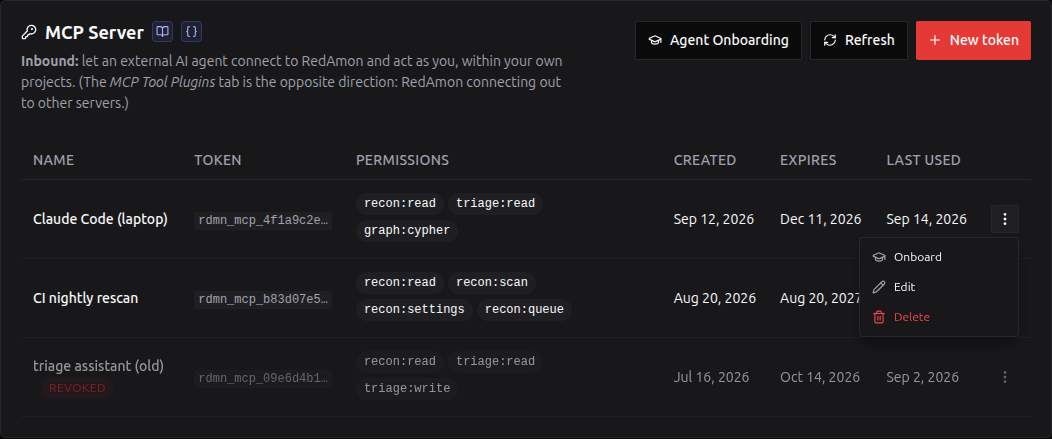
Managing tokens
The list shows every token with its name, first 8 characters, permissions, creation date, expiry and last use. "Last used" is updated at most once a minute per token.
Each row's actions are behind the ⋮ menu at its right: Onboard, Edit and Delete. They live in a menu rather than as three spelled-out buttons because the buttons were the widest thing in the row and pushed the permission tags, which are what you actually read the table for, into wrapping.
- Delete removes the token from the database. The agent's next call fails, not its next reconnect, and the row disappears rather than staying flagged. It asks first, and it cannot be undone.
- What survives is the audit record. The audit log keeps that the token existed, its first 8 characters, its permissions and who removed it when, so an incident review can still match it against the MCP call log. Deleting the row does not erase its history.
- Available on every row, including expired and revoked ones: a row nobody needs any more is exactly the one worth clearing out.
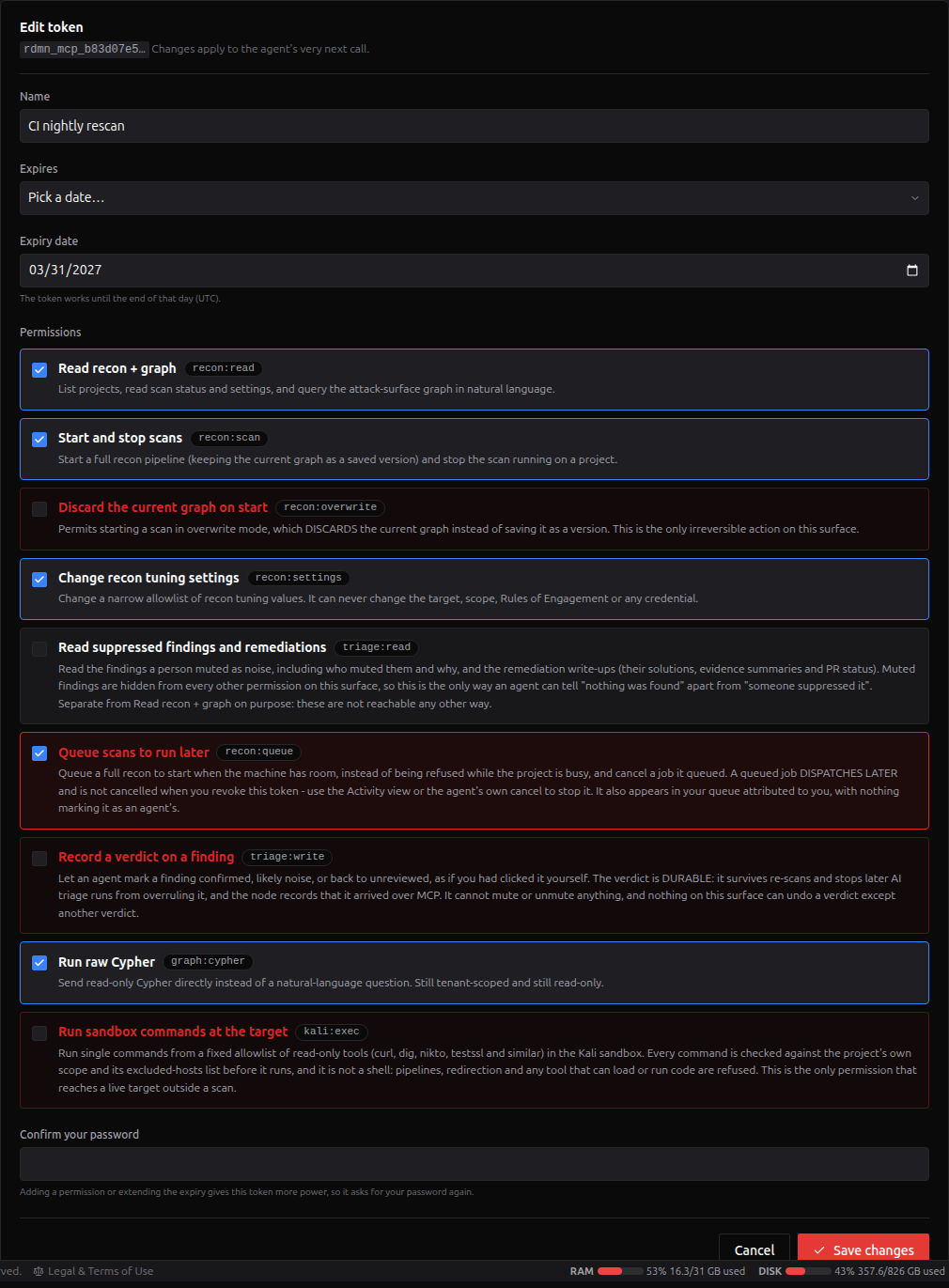
- Edit changes the name, the Agent Profile, the permissions and the expiry. Changes apply to the agent's very next call.
- Expiry can be kept, ended right now (Expire now), set to 30, 60 or 90 days or 1 year from today, set to a date you pick (the token works until the end of that day, UTC), or removed.
- Expire now vs Delete: both stop the agent at once, but an expired token stays listed and can be extended again later; a deleted one is gone.
- Taking power away needs no password: removing a permission, an earlier expiry, Expire now, a new name.
- Giving power needs your password again, exactly like creating a token: adding a permission, a later expiry, removing the expiry, or bringing an expired token back. A stolen browser session therefore cannot upgrade an existing token any more than it can create a new one. Wrong passwords count toward the same lockout as token creation.
- Changing the profile grants nothing, so it never asks for your password. It re-suggests that profile's permissions, and if you accept them, those are judged on their own merits: one that adds a permission asks for the password like any other widening, one that only removes permissions does not.
- Hand-editing the permissions away from the profile is fine. The form points it out and changes nothing on its own. The profile is a label and a starting point, never a permission.
- A revoked token can only be renamed or have its profile changed. To restore access, create a new token.
- After an edit that changes what the token can do, the tab offers to re-export its onboarding pack, because the one you already gave that agent now describes a token that no longer exists.
- Edit never changes the token itself. The agent keeps using the same
rdmn_mcp_...value. If you think the token has leaked, don't just remove permissions: delete it and create a new one.
- Expired and revoked tokens stay listed, flagged, until you delete them. "Why did my agent stop working" is the common question, and hiding the answer makes it harder. Left alone, they are removed automatically 90 days after they expired or were revoked (
MCP_TOKEN_RETENTION_DAYS). - Changing your password revokes every token, including when an administrator resets it for you. A reset that left live credentials behind would not really lock the account.
An administrator can list your tokens and take power away from them during an incident: rename, remove permissions, shorten or end the expiry, and delete. They cannot mint a token on your account or give an existing one more power, not even while viewing your settings; the tab shows a notice and disables those actions. A credential created or upgraded that way would outlive their session, need no further authentication, and be indistinguishable from your own calls.
What a token can never do
This is the part worth reading twice.
It cannot change what RedAmon is pointed at. Not the target domain, not the IP list, not the subdomain seed list, not the targeting mode, not the scope guardrail. The one exception is project:rescope, which edits a batch project's host list and the other scanners' targets — the lists the project form also edits — behind its own permission and, for a third-party engagement, a new authorization record.
The reason is blunt: if a token could set targetDomain and switch off the guardrail, then "let my agent rescan my own projects" would quietly become "let my agent scan anyone, with the safety off". That is the boundary the whole product's legal posture rests on. Every targeting column is fixed at creation and refused by name afterwards, never silently dropped, so your agent always knows a setting did not apply. A test asserts every one of the 700-plus project columns is explicitly classified, so a field added next month has a stated disposition rather than an accidental one.
It cannot touch the engagement RECORD. Not the client name, the contacts, the emergency number, the dates, the compliance frameworks or the uploaded document. Those are the contract: a person writes them, a model reads them, and nothing in the pipeline enforces them, so they carry a third party's personal data and no benefit from being machine-writable.
It CAN change the engagement's limits, and that is deliberate. The rate ceiling, the never-touch hosts, the scanning window, the forbidden tools and categories, the severity cap: ordinary settings, writable in either direction. What keeps them honest is not a write-time direction rule — one of those shipped here and five of the fields it covered accepted a widening while reporting a tightening — but that every limit is enforced at scan start whatever the setting says. A ceiling of 3 rewrites all 17 rate fields; an excluded host is dropped in three places in the pipeline. Call preflight_scope_check and report the RESOLVED values: that is the check that actually holds.
It cannot switch the limits off while leaving them configured. There is no master flag to write. The limits apply when there IS a limit to apply — a non-zero ceiling, a non-empty exclusion list, or a window — and that is derived rather than stored, so removing a limit means removing it, visibly, rather than flipping one boolean and leaving every field displaying its old value.
It cannot spawn an arbitrary container. Every *DockerImage field is a closed list of the shipped images, and a value outside it is refused at the write rather than accepted and silently replaced at scan start.
It also cannot reach the other scanners' targets without project:rescope, the wordlists, templates, custom headers or out-of-band callbacks beyond their validators, or one stored credential.
kali_exec is the exception, and you should read it as one. Everything above describes what a token cannot do by enforcement. kali_exec is not enforced: it is a shell, it has no target check, and an agent holding kali:exec can reach any host the sandbox can - including one this project is not for.
That is the same position RedAmon's in-app agent is in, and it is why the permission can be withdrawn at three independent levels and why the per-project switch cannot be changed over MCP. All three are on by default, so the protection is a human deciding which tokens keep the permission, not the software catching a bad command afterwards. Untick it for any agent you would not trust with a terminal.
It cannot reach another user's data. A token is one user. A project id that is not yours returns "not found", the same answer as a project id that does not exist, so the tool cannot be used to discover what exists. Every graph query is rewritten to your project before it runs, and every row that comes back is re-checked against your tenant on the way out; anything that fails drops the entire response and raises an audit record.
It cannot hide or reveal a finding without triage:mute, and never a proven or kept-visible one. A token can record a verdict, which ranks a finding. Only with the opt-in triage:mute can it mute or unmute one, which hides or reveals it, and even then it can never hide a confirmed or proven finding, one a person brought back, or change a mute that already exists; each mute needs a reason and stays marked as the agent's. That is what keeps a manipulated agent from quietly making a real issue disappear: the worst it can do is hide unproven findings, with no cap on how many, each one labelled, listed per token and one click from coming back.
It cannot set a score, or change a decision a person made in the app. A review corrects factors with quotes and RedAmon computes the score; a verdict made in the app is out of reach of every token.
It cannot write anything else to the graph. Every read runs in a read-only database session. A verdict, a review, a triage run start or stop, and with triage:mute a mute or an unmute, are the only writes on this surface.
It cannot quietly spend your money. Natural-language queries use your configured LLM provider, so each token gets its own daily budget and its own rate limits on top of the account-wide cap. Raw Cypher and every other tool spend nothing.
What it deliberately refuses to do
- Start a scan while you are working. If you have the in-app agent open on that project, a triage run going, or Mute Rules being applied,
start_reconrefuses. A full scan rebuilds the graph from scratch and would pull it out from under you. - Change settings mid-scan. Recon reads its settings once, when the scan container starts. A change made afterwards would do nothing, so the tool says so instead of reporting a success that is not one.
- Apply a preset or change a target list while the graph is in use.
apply_recon_presetandupdate_project_scoperefuse while a scan, a triage run or an in-app agent session is running, because the agent re-reads project settings on every turn. A session counts only while the agent confirms it is running: one left marked as running by an agent that restarted mid-run is cleared the next time anything checks, instead of locking the project. If the agent cannot be reached, the session still counts, and the refusal says to check the agent. - Overwrite a change it has not seen. Every settings, preset and target-list write checks the project's or preset's
updatedAtand answersconflictif it moved. The project form does the same in the other direction: a form left open answers This project changed since you opened it on save instead of reverting what an agent changed. - Answer "nothing found" when it means "could not ask". If the orchestrator is unreachable, status comes back as unknown, never not running. If the graph cannot be read, that is an error, never an empty result.
- Compare a graph that moved while it was reading it. Swapping a saved version in is not atomic, so a comparison that straddled one would report your whole attack surface as deleted.
compare_scan_versionschecks before and after, and refuses rather than returning a difference that never existed. - Record a verdict or a review a triage run could silently re-file. A run reads at its first step and publishes minutes later; RedAmon's run re-reads decisions and reviews when it publishes, so a verdict or review written meanwhile is honoured. If the agent service cannot confirm it works that way (an older build), both are refused while a run is in progress, and refused too if the run state cannot be read.
- Change a decision a person made in the app.
set_finding_verdictanswersRefused (decided_in_app)and writes nothing. - Write during a version switch. A verdict or review is refused while a version is being activated, and one that lands as a switch begins is reported as needing a re-check rather than as a success.
- Unmute a finding through a verdict. Rules never mute a finding a person has judged, so a verdict on a finding a Mute Rule muted would release that mute at the next apply or scan.
set_finding_verdicttherefore refuses any muted finding and writes nothing, sotriage:writealone can never release a rule mute. To have one judged, unmute it first (unmute_findings, which needstriage:mute), then record the verdict. - Mute over evidence or over you.
mute_findingsrefuses a proven finding and one you brought back, and never changes a mute that already exists, whoever made it. - Mute or unmute while the graph is being swapped. A version activation, a Mute Rules apply, or (for a rule's mute) a running recon scan makes both tools answer
busywith nothing written, and so do the in-app Mute and Unmute buttons during an activation. - Leak internals in errors. Errors are short, fixed sentences. Stack traces, file paths, host details and upstream messages go to the server log only, never to the agent.
Audit
Every call is recorded: which tool, which project, which token (by id and prefix), and what happened. Failures too: a revoked token being presented, a permission denied, a project id that was not yours. That is the only way a brute-force attempt or a leaked-then-revoked token becomes visible.
| Action | Recorded when |
|---|---|
mcp.<tool> | Every tool call, with outcome ok, scope_denied, access_denied, rate_limited, busy, and so on |
mcp.start_recon, mcp.start_recon.refused | A scan start, with mode, scanJobId and version |
mcp.update_recon_settings | A settings change, with before and after values |
mcp.kali_exec, mcp.kali_exec.refused | Every sandbox command, verbatim. Refusals too: a command aimed outside your scope is the clearest sign an agent has been talked into something, and this is the only record of what it tried |
mcp.set_finding_verdict | A verdict, with the finding, the status, the token and the score before and after. A verdict is durable and outranks every review, so it is recorded on both the webapp and the agent side |
triage.review | A review by an agent: the finding, its verdict, the disputed fact names, the multiplier, the score before and after, the token, and a SHA-256 of its text (never the text itself) |
triage.verdict | A verdict from the Priority Board, with the real person behind it when an admin acts as another user |
mcp.start_triage_run, mcp.stop_triage_run, triage.start, triage.finish, triage.finish.late | A run started or stopped over MCP; every run's start (with who started it, the token, the budget and the model) and its outcome. late marks a run that reported after it had been declared lost |
muted_nodes.muted, muted_nodes.unmuted (source mcp) | A mute or unmute by an agent, with the token id and prefix, every item and its outcome, and the reason. outcome: unknown when the answer was lost. The agent logs each muted finding too |
mcp.queue_recon, mcp.cancel_queued_scan | Work queued or un-queued, with the job id |
mcp.kali_cancel | A command stopped, with its job id |
mcp.auth.denied | A bad token (sampled to one row per token prefix per minute, so a flood cannot fill the database) |
mcp-token.create, mcp-token.rename, mcp-token.revoke | Changes made in the tab |
mcp-token.update | Permissions or expiry edited, with before and after values and whether the edit gave the token more power (widened) |
mcp-token.revoke-all | A password change revoked your tokens |
A scan started over MCP shows up in the Scan Timeline exactly like a manual one, attributed to you.
There is no audit-log viewer in the product yet; reading it is a SQL query against the audit_log table, for example:
SELECT created_at, action, target_id, after
FROM audit_log
WHERE source = 'mcp'
ORDER BY created_at DESC
LIMIT 50;
Regenerating the API reference
The MCP API Reference page is not written by hand. A script asks the MCP server for its tool list, exactly as a connected agent would, and turns the answer into Markdown. There is no AI involved: the same code always produces the same page.
What comes from the code, and where. Everything on that page is read from webapp/src/lib/mcp/server.ts:
| On the page | Comes from |
|---|---|
| Tool names, titles and descriptions | The registerTool(...) calls (the same descriptions the agent reads) |
| Arguments, types, required flags, length and pattern limits | Each tool's inputSchema |
| Permissions | Each tool's _meta: scopesMeta({...}) declaration |
| Read-only / destructive / idempotent | Each tool's annotations |
| Permission labels and explanations | webapp/src/lib/mcp/scopeCopy.ts, shared with the token screen in the UI |
This page (MCP Server) stays hand-written, including the tool table near the top.
When to run it. After any change to a tool: a new tool, a renamed argument, an edited description, a different permission. Nothing else needs it.
How to run it. From the main RedAmon repo, with the wiki checked out at redamon.wiki/ in the repo root:
cd webapp
npm run docs:mcp          # writes ../redamon.wiki/MCP-API-Reference.md
It needs webapp/node_modules (npm ci once) but no database and no running stack; it takes about a second. If your wiki checkout lives somewhere else, point at it:
MCP_DOCS_WIKI_DIR=/path/to/redamon.wiki npm run docs:mcp
Then publish it like any other wiki edit:
cd ../redamon.wiki
git add MCP-API-Reference.md
git commit -m "docs: regenerate MCP API reference"
git push
You cannot forget it. The same file, webapp/src/lib/mcp/apiReference.test.ts, runs with the normal webapp tests (npm run test, and ./redamon.sh test). It renders the page in memory and compares it with the wiki file. If they differ, the test fails with MCP-API-Reference.md is stale: run npm run docs:mcp in webapp/. On a checkout without the wiki there is nothing to compare, so that one check is reported as skipped, not passed.
The test also keeps the permissions on the page honest. It calls every tool through a real MCP client with each declared permission taken away and checks the call is refused naming that permission, and that the declared permissions are enough. A permission written in the page but not enforced in the code, or the other way round, fails the test before it can be documented.
The copy on redamon.org/docs is refreshed from the wiki separately, like every other page.
Related pages
- MCP API Reference: every tool, argument and permission, generated from the server
- MCP Tool Plugins: the outbound direction
- Attack Surface Graph: what the graph tools query
- Scan Timeline: versions, and what
newvsoverwritemeans - Global Settings: where the MCP Server tab lives
- Agent Skills: the inbound direction. Agent Skills teach RedAmon's agent; Agent Onboarding teaches yours