
AI Model Providers
RedAmon supports twelve AI providers out of the box, giving you access to 400+ language models through a single, unified interface. The model selector in project settings dynamically fetches available models from each configured provider — no hardcoded lists, no manual updates.
Which model runs what. Each project has its agent model (project settings → Agent Behaviour), which runs the AI agent and answers plain-English graph queries, and the recon AI pipeline has its own. Eight other AI features each run on their own model, chosen once for your account and used in all your projects: Triage review, CodeFix, Multi mute, Report narratives, RoE parsing, the Recon preset generator, the Command whisperer and the Tradecraft section picker. You choose them in Global Settings → LLM Providers → Models by feature, or when a feature first asks. Every feature runs on the provider keys of the person it runs for (the project owner's, for triage and CodeFix). Each installed plugin that may call a model gets a model choice of its own in the same place. The plugin never sees a key: the agent makes the call for it, on the model you chose and with your keys, under a daily cap of its own (PLUGIN_LLM_DAILY_CALL_CAP, 100 calls), so a plugin cannot use up your other features' budget.
Supported Providers
| Provider | Models |
|---|---|
| OpenAI (Direct) | ~30 chat models — GPT-5.2, GPT-5, GPT-4.1, o3, o4-mini |
| Anthropic (Direct) | ~15 models — Claude Opus 4.6, Sonnet 4.6/4.5, Haiku 4.5 |
| Google Gemini (Direct) | Gemini 3, 2.5, 2.0 (Pro / Flash / Flash-Lite families) |
| DeepSeek (Direct) | DeepSeek-V4 Pro, V4 Flash, Chat, Reasoner |
| GLM (Zhipu AI) (Direct) | GLM-4 family — Plus, Air, Flash, AirX, multilingual reasoning |
| Kimi (Moonshot) (Direct) | Moonshot-V1 (8k/32k/128k contexts), Kimi-K2 long-context |
| Qwen (Alibaba) (Direct) | Qwen-Max, Qwen-Plus, Qwen-Turbo, Qwen3-Coder |
| xAI (Grok) (Direct) | Grok 3, Grok 3 Fast, Grok 3 Mini, Grok 2 |
| Mistral AI (Direct) | Mistral Large, Mistral Small, Nemo, Codestral Mamba |
| OpenRouter | 300+ models — Llama 4, Gemini 3, Mistral, Qwen, DeepSeek |
| AWS Bedrock | ~60 foundation models — Claude, Titan, Llama, Cohere, Mistral |
| OpenAI-Compatible | Any self-hosted or third-party OpenAI-compatible API |
All providers are configured exclusively in Global Settings (http://localhost:3000/settings → gear icon in the header). API keys are stored per-user in the database.
One more key lives in the same tab but is not a chat provider: TypeSafe AI (Jev), a decision model that four recon AI hooks can use instead of an LLM, and that five Jev-only recon hooks run on. It has its own section, never appears in a model picker, and does not count as "an LLM provider" for any gate. What Jev is and how it plugs into recon is covered on its own page, TypeSafe Jev.
How It Works
- Provider configuration — Configure providers in Global Settings (http://localhost:3000/settings). All API keys are stored per-user in the database.
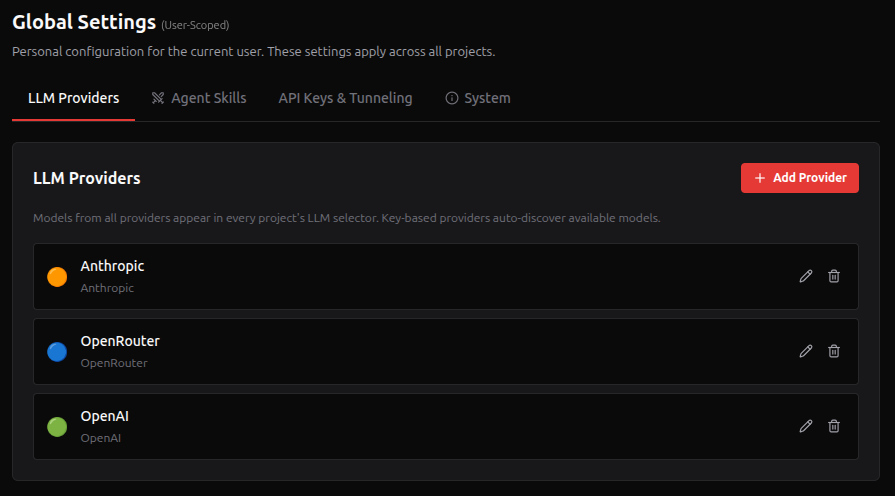
- Dynamic model fetching — the agent's
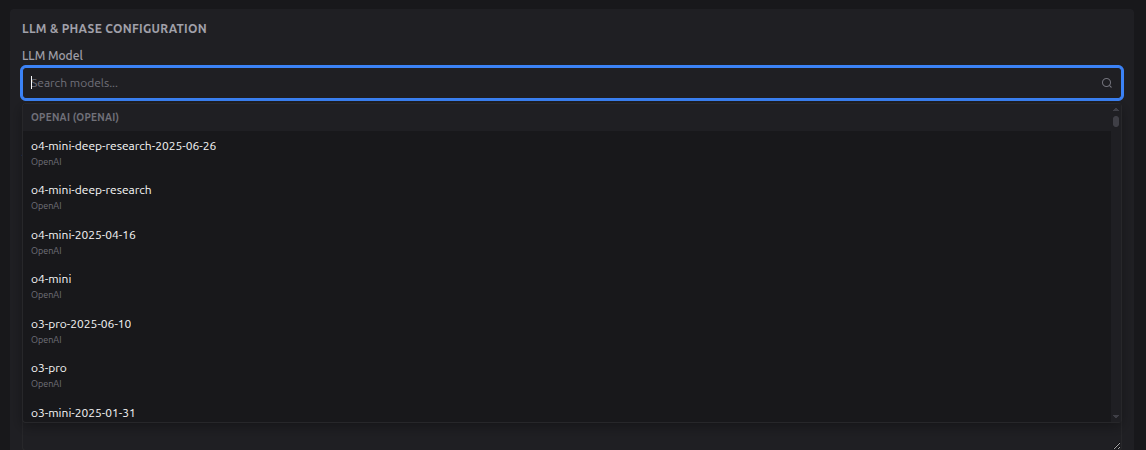
/modelsendpoint fetches available models from all configured providers in parallel. OpenAI-Compatible providers appear as single custom model entries. Results are cached for 1 hour. - Searchable model selector — the project settings UI presents a searchable dropdown grouped by provider. Each model shows its name, context window size, and provider.
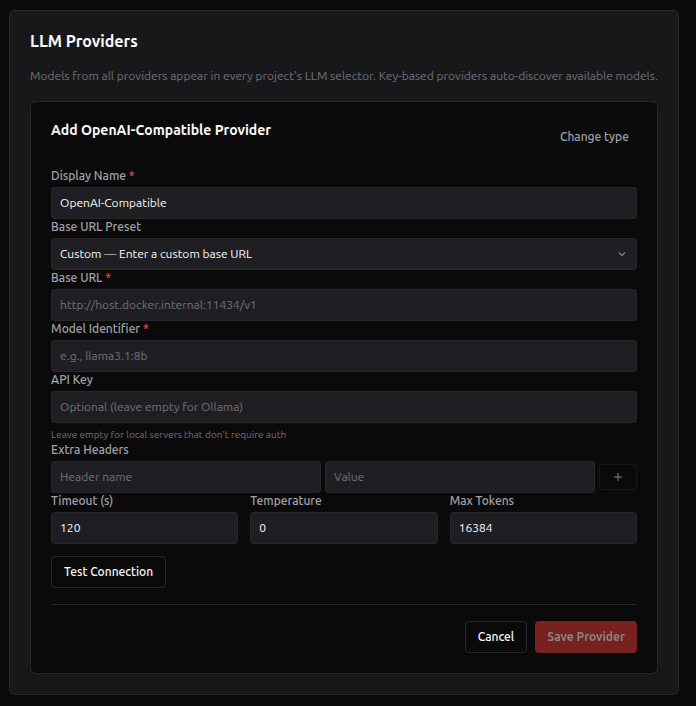
- OpenAI-Compatible setup — Add any local or third-party OpenAI-compatible endpoint (Ollama, vLLM, Groq, etc.) with presets for common providers.
- Provider prefix convention — models are stored with a provider prefix (
custom/,openrouter/,bedrock/,deepseek/,gemini/,glm/,kimi/,qwen/,xai/,mistral/) so the agent knows which SDK to use at runtime. OpenAI and Anthropic models are detected by name pattern (no prefix needed). - Test Connection — each provider can be tested before saving using the "Test Connection" button.
Provider Setup
Open Global Settings (http://localhost:3000/settings → gear icon), click "Add Provider", choose the type, enter your credentials, test the connection, and save.
OpenAI (Direct)
Enter your API key from platform.openai.com/api-keys.
Anthropic (Direct)
Enter your API key from console.anthropic.com/settings/keys.
Recommended — Claude Opus 4.6 is the default model and generally provides the best results for autonomous pentesting tasks.
Google Gemini (Direct)
Enter your API key from aistudio.google.com/app/apikey. Uses the AI Studio endpoint (generativelanguage.googleapis.com/v1beta); the available model list is fetched live so new Gemini releases appear automatically.
Free-tier note: Gemini Pro / preview models often have a free-tier quota of zero. If a chat hangs and the agent log shows
429 RESOURCE_EXHAUSTED ... limit: 0, switch to a Flash-class model (e.g.gemini-2.5-flash) or enable billing on the linked Google Cloud project.
DeepSeek (Direct)
Enter your API key from platform.deepseek.com/api_keys. DeepSeek's /v1/models endpoint is queried live; if the listing endpoint is rate-limited the agent falls back to a curated list of known-good model IDs so the dropdown is never empty.
GLM (Zhipu AI) (Direct)
Enter your API key from open.bigmodel.cn/usercenter/apikeys. Uses the OpenAI-compatible endpoint at https://open.bigmodel.cn/api/paas/v4. Best suited for tasks requiring strong Chinese-language reasoning or multilingual analysis.
Kimi (Moonshot) (Direct)
Enter your API key from platform.moonshot.ai/console/api-keys. Uses the international endpoint at https://api.moonshot.ai/v1. Moonshot specializes in long-context models — moonshot-v1-128k and kimi-k2-* accept very large documents in a single request, making them useful when ingesting large recon outputs.
Qwen (Alibaba) (Direct)
Enter your API key from bailian.console.aliyun.com. Uses the international DashScope endpoint at https://dashscope-intl.aliyuncs.com/compatible-mode/v1. Strong open-source family with cost-effective Turbo / Plus / Max tiers and a coder-tuned qwen3-coder-plus variant.
xAI (Grok) (Direct)
Enter your API key from console.x.ai. Uses the OpenAI-compatible endpoint at https://api.x.ai/v1; the available model list is fetched live, with a curated fallback (Grok 3 / 3-Fast / 3-Mini / 2) used if the listing endpoint is unreachable. Grok models excel at real-time reasoning and benefit from xAI's distinctive training corpus.
Mistral AI (Direct)
Enter your API key from console.mistral.ai/api-keys. Uses Mistral's OpenAI-compatible endpoint at https://api.mistral.ai/v1; models are discovered live, with a fallback covering Mistral Large, Mistral Small, Nemo, and Codestral Mamba if discovery fails. Use the Direct provider rather than the OpenAI-Compatible preset to get automatic model discovery and the mistral/ prefix routing.
OpenRouter
Enter your API key from openrouter.ai/settings/keys. OpenRouter provides access to 300+ models from 50+ providers through a single API, including many free models for testing.
AWS Bedrock
Bedrock supports two authentication methods. Pick one via the Authentication Method segmented control in the provider form.
IAM Access Keys (SigV4). Enter your AWS Region, Access Key ID, and Secret Access Key. Create an IAM user with bedrock:InvokeModel, bedrock:InvokeModelWithResponseStream, and bedrock:ListFoundationModels permissions (or attach the AWS-managed AmazonBedrockFullAccess policy). Long-lived, traditional auth.
Long-term API Key (bearer auth). Generate one in the Bedrock console under API keys -> Long-term API keys. Paste the resulting ABSK... token into the Bedrock API Key field. Single secret, simpler to rotate. Permissions are inherited from the IAM identity that issued the key. Internally this is sent as Authorization: Bearer <token> and works against both the Bedrock control plane and bedrock-runtime.
Short-term API keys are not supported. They expire when the AWS console session that issued them ends (≤12 h), which would silently break long-running scans. Use IAM keys or long-term API keys.
Recommended region:
us-east-1(N. Virginia) has the widest model availability.
Model access must still be enabled per-model in the Bedrock console (Model access tab) before models appear in the picker. Anthropic Claude models on Bedrock require an explicit grant — instant for most, manual approval for some.
OpenAI-Compatible Provider
Add Provider → OpenAI-Compatible. Choose from presets (Ollama, vLLM, LM Studio, Groq, Together AI, Fireworks, Mistral, Deepinfra) or enter a custom base URL. Each entry configures one model.
Any backend exposing /v1/chat/completions endpoint works. The agent container includes host.docker.internal resolution, so local servers on your host machine are reachable from Docker.
TypeSafe AI (Jev)
Settings → LLM Providers → TypeSafe AI (Jev) section → Add token. Get a key at console.typesafe.ai/keys. You can also add it without leaving a project: the AI in Pipeline panel of the project form has a Jev engine column with the same input, and saving there is the same as saving here. The full guide is TypeSafe Jev.
- One token per account. A second add is refused; edit the existing one to rotate it.
- Pinned model. The row is always
jev-1.13.0: the recon thresholds are calibrated against that version, so a move to a newer one is a deliberate change, not an alias drift. You cannot set a base URL, headers or a model; the key can only ever be sent toapi.typesafe.ai. - Test Connection lists the models your key can use, which spends no credit.
- Check API usage adds the key to its report. TypeSafe has no balance endpoint, so the check also asks one tiny question (about 300 input tokens, roughly a hundredth of a cent) to prove the account can still pay: Key valid, Key rejected or Quota used up.
- What it does. It answers four recon AI hooks (FFuf extensions, Nuclei tags, WAF classification, takeover disambiguation) when you switch their engine to Jev, and five Jev-only hooks when you turn them on (page-type labels, FFuf base-path ranking, Hakrawler seed order, tool health, serialized-object ranking). See TypeSafe Jev. The recon container never sees the token: the agent calls TypeSafe on its behalf.
- Not a chat model. It is excluded from model discovery, the project LLM gate and the triage preflight, so a Jev token alone does not let you create a project or run a triage review. Add a chat provider for those.
Local Models & Self-Hosted Options
Ollama (Recommended for Local)
The easiest way to run local LLMs:
- Install Ollama: ollama.com
- Pull a model:
ollama pull llama3.1:70b - In Global Settings, add an OpenAI-Compatible provider:
Ollama on the same machine as RedAmon: use base URL http://host.docker.internal:11434/v1
Ollama on a remote server (different machine): use http://192.168.1.50:11434/v1 (replace with your Ollama server's IP or hostname). Ensure port 11434 is reachable from the machine running RedAmon (check firewall rules).
Important — Bind Ollama to
0.0.0.0: By default, Ollama only listens onlocalhostand will reject connections from Docker containers and remote machines. You must configure it to listen on all interfaces:# If Ollama is managed by systemd (Linux): sudo mkdir -p /etc/systemd/system/ollama.service.d echo -e '[Service]\nEnvironment="OLLAMA_HOST=0.0.0.0"' | sudo tee /etc/systemd/system/ollama.service.d/override.conf sudo systemctl daemon-reload && sudo systemctl restart ollamaThis is required for all Linux setups (local or remote) and for remote access from any OS. macOS and Windows with Docker Desktop handle local container-to-host resolution automatically, but still need
OLLAMA_HOST=0.0.0.0if Ollama must be accessed from a different machine.
Other Self-Hosted Options
| Provider | Description | Example Base URL |
|---|---|---|
| vLLM | High-performance GPU inference | http://host.docker.internal:8000/v1 |
| LM Studio | Desktop app with built-in server | http://host.docker.internal:1234/v1 |
| LocalAI | Open-source OpenAI drop-in, runs on CPU | http://host.docker.internal:8080/v1 |
| Jan | Desktop app with local server mode | http://host.docker.internal:1337/v1 |
| llama.cpp server | Lightweight C++ inference | http://host.docker.internal:8080/v1 |
| OpenLLM | Run open-source LLMs with one command | http://host.docker.internal:3000/v1 |
| text-generation-webui | Gradio UI with OpenAI-compatible API | http://host.docker.internal:5000/v1 |
Gateway / Proxy
| Provider | Description |
|---|---|
| LiteLLM | Proxy for 100+ LLMs in OpenAI format — self-hostable via Docker |
Cloud Providers with OpenAI-Compatible API
| Provider | Description |
|---|---|
| Together AI | 200+ open-source models, serverless |
| Groq | Ultra-fast inference for Llama, Mixtral, Gemma |
| Fireworks AI | Fast open-source model hosting |
| Deepinfra | Pay-per-token open-source models |
| Mistral AI | Mistral/Mixtral via OpenAI-compatible endpoint |
| Perplexity | Sonar models via OpenAI-compatible API |
Important Notes
- Global Settings only — All AI provider keys and Tavily API key are configured exclusively in the Global Settings page. They are not read from
.envor environment variables. - Jev is separate — the TypeSafe AI (Jev) token is not one of the twelve chat providers and is never offered as a model; it only powers the recon hooks you switch to it.
- Multiple providers at once — you can configure all twelve providers simultaneously. The model selector shows all available models from all providers, grouped by provider.
- OpenAI-Compatible — each entry in Global Settings configures a single model+endpoint. For key-based providers (OpenAI, Anthropic, Gemini, DeepSeek, GLM, Kimi, Qwen, xAI, Mistral, OpenRouter, Bedrock), all models are auto-discovered from a single API key.
- Switching models — you can change the model per project at any time. Switch between a free Llama model on OpenRouter for testing and Claude Opus on Anthropic for production assessments. The models in Models by feature are per account, not per project.
Next Steps
- Project Settings Reference > Agent Behavior — configure agent parameters
- Global Settings > Models by feature — choose the model each AI feature runs on
- AI Agent Guide — learn how to use the agent