
Logs
Every scan, agent chat, triage run and CodeFix session of a project saves its log, and the
Logs tab of the graph page lists them: you can read one, follow one that is still running,
download one or a zip of several, and delete them. The files themselves sit in one folder on the
server, logs/ beside the RedAmon checkout, one subfolder per project, so you can also open them
from a file manager.
Table of Contents
- What Is Saved
- Opening the Logs Tab
- Reading a Log
- Downloading
- Deleting
- Logging Settings
- What Each Level Adds
- Who Sees Which Logs
- How Long Logs Are Kept
- The Files on the Server
- Troubleshooting
What Is Saved
Ten log groups, each with its own switch, level and retention:
| Group | One log per |
|---|---|
| Recon | Full recon run: what the live drawer shows, line for line, with its time |
| Partial recon | Partial recon run (one tool) |
| GVM | GVM vulnerability scan |
| GitHub hunt | GitHub secret hunt |
| TruffleHog | TruffleHog scan, one per source |
| Supply chain | Supply-chain scan |
| AI attack | AI attack surface run (one tool), with garak's report and hit log attached |
| Agent | Agent chat: the agent's reasoning, tool calls and decisions, and an events file |
| Triage | Priority Board triage run |
| CodeFix | CodeFix session |
A scan's log is saved whether or not anyone has its drawer open, and survives the container being removed. Each log records how its run ended: Done, Failed (by its exit code), Stopped (you pressed Stop, or the server was shut down while it ran), Interrupted (its container was removed outside RedAmon, or disappeared in a server crash) or Unavailable (the server could not write it); Live while it runs. A scan still running when the server crashed is picked up again when it restarts, and ends by its exit code.
Secrets of known shapes (API keys and tokens, Authorization, Cookie and Set-Cookie header
values, passwords in URLs) are replaced by [REDACTED] before a line is saved.
Not here: your Kali sandbox's output (it reaches the chat's
log as tool output), the agent's background jobs (in the Agent Workspace), and
the services' own console logs (docker compose logs).
Opening the Logs Tab
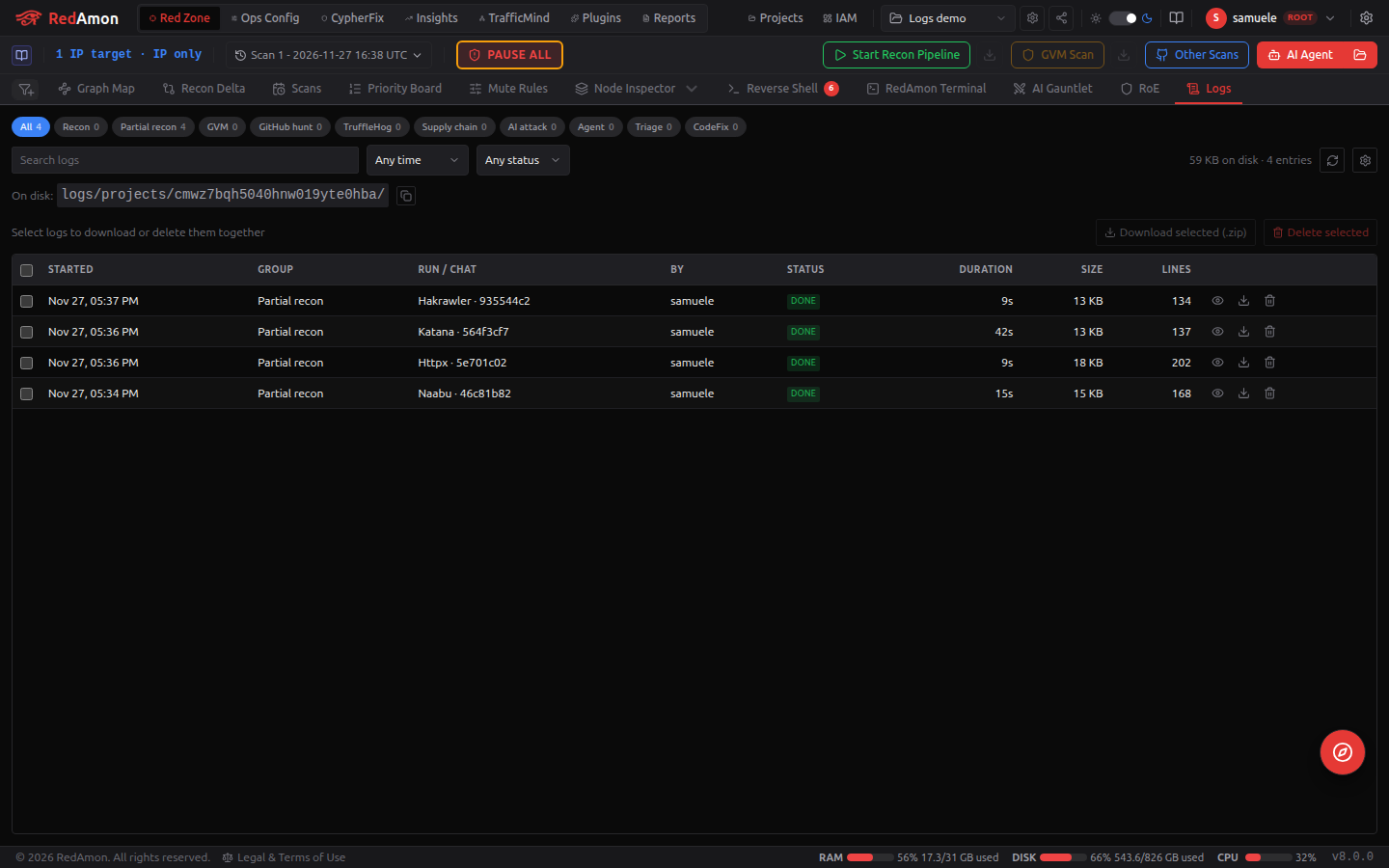
The Logs tab sits right of RoE on the graph page. It shows only when you may read the project's raw data: your own projects, or a project shared with you with Raw data & files (see Who Sees Which Logs).
- Filters: one chip per group (with its count), a search box (run, chat title, person, id), Started (Any time, Last 24 hours, Last 7 days, Last 30 days) and Status.
- On disk: the project's folder on the server, with a copy button, and how much space the project's logs take.
- The list: Started, Group, Run / chat (the tool and run, or the chat's title), By (who ran it), Status, Duration, Size, Lines, and the actions View, Download and Delete. A log that reached its size cap says capped.
- Settings (the gear) opens the Logging Settings.
- The list refreshes every 10 seconds while a log in it is live.
A link of the form /graph?view=logs&log=<group>/<entry> opens one saved log directly.
Scans and chats that ran before log saving was added have no saved log; the empty tab says so.
Reading a Log
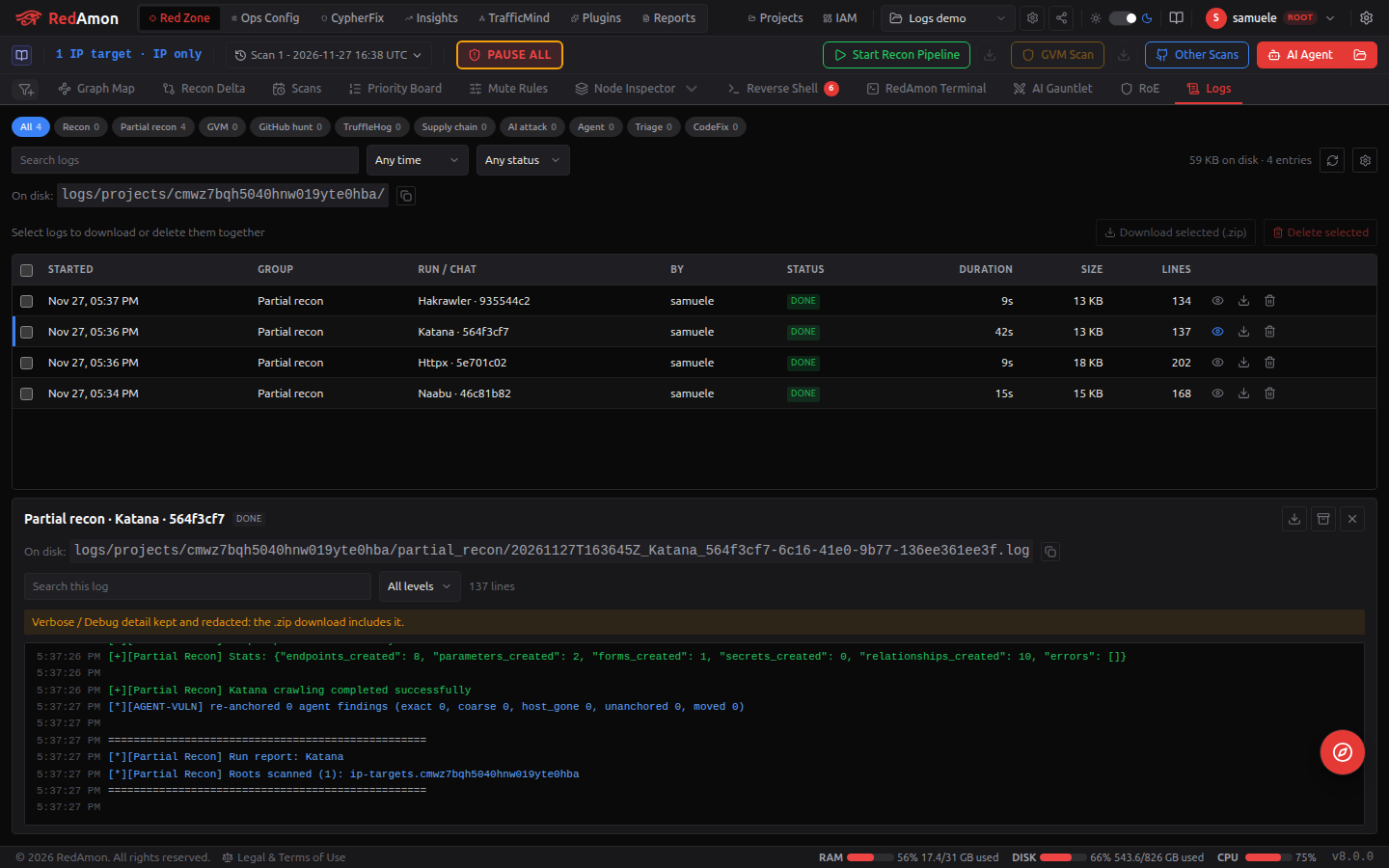
View opens the log beside the list, on its last lines:
- Load earlier lines reads further back.
- Search this log and the Level filter (Errors, Warnings, Success, Actions, Info) narrow what is shown; scan lines keep the live drawer's colours and phase badges.
- A live log is followed: new lines appear every 3 seconds until it ends.
- The viewer holds at most 20,000 lines; download the log for all of it.
- On disk gives the file's path on the server, with a copy button.
Downloading
| Button | You get |
|---|---|
| Download (in the row or the viewer) | The log file as saved (.log, or .log.gz once the server compressed it; for a chat, its session.log) |
| Download this log with its detail (.zip) (in the viewer) | A zip of everything the entry holds: the log (with its rotated copies), its .meta.json, its Verbose/Debug detail once redacted, and AI attack's garak reports; for a chat, its whole folder |
| Download selected (.zip) | One zip of up to 500 selected logs, each under its group's folder |
Verbose and Debug detail is written raw while a scan runs and redacted by the server once it ends; until then, the zip carries a short note in its place, saying why. Download again after a minute or so.
Deleting
Delete (one row) and Delete selected remove the files from the server. This cannot be undone, and the record of who ran what goes with them.
- Deleting needs the
logs:deletepermission, and Manage on a project shared with you. A button you may not use says why. - A log that is still being written cannot be deleted (Still running: it can be deleted once it ends); for a chat, stop the agent first.
- Each deletion is recorded in the audit log, as Deleted some of the project's logs, before anything is removed.
- Deleting a chat deletes its log; deleting a project deletes all of its logs.
Logging Settings
Each group has three settings, in the project's settings form (Logs → Logging tab) and in the Logs tab's Settings panel:
| Setting | Values | Default |
|---|---|---|
| Switch | On / off. Off saves nothing of that group; the work itself runs as before | On |
| Level | Normal, Verbose, Debug (what each adds) | Normal |
| Retention | Days, 0-3650; 0 keeps the logs forever (the server's quota can still remove the oldest) | 30 |
The Agent chat row also carries the chat log's size (MB) before it rolls over to a numbered copy, and how many copies are kept (10 MB and 5 by default).
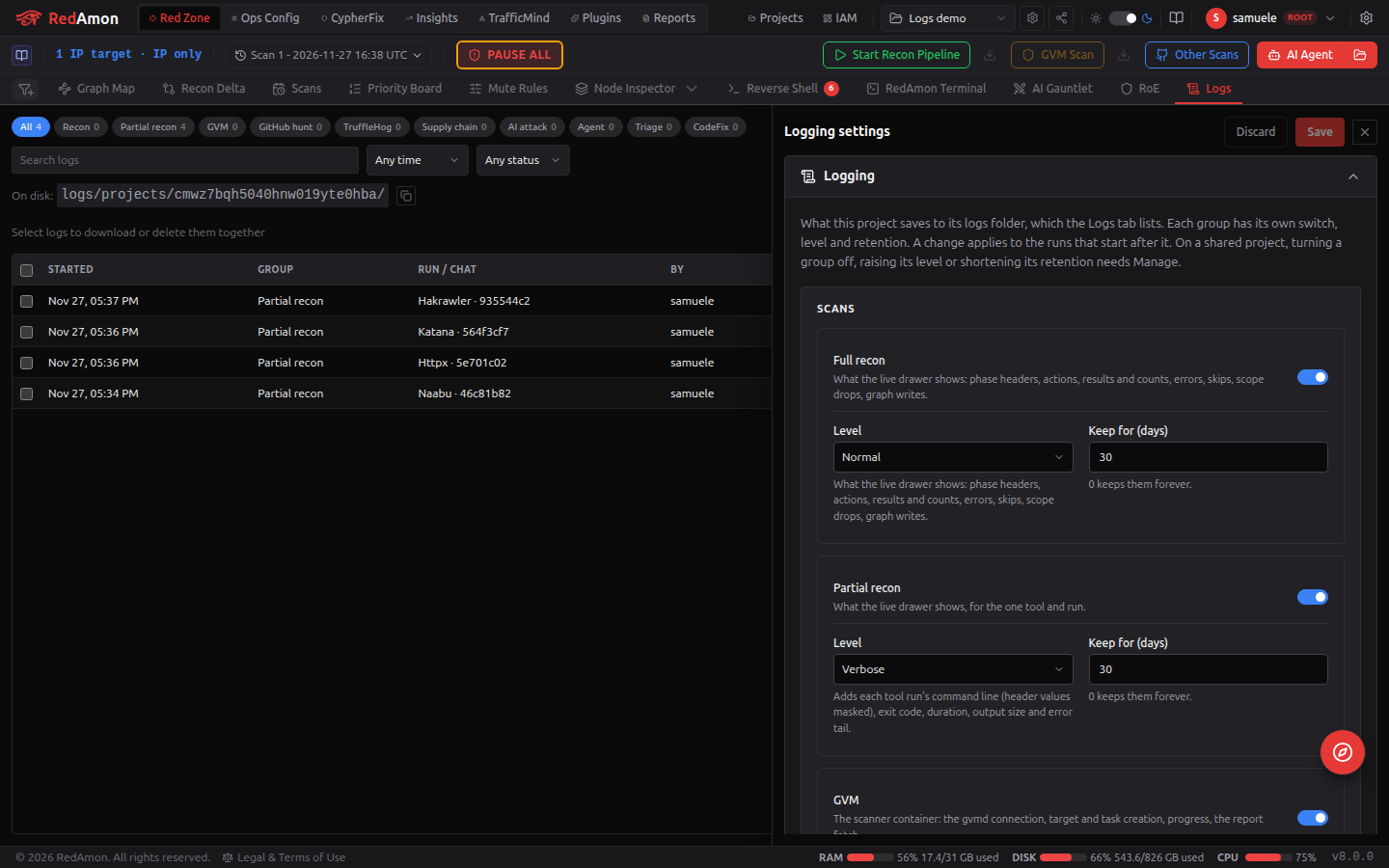
A change applies to the runs that start after it. Debug keeps raw tool output and model prompts: redaction catches known secret shapes only, which the form says beside it.
On a shared project, a collaborator with Read & Write can tighten each setting (turn a group on, lower a level, keep logs longer) but needs Manage to turn a group off, raise a level, or shorten a retention (or give a number of days where it was 0). These settings are never offered over the MCP Server, for reading or writing, and a Rules of Engagement document never sets them.
What Each Level Adds
Normal is what each log holds at all; Verbose and Debug add, for each group:
| Group | Verbose adds | Debug adds |
|---|---|---|
| Recon, Partial recon | Each tool run's command line (header values masked), exit code, duration, output size and error tail | Each tool's raw output and copies of the files it wrote (nuclei's results, for example) |
| GVM | The scanner's debug lines | The exchange with the GVM scanner, its password masked |
| GitHub hunt | The scanner's debug lines | Each request's address, status and rate-limit headers; each match's redacted sample |
| TruffleHog | TruffleHog's own debug log, redacted by the scanner | TruffleHog's trace log (never its findings file, which holds the secrets) |
| Supply chain | Each analyzer job's command line, exit code, duration and output size | Each analyzer job's output |
| AI attack | The scanner's debug lines | garak's own log for the run |
| Agent chat | The classification prompt and the agent's internals | The full prompt at every step, each raw model reply and full tool output |
| Triage | The run's debug lines | Each review's prompt and reply |
| CodeFix | Every tool's full input and output, sandbox output included | Each model call's prompt and reply |
At Normal the agent chat's log keeps the agent's decisions, tool calls with the head of their output, the first full system prompt, approvals and errors. Scan detail never reaches the live drawers: a scan prints the same lines at every level, so a person who may watch a scan but not read raw data sees nothing more at Debug. Each detail file is capped (32 MB, and 512 MB for a whole run, by default).
Who Sees Which Logs
Reading logs needs the logs:read permission and Raw data & files on the project; deleting
needs logs:delete and Manage. Scan, triage and CodeFix logs are the project's: whoever may
read logs reads all of them. A chat's log follows its conversation: you read it exactly when you
can open that chat in the conversation history.
| Who | Scan, triage, CodeFix logs | Your own chats' logs | Other people's chats' logs | Delete |
|---|---|---|---|---|
| Owner | ✅ | ✅ | When the author shared the chat, or with Co-owners can read every session of this project on | ✅ |
| Co-owner (Read & Write + Manage) | ✅ | ✅ | Same as the owner | ✅ |
| Read & Write | ✅ | ✅ | Shared chats only | ❌ |
| Read + Raw data & files | ✅ | ✅ | Shared chats only | ❌ |
| Read, without Raw data | ❌ (no tab) | ❌ | ❌ | ❌ |
| Administrator by oversight | ❌ | – | ❌ | ❌ |
| Root on break-glass | ✅ | – | ✅ all, read-only | ❌ |
| An MCP token | ❌ | ❌ | ❌ | ❌ |
With Read & Write sharing off, everyone reads only their own chats' logs. An administrator acting
as someone sees what that account sees, within the act-as rules
(Sharing Projects). The built-in sets that read
(Default member, Red-team operator, Recon operator, Read-only analyst, Automation) hold
logs:read; Default member, Red-team operator and Recon operator hold logs:delete; a custom
set gains neither until you add it (Permission reference).
The By column is who started a scan or a triage run, shown only when that person is the project's owner or one of its collaborators now (otherwise "—"), and a chat's author. CodeFix rows show none.
How Long Logs Are Kept
- Each group keeps its logs for its retention (30 days by default), counted from when the run finished. An hourly sweep deletes what is older; a log still being written is never deleted.
- Finished scan logs over 1 MB are compressed (
.log.gz) ten minutes after their run ends. - The server has a quota for all logs (20 GB by default, set by the operator with
LOGS_QUOTA_GB). Over it, the sweep deletes the oldest finished logs of the project using the most space first, so one project's Debug runs never push out another project's logs. - A chat whose conversation was deleted has its log removed with it; a project's logs go with the project. Moving a project to a new owner keeps them. A project export leaves logs out.
The Files on the Server
logs/projects/<project>/
  recon/          20261126T190112Z_<run>.log    .meta.json    .detail/ (Verbose, Debug)
  partial_recon/  gvm/  github_hunt/  trufflehog/  supply_chain/  ai_attack/   (the same)
  agent/<chat>/   session.log  session.log.1 …  events.jsonl  meta.json
  triage/         <time>_<run>.log  .meta.json
  codefix/        <time>_<session>.log  .meta.json
Every file belongs to the owner of the logs/ folder, so you can open and delete them without
sudo. The .meta.json beside each log is for display only: editing it changes what the tab
shows, never who may read the log. ./redamon.sh purge deletes the folder; down and clean
keep it.
Updating from 7.x moves no old log: the agent's 7.x logs stay in agentic/logs/, unread, and the
Logs tab does not show them. ./redamon.sh moves the MCP servers' data (mcp_memory.json,
sandbox/) from there into agentic/mcp-data/ once, never over a copy already there (as root in a
throwaway container when Docker made that folder as root), and tells
you when what is left in agentic/logs/ is old logs you can delete. It never deletes anything
itself.
Troubleshooting
| Problem | Why | Fix |
|---|---|---|
| No Logs tab | You may not read the project's raw data: a share without Raw data & files, or an account without logs:read | Ask the project's owner for Raw data & files, or an administrator for logs:read |
| A scan has no saved log | It ran before log saving was added, or its group is switched off, or it ran across the update (GVM, GitHub hunt, TruffleHog, supply chain, AI attack) | Check the Logging Settings; later runs are saved |
| The log archive is not available on this server | The server is not saving new scan logs | Ask the operator (Troubleshooting) |
| A Verbose or Debug scan has no detail | The server could not prepare its detail folder and ran it at Normal; the entry's .meta.json (in its zip) says "level": "normal" | Ask the operator (Troubleshooting) |
| The zip has a note instead of the detail | The run is still going, the detail is not redacted yet, or it is over its size cap | Download again after a minute; for the cap, the note says what to do |
| A chat's log cannot be deleted | Its agent is still running | Stop the agent, then delete |
| Logs disappear sooner than their retention | The server's quota removed the oldest logs of the largest project | Ask the operator to raise LOGS_QUOTA_GB, or lower your levels |